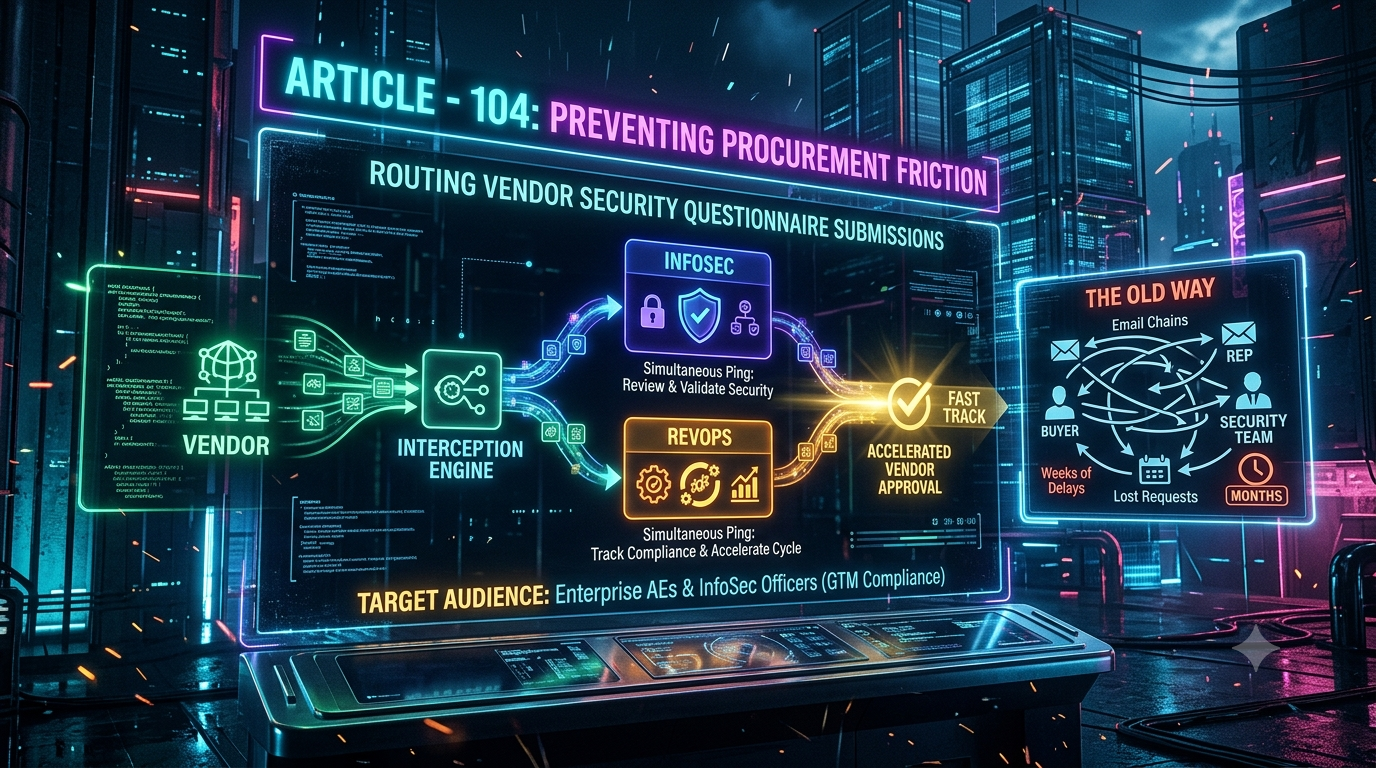
Zapier connects thousands of apps through configurable, sequential workflows — a strength for general-purpose automation but not for time-sensitive InfoSec triage. InstaChime is purpose-built for Enterprise Account Executives and InfoSec teams: it intercepts vendor security questionnaire submissions and dispatches parallel, context-rich alerts to InfoSec and RevOps in one native step, shortening vendor approval cycles.
The Core Difference: Generic Multi-Step Automation vs. Simultaneous InfoSec + RevOps Interception
Zapier and InstaChime respond to the same triggering event — a prospect submits a SOC 2 Type II, ISO 27001, CAIQ, or SIG Lite questionnaire — but the two products execute it differently.
Zapier: sequential action chains. A Zap fires one trigger, then runs a defined sequence of action steps: log the request to a spreadsheet or Zapier Table, post to Slack, send an email to a distribution list. Each successful action step consumes one billed task (triggers and filters are free). To send meaningfully different information to two teams from a single event, you need either several chained action steps or the Paths tool, which requires a Professional plan and evaluates its branches sequentially, left to right — capped at five branches per Zap. If an early step stalls (a Delay, a Code step, a schema mismatch on the uploaded file), downstream branches wait behind it.
InstaChime: native parallel dispatch. One trigger — a questionnaire submitted through your Trust Center, a Whistic request, or an inbound webhook — pulls the associated opportunity from your CRM and fires two independent, pre-formatted notifications at once: a structured triage card to InfoSec with the relevant compliance documentation attached, and a deal-stage update with an active SLA clock to RevOps. Neither branch waits on the other.
The gap compounds under real volume. A single Zapier automation that enriches a lead, writes to a CRM, posts to Slack, and sends an email can burn four or more tasks per run, and Zapier's Professional plans start around 750 tasks a month before overage charges apply (current tiers should be confirmed at zapier.com/pricing, since Zapier has revised its pricing more than once in the past two years). InstaChime is priced around the workflow, not the individual step, so adding the InfoSec/RevOps split is a configuration change, not a new multi-branch build.
Why Teams Look for Zapier Alternatives for Vendor Security Questionnaire Routing
RevOps leaders and InfoSec officers running late-stage enterprise deals tend to outgrow general-purpose automation tools for this specific workflow for a few recurring reasons:
- Sequential email and Slack friction. When a review bounces between the buyer, the AE, and a security analyst across email threads and static Slack pings, no one outside that thread can see where the request stands — RevOps usually finds out about a stalled review only when the close date slips.
- No native reviewer-response SLA tracking. Zapier's Enterprise plan includes a contractual uptime SLA for the platform itself, but nothing in the product tracks or visualizes how long an individual InfoSec analyst has been sitting on a specific questionnaire. Building that requires a separate timer tool or custom logic layered on top.
- Task consumption that scales faster than headcount. Every enrichment lookup, CRM field update, attachment-handling step, and notification is a billed task. A routing workflow with five or six action steps, run against real vendor-request volume, works through a Professional-tier task allowance quickly and pushes teams toward overage fees or a higher tier.
- Branching logic with a hard ceiling. Zapier's Paths tool tops out at five branches per Zap and requires a paid plan. Routing simultaneously by opportunity ARR, questionnaire type (SOC 2 vs. CAIQ vs. custom SIG Lite), and reviewer availability usually means stacking multiple Paths steps or nested logic to cover the real cases a procurement pipeline actually produces.
Feature Comparison: InstaChime vs. Zapier
| Feature / Workflow Capability | InstaChime | Zapier |
|---|---|---|
| Dual Interception (InfoSec + RevOps) | Native. One trigger fires parallel, pre-formatted alerts to both teams with live deal context. | Manual. Requires chained action steps or a paid Paths branch; branches execute sequentially, not in parallel. |
| Vendor SLA Clock & Escalation | Built-in. Visual countdown timer per request, with automated manager escalation past the SLA threshold. | Not native. Zapier's SLA is a platform-uptime guarantee on Enterprise plans, not a reviewer-response timer. |
| Automated CRM Stage Gating | Bi-directional. Updates the Salesforce/HubSpot opportunity stage automatically when InfoSec marks a review complete. | Task-based. Each CRM lookup and field update is a separately billed task on every run. |
| Out-of-Office InfoSec Failover | Automatic. Checks InfoSec team calendars and re-routes to the next available reviewer. | Not native. Requires custom Code steps or manual Zap toggling during PTO. |
| Document Schema & Payload Parsing | Native. Detects and tags request type (SOC 2, ISO 27001, CAIQ, SIG Lite, custom Excel). | Basic. Treats uploads as raw attachments; type detection needs a separate formatter or AI action step. |
How to Migrate from Zapier to InstaChime
1. Connect your security ingestion endpoints.
*Prerequisite: admin access to your Trust Center or security portal (Vanta, Whistic, TrustArc, or similar) and webhook permissions.*
Point incoming questionnaire submissions and Trust Center requests at InstaChime through a native integration or a standard inbound webhook — no Zap rebuild required.
2. Configure dual InfoSec and RevOps routing rules.
*Prerequisite: InfoSec team roster and an agreed escalation matrix.*
Set triage conditions on opportunity ARR and questionnaire complexity, assign the InfoSec routing pool, and turn on parallel deal-context notifications for RevOps.
3. Set SLA clocks and CRM stage sync.
*Prerequisite: InstaChime app installed in Slack or Microsoft Teams.*
Define target review windows (for example, 24 hours for a standard SOC 2 request), enable the visual countdown, and authorize automatic CRM stage updates when a review closes.
Run both systems in parallel for one full review cycle before decommissioning the legacy Zap. This surfaces routing edge cases — an unusual questionnaire format, an unlisted reviewer — before they can stall a live deal.
Frequently Asked Questions
Is InstaChime cheaper than Zapier for this workflow?
It depends on volume. Zapier bills per task, and every enrichment lookup, CRM write, and notification inside a multi-step Zap counts separately, with Professional plans starting around 750 tasks a month before overage fees. InstaChime prices around the workflow itself, so a questionnaire-routing process with several steps per submission doesn't multiply the bill the way it can under Zapier's per-task model. Compare both against your actual monthly questionnaire volume rather than list price alone.
Do I need a developer to set up InstaChime, or can RevOps configure it directly?
RevOps and InfoSec can configure routing rules, SLA windows, and escalation logic through InstaChime's interface without writing code. The equivalent Zapier build — multi-branch Paths, webhook mapping, and custom Code steps for calendar-based failover — typically needs someone comfortable with API payloads and conditional logic, even though Zapier is generally marketed as no-code.
How does InstaChime handle a request if the assigned InfoSec analyst is unavailable?
InstaChime checks the reviewer's calendar in real time. If the assigned analyst is on PTO or in a meeting, the request automatically re-routes to the next available person in the InfoSec escalation pool, and the SLA clock keeps running against the original submission time.