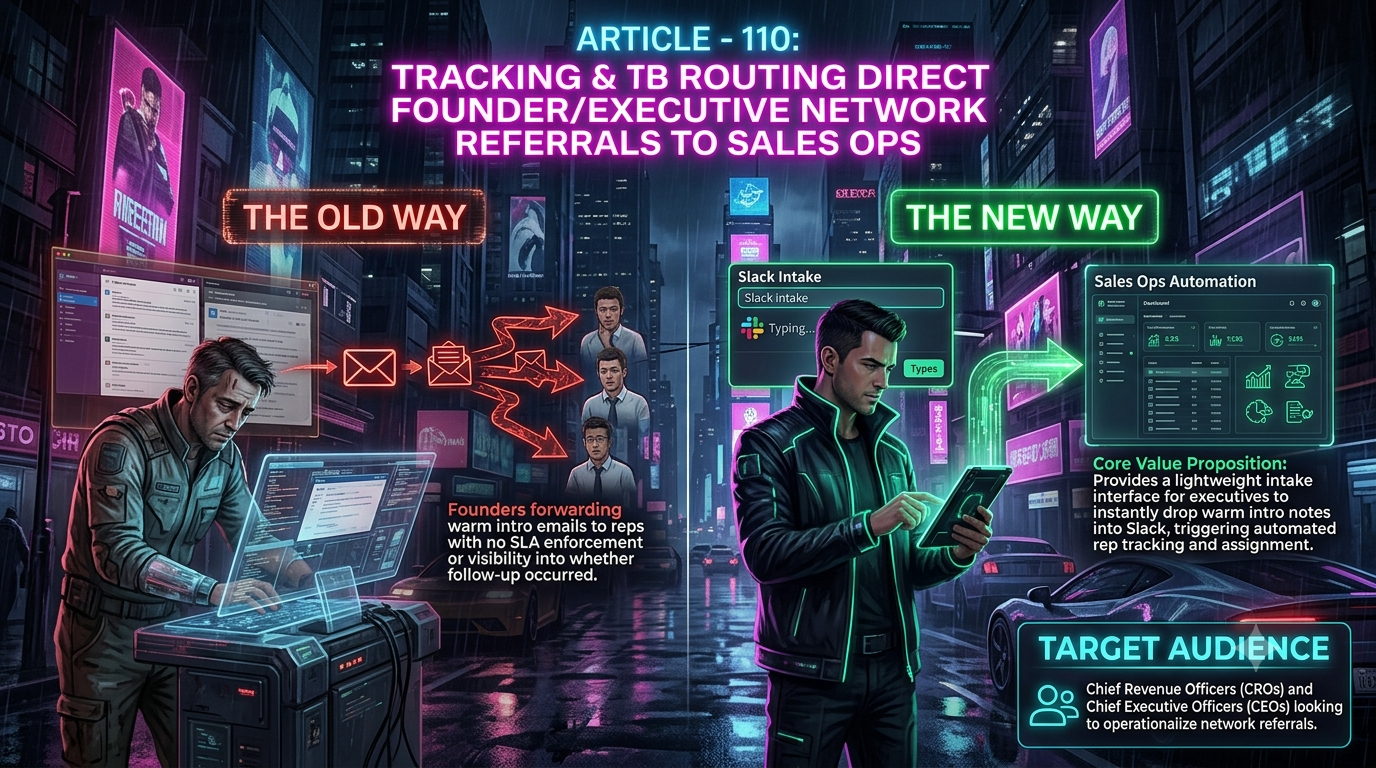
Zapier can automate almost any workflow, including SLA alerts and lead routing, once you build it. But turning a forwarded intro email into a tracked, attributed deal means stitching together an Email Parser, a Lead Router, and several CRM steps. InstaChime replaces that build with one Slack modal: a 30-second intake path with native SLA clocks for executive referrals.
The Core Difference: Zapier's Assembled Automation vs. InstaChime's Native Executive Intake
The operational gap between the two tools comes down to unstructured data handling versus a purpose-built intake UI.
Zapier has no native "executive referral" object. To capture a warm intro, teams typically wire up Email Parser by Zapier, which works by training a template on a sample email and highlighting the fields to extract. That template is position-dependent: it breaks when a signature block, forwarding chain, or inline reply changes the email's layout, which produces dropped fields, mismatched contacts, or unassigned CRM records. The alternative is a Zapier Interfaces form, but that asks a founder or CEO to leave Slack and fill out a web form for something as informal as a warm intro.
InstaChime skips both steps. Executives paste the intro text — or select the message thread directly — using a Slack shortcut. InstaChime extracts the contact, creates or updates the record in Salesforce or HubSpot, assigns a Senior AE, and posts an interactive Slack alert with a visual SLA countdown clock, in one motion:
1. Founder or CEO receives a warm intro email.
2. They paste the note into the InstaChime Slack modal, or select the thread.
3. InstaChime creates or updates the CRM record and tags the referral source.
4. A Senior AE is assigned by round-robin.
5. A Slack alert fires with a live SLA countdown.
Why Teams Look for Zapier Alternatives for Executive Referral Routing
CROs and CEOs who move this specific workflow off Zapier usually cite three friction points:
- SLA tracking has to be assembled, not switched on. Zapier's SLA and escalation automations exist as combinations of Filter, Delay, and Schedule steps layered across a connected CRM or helpdesk. That works for ticket queues with existing timestamps, but a one-off executive referral has no ticket to attach a countdown to, so someone has to build and maintain that chain by hand.
- Executives won't adopt workflow tooling. Asking a founder to trigger a specific Slack shortcut wired to a multi-step Zap, or to fill out a separate intake form, adds friction to something that used to be a two-line forward. Low adoption sends the behavior back to unmonitored email.
- CRM attribution takes several action steps. Tagging an "Executive Referral Source" field on a Salesforce or HubSpot record inside a Zap generally needs separate Find/Create and Update actions per object. Each added step is also an added line item on the bill, and a skipped step means the deal loses its attribution.
Feature Comparison: InstaChime vs. Zapier
| Workflow Capability | InstaChime | Zapier |
|---|---|---|
| Executive intake interface | Native Slack modal. Paste raw intro text or select a thread, no template setup. | Email Parser (trained template) or a Zapier Interfaces form outside Slack. |
| SLA enforcement | Built-in countdown clock on every alert, with auto-escalation to Sales Ops on miss. | Built through SLA management templates (Filter, Delay, Schedule steps) across a connected CRM or helpdesk, not one native step. |
| CRM executive attribution | Auto-tags the referring executive and source metadata at record creation. | Needs separate Find/Create and Update actions per CRM object to write the same fields. |
| Rep availability-based routing | Checks live calendar status at the moment of assignment. | Lead Router adds round-robin and calendar-based availability, but the check runs as its own scheduled Zap (commonly daily), not at the instant a referral arrives. |
| Cost structure | Flat rate covering unlimited referral intakes, CRM updates, and SLA tracking. | Billed per completed task. A multi-step Zap for parsing, CRM lookups, and notification typically spends four to eight tasks per referral. |
How to Migrate from Zapier to InstaChime
1. Install the InstaChime Slack app.
Prerequisite: Slack admin permissions. Add the app to your workspace and enable the `/referral` slash command and message shortcut so any executive can trigger intake from desktop or mobile Slack.
2. Connect your CRM and set attribution rules.
Prerequisite: Salesforce or HubSpot OAuth access. Map the Executive Referral Source field, set auto-creation rules for contacts and opportunities, and define the Senior AE pool for round-robin assignment.
3. Set SLA thresholds and escalation paths.
Prerequisite: a designated Sales Ops Slack channel. Define the target outreach window (for example, a 2-hour SLA on executive intros), turn on the live countdown, and set the fallback owner for if the assigned AE misses the window.
Frequently Asked Questions
Is InstaChime cheaper than Zapier for tracking executive referrals?
At low volume, Zapier's free or entry tier can cost less. But Zapier bills per completed task, and a referral workflow that parses an email, looks up or creates CRM records, and posts a Slack alert typically spends several tasks per event, so cost rises with volume even though the process hasn't changed. InstaChime's flat pipeline rate doesn't move with referral count, which makes it more predictable once you're past a few dozen referrals a month.
Do I need a developer to set up InstaChime instead of a Zapier parser?
Neither requires code. But Zapier's version of this workflow — a trained Email Parser template, a Lead Router with queues and calendar rules, and CRM field mapping split across several Zaps — is usually built and maintained by someone fluent in Zapier's logic. InstaChime's setup is three guided steps: install the Slack app, connect the CRM, and set SLA thresholds.
How does InstaChime stop a warm executive intro from going cold?
Every referral alert carries a live SLA countdown. If the assigned Senior AE hasn't logged a verified outreach activity in the CRM before the countdown ends, InstaChime automatically re-routes the alert to Sales Ops so the lead doesn't sit unworked.
Optional: FAQPage structured data
Google retired the FAQ rich-result accordion from Search on May 7, 2026, so this markup no longer earns a SERP snippet on Google. It's still worth keeping on the page: AI answer engines (ChatGPT, Perplexity, Claude) continue to parse and cite FAQ-formatted content, and the markup gives crawlers a clean, self-contained Q&A to extract. Add this to your page's `<head>` if your CMS supports custom schema: