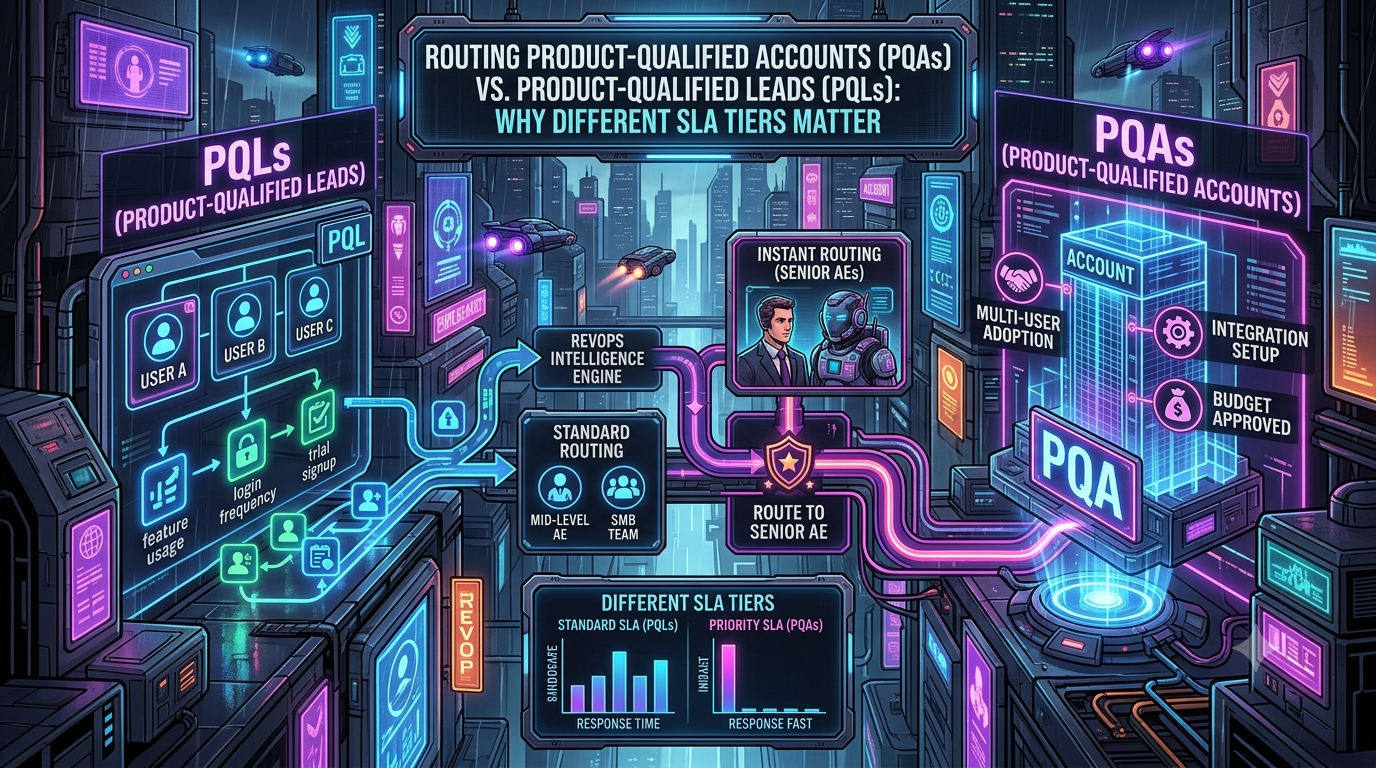
In Product-Led Growth (PLG) and Product-Led Sales (PLS) motions, product usage is one of the strongest signals of buyer intent. Many Revenue Operations (RevOps) teams still hit a bottleneck because they treat every sign-up or activation event the same way.
Routing a single highly engaged user to sales might produce a small self-serve upgrade or a one-seat expansion. Missing a quiet group of 20 users inside a large enterprise who are hitting usage limits, connecting integrations and visiting pricing pages can mean a much larger deal never gets worked.
To close this gap, RevOps leaders need to separate Product-Qualified Leads (PQLs) from Product-Qualified Accounts (PQAs). Each signal needs its own Service Level Agreement (SLA) and routing path. High-value PQAs go quickly to senior Account Executives (AEs), and individual PQLs stay in automated or lower-touch paths.
Understanding the Distinction: PQLs vs. PQAs
Both metrics come from product telemetry and event data, but they differ in scope, buying authority and likely Annual Contract Value (ACV).
```
┌────────────────────────────┐
│ PRODUCT EVENT DATA │
└─────────────┬──────────────┘
│
┌─────────────────┴─────────────────┐
▼ ▼
┌───────────────────┐ ┌───────────────────┐
│ PQL ARCHETYPE │ │ PQA ARCHETYPE │
│ Individual user │ │ Multi-user team │
├───────────────────┤ ├───────────────────┤
│ • One active user │ │ • Several active │
│ • Localized use │ │ domain users │
│ • Personal value │ │ • Admin settings │
│ realized │ │ • SSO / security │
│ │ │ • ICP fit │
└─────────┬─────────┘ └─────────┬─────────┘
│ │
▼ ▼
┌───────────────────┐ ┌───────────────────┐
│ Lower-touch path │ │ Priority path │
│ Example SLA: │ │ Example SLA: │
│ hours to 2 days │ │ minutes │
│ (nurture / SDR) │ │ (senior AE) │
└───────────────────┘ └───────────────────┘
```
*The SLA values above are illustrative starting points, not industry standards. Tune them to your own rep capacity and conversion data.*
What is a Product-Qualified Lead (PQL)?
A PQL is an individual user who has crossed a defined threshold of engagement or value in your product. The signal comes from in-product behavior, not from a form fill or content download.
- Focus: Individual behavior and single-user activation events.
- Typical indicators: Completing onboarding, hitting a usage-frequency milestone, or reaching the “aha moment” specific to your product.
- Goal: Adoption, habit formation, and self-serve or low-touch conversion.
What is a Product-Qualified Account (PQA)?
A PQA is an organization whose aggregated user behavior, combined with firmographic fit, suggests readiness for a commercial conversation. Definitions vary by company. Some use a minimum number of active users, some use the share of users who are individually PQL-qualified, and some use volume, velocity and feature breadth. The common idea is that account-level behavior, not one person’s behavior, triggers the play.
- Focus: Collective usage, cross-team collaboration, enterprise features and organizational fit.
- Typical indicators: Multiple active users on the same company domain, enterprise integrations (for example Okta, Salesforce or Workday), admin and security settings, and usage approaching plan limits.
- Goal: Multi-seat or company-wide deployment, security and compliance review, and a negotiated contract.
Product-led sales practitioners point to a further reason the two objects differ. In an SMB account, the buyer is often one of the active users. In a mid-market or enterprise account, the person who signs the contract frequently isn’t using the product at all, so a PQL-only view misses the real buyer (Priya Bhatia, PQLs vs. PQAs).
The Operational Risk of Collapsing PQLs and PQAs
When PQLs and PQAs share one queue and one SLA, two failure modes appear.
1. Rep fatigue and distrust of the data. If senior AEs receive a steady stream of single-seat users with no budget or buying authority, they learn to ignore product-signal alerts. Real enterprise signals then get ignored along with the noise.
2. Delayed enterprise outreach. Enterprise purchases are group decisions. Gartner reports that complex B2B purchases typically involve six to ten decision-makers, and the evaluation often starts with scattered team sign-ups rather than a demo request. If that account is treated as one more free-tier sign-up, outreach can lag by days or never happen, which gives competitors time to get in first.
Separating User Activity from Organizational Intent
To route enterprise opportunities well, RevOps needs a data layer that turns individual event streams into account-level intelligence.
```
USER-LEVEL EVENTS ACCOUNT-LEVEL INTENT
┌───────────────────────────┐ ┌───────────────────────────┐
│ • Individual sign-ups │ │ • Growing count of │
│ • Personal workspaces │ │ domain-matched users │
│ • Basic feature usage │ ───────> │ • SSO / SAML configured │
│ • Exporting files │ AGGREGATE│ • Security / pricing page │
└───────────────────────────┘ INTO PQA │ visits │
│ • Plan limits approached │
│ • ICP / firmographic fit │
└───────────────────────────┘
```
1. Account Roll-Up and Identity Resolution
A PQA engine depends on reliable user-to-account mapping.
- Domain matching: Group users by company email domain (for example `user@company.com`) and exclude public webmail domains such as `gmail.com`, `yahoo.com` and `outlook.com`. Add allow and block lists for edge cases such as consultants, agencies and universities.
- Corporate parent enrichment: Use a firmographic data provider to roll subsidiaries and regional domains up to a parent account, and to add employee count, industry and revenue. Check the current state of your vendor before you build on it. For example, HubSpot acquired Clearbit in late 2023 and relaunched its capabilities as Breeze Intelligence. Clearbit’s free tools (the free platform, Clearbit Connect, the Weekly Visitor Report and the TAM Calculator) were discontinued on April 30, 2025, and the free Logo API was scheduled to sunset on December 1, 2025. Breeze Intelligence now runs inside HubSpot rather than as a standalone product. Teams not on HubSpot generally need other providers such as ZoomInfo, Apollo or Cognism.
- Lead-to-account (L2A) matching: Domain-only matching misses subsidiaries, personal-email sign-ups and renamed companies. Dedicated L2A tools, such as LeanData, use fuzzy matching to tie product users to the right CRM account and owner. Check that product-side users and CRM-side contacts resolve to the same account record.
- Customer status check: Before anything is scored, test whether the account is already a customer, an open opportunity, or an excluded segment such as a competitor.
2. Combine Fit, Usage and Intent
A common framework scores accounts on three dimensions: fit (how closely the account matches your ICP), product usage (user-level and account-level events that correlate with retention and conversion), and intent (such as pricing-page visits, “talk to sales” clicks or seat additions). The best candidates combine strong fit with high usage, and accounts with great fit but low usage are better nurtured than ignored (Pocus guide to defining PQLs).
Derive thresholds from your own history. Look at which behaviors preceded paid conversion and expansion among your best customers, rather than copying another company’s definition. Review thresholds again after any pricing or packaging change.
3. Weight Enterprise-Intent Signals
Typical high-intent account signals include:
- Multiple active users on the same domain, across more than one team
- SSO or SAML setup, or visits to security and compliance pages
- Enterprise integrations connected
- Admin settings and workspace-level configuration
- Usage approaching or exceeding plan limits
- Pricing or “contact sales” page visits from known account users
4. Track Recency and Momentum
Accounts move in and out of PQA status. Use time windows (for example, signals in the last 14 or 30 days) and look at acceleration as well as totals. Retire accounts from the active queue if they stop engaging, so sales effort stays focused.
Designing Tiered SLAs
The case for fast response comes mainly from inbound-lead research:
- A widely cited Lead Response Management study (research led by James Oldroyd with InsideSales.com, 2007) found that contacting a web lead within 5 minutes rather than 30 made the lead about 21 times more likely to qualify and about 100 times more likely to be contacted at all.
- A 2011 Harvard Business Review study found that firms attempting contact within an hour were nearly seven times as likely to qualify a lead as those that waited even one more hour.
- One caution: the “five-minute” figure is often attributed to HBR, but it traces back to the 2007 study (source).
These studies covered web-form leads, not product-usage signals, so treat them as directional. They support the principle that response time matters most where intent and deal value are highest. They don’t prove that a specific product-signal SLA will produce a specific lift.
Here is a suggested tier structure. All times are measured in business hours and are starting points to tune against your capacity.
| Tier | Trigger | Owner | Suggested first-touch SLA | Escalation |
|---|---|---|---|---|
| 1. Strategic PQA | Target-ICP account with multiple domain users plus enterprise signals (SSO, security review, limits) | Named owner or senior AE | ~15 minutes | Manager alert, then reassign if untouched |
| 2. Mid-market PQA | Fit account with growing multi-user usage, fewer enterprise signals | AE pod, round-robin | ~1 hour | Reassign within the pod |
| 3. High-intent PQL | Individual user with strong intent (pricing visit, limit hit) in a low-fit or small account | SDR or inside sales | Same business day | Fall back to nurture |
| 4. Standard PQL | Activation milestone reached, no account-level signal | Automated lifecycle messaging | No human SLA | Re-score if signals change |
| 5. Existing customer expansion | PQA signals in an account that already pays | Account manager or CSM | Per account-management SLA | Notify the owner AE |
Routing Architecture
A routing flow that supports these tiers is account-first:
```
Product event → Identity resolution → Customer / opportunity check
│
├── Existing customer? → Route to AM / CSM
├── Open opportunity? → Notify opportunity owner
└── Net-new account?
│
├── Aggregate account score
│ ├── Tier 1 → Named / senior AE (alert + task)
│ ├── Tier 2 → AE pod
│ ├── Tier 3 → SDR / inside sales
│ └── Tier 4 → Automated nurture
│
└── SLA timer → Escalate → Reassign if no first touch
```
Key design principles:
- Route to the account owner first. If an active account already has an owner, send the signal there. Round-robin alone fails once account ownership, territories or product specialization matter.
- Collapse PQLs into their PQA. When a user belongs to a qualifying account, suppress the individual PQL alert and send one account-level alert listing the users and signals.
- Include context in the alert. Reps respond better to “engineering and marketing are both running weekly dashboards and SSO was configured yesterday” than to a bare score.
- Enforce SLAs with timers and reassignment. Use SLA timers, manager escalations and automatic reassignment. Orchestration tools such as LeanData and Chili Piper cover routing, SLA timers and instant scheduling, and many stacks run both.
- Keep a fallback queue. Records that fail matching or routing should land in a monitored queue rather than disappear.
Tooling Notes
The product-signal tooling market has shifted recently. Pocus, a prominent PLS platform used by companies including Asana, Canva and Monday.com, was acquired by Apollo.io in March 2026, and its capabilities are being folded into Apollo’s platform. If you’re evaluating or already using standalone product-signal tools, confirm current packaging and roadmap with the vendor. Whatever you choose, the underlying requirements stay the same: reliable identity resolution, a scoring model derived from your own data, and routing with enforceable SLAs.
Measuring Whether It Works
Benchmarks vary widely by source and company stage. Published figures for PQL conversion range from low double digits to the 30s, against single digits for MQLs, and the numbers come from differing definitions. Rely on your own baselines, and track:
- SLA attainment: the share of PQAs and PQLs touched within their tier’s window
- Speed to first touch by tier
- PQA-to-opportunity and PQL-to-paid conversion
- Win rate, ACV and sales-cycle length by tier
- False-positive rate: alerts that reps reject as unqualified
- Reassignment rate: a high rate usually points to matching or ownership problems
If PQA volume exceeds sales capacity, tighten thresholds. If PQL-to-sales-qualified conversion is low, look at packaging, pricing friction and whether the PQL definition is too loose.
A Practical Rollout Plan
1. Weeks 1–2: Data foundation. Audit user-to-account mapping, domain rules and exclusions.
2. Weeks 3–4: Define and back-test. Build PQL and PQA definitions from historical conversions and test them against closed-won and closed-lost accounts.
3. Weeks 5–6: Pilot routing. Launch Tier 1 and Tier 2 alerts to a small group of AEs with SLA timers.
4. Weeks 7–10: Review and tune. Check false positives, SLA misses and rep feedback, and adjust thresholds.
5. Ongoing: Re-validate definitions after pricing, packaging or product changes.
Conclusion
PQLs and PQAs answer different questions. A PQL tells you a person is getting value, and a PQA tells you an organization may be ready to buy. Separating them lets you spend your fastest, most senior response on the accounts where it matters most, and lets automation handle the rest. The result is fewer wasted alerts, faster enterprise engagement and a data model that reflects how companies actually buy.
Sources
- PQLs vs. PQAs, Priya Bhatia
- How to analyze usage data to create PQL definitions, Pocus
- Clearbit release notes: free tools discontinued
- Apollo.io acquires Pocus, The Next Web
- Speed to Lead Statistics, Carly (on the origins of the 5-minute and 1-hour figures)
- Buying groups and B2B go-to-market motions, LeanData (citing Gartner)
- LeanData overview, Usage Pricing