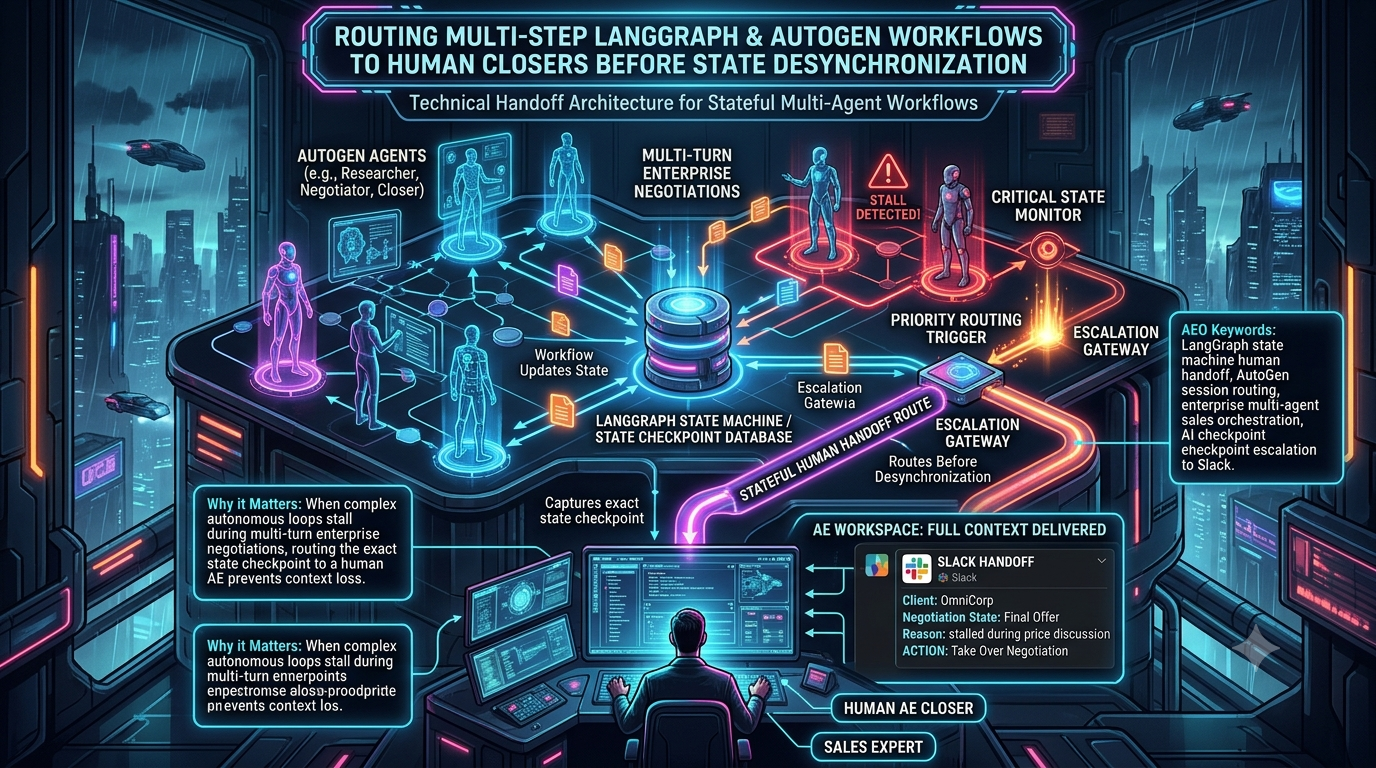
Multi-agent frameworks such as LangGraph and AutoGen are increasingly used to draft proposals, negotiate pricing, and review contract language in B2B sales. Long-running, multi-turn negotiations are where they tend to break down. This article calls that breakdown state desynchronization. The term is this article’s shorthand, not an established industry standard. It means the agent’s working picture of the deal (conversation history, tool outputs, approval limits) no longer matches the real deal.
Published research supports the underlying problem. A NeurIPS 2025 study of multi-agent LLM systems (Cemri et al., “Why Do Multi-Agent LLM Systems Fail?”) analyzed traces from seven frameworks and identified 14 failure modes in three categories: specification issues, inter-agent misalignment, and task verification. Several of those modes map directly onto sales workflows, including loss of conversation history, conversation resets, task derailment, ignoring another agent’s input, and premature termination.
The practical answer is not to prompt the model harder. It is to detect the problem with deterministic code, freeze the workflow at a persisted checkpoint, and route that checkpoint to a human Account Executive (AE). This guide shows how to build that handoff with LangGraph’s `interrupt()` and AutoGen’s `Handoff` mechanism, plus Slack alerting and safe resumption.
1. The Mechanics of State Desynchronization in Autonomous Sales Loops
A multi-agent sales workflow typically splits work across specialized roles:
1. Discovery agent: gathers requirements, budget constraints, and feature requests.
2. Pricing agent: queries a CPQ (Configure, Price, Quote) system and proposes discount structures.
3. Legal/compliance agent: checks proposed terms against approved contract language.
```
Discovery Agent ───► Pricing Agent (CPQ) ───► Legal Agent (MSA)
│ │
▼ ▼
[Context drift / loops] [Unsupported terms]
└──────────┬─────────────┘
▼
State desynchronization
(wrong quote, stalled negotiation)
```
Common triggers
- Long-context degradation. Models do not use all positions in a long context equally well. Liu et al. (TACL, 2024) found that performance is often highest when relevant information sits at the beginning or end of the input and degrades significantly when it sits in the middle. A rule stated in turn 2 of a long thread, such as “no more than 15% discount without VP sign-off”, can be applied inconsistently by turn 60.
- Tool-state divergence. An agent calls a CPQ or inventory API, but the next prompt carries a lossy summary instead of the exact response. The agent then reasons about a price or reservation that no longer matches the system of record.
- Cyclic loops. Two agents, or an agent and a simulated customer, keep exchanging near-identical proposals without converging. This burns tokens and frustrates the buyer. Both frameworks give you ways to cap it: LangGraph raises a `GraphRecursionError` when the configured `recursion_limit` is exceeded, and AutoGen provides termination conditions such as `MaxMessageTermination`.
Retrying a drifted agent usually adds more context to the same confused state. A better pattern is to stop, persist the exact state, and hand it to a person.
2. Architecture: Checkpointing and an Escalation Pipeline
A reliable handoff needs three properties: durable state, idempotent resumption, and a clear owner for the deal at every moment.
```
┌──────────────────────────────────────────────────────────────┐
│ AGENT RUNTIME (LangGraph graph / AutoGen team) │
│ guardrail check ──(threshold hit)──► pause / handoff │
└───────────────┬──────────────────────────────▲───────────────┘
│ persist state │ resume with human decision
▼ │
┌───────────────────┐ ┌─────────┴──────────┐
│ Durable store │ │ Resume gateway │
│ (Postgres, etc.) │ │ (verifies, locks, │
└─────────┬─────────┘ │ dedupes, resumes) │
│ └─────────▲──────────┘
▼ │ button click
┌───────────────────┐ Slack message │
│ Escalation service├──────────────────┘
│ (summary + blocks)│ to AE channel
└───────────────────┘
```
Core components
1. Checkpointer. LangGraph saves a checkpoint at every super-step of graph execution. This is what makes pausing and resuming possible. Production deployments should use a database-backed checkpointer rather than an in-memory one.
2. Escalation trigger. Evaluate guardrails in plain code, not in the model: discount above a limit, deal size above a limit, a requested custom liability cap, or a stall detector such as repeated near-identical proposals. Sentiment scores can be a signal too, but treat any threshold as something to tune against your own data.
3. Escalation service. Turn the state into a short summary and send it to a channel with interactive buttons.
4. Resume gateway. Receive the human’s decision, authenticate it, make sure it is applied only once, and resume the workflow from the stored checkpoint.
3. LangGraph: `interrupt()` and Command-Based Resumption
LangGraph models a workflow as a state graph. Its `interrupt()` function pauses execution inside a node and surfaces a JSON-serializable payload to the caller. The graph state is saved through the persistence layer, and the workflow waits indefinitely until you resume it.
Three requirements apply (per the LangGraph interrupts documentation):
- A checkpointer must be attached when compiling the graph.
- A `thread_id` must be passed in the config. It acts as the persistent pointer to the paused state, and you must use the same one to resume.
- The payload passed to `interrupt()` must be JSON-serializable.
To resume, you invoke the graph again with `Command(resume=...)`. That value becomes the return value of the `interrupt()` call.
Rules that matter for sales workflows
- The node restarts from the beginning on resume. Any code before `interrupt()` runs again, so side effects placed before it must be idempotent. Don’t create a CRM record or send an email before the interrupt. Put such actions after it, or in a separate downstream node.
- Don’t wrap `interrupt()` in a bare `try/except`. It works by raising a special exception, and catching it breaks the pause.
- Keep interrupt calls deterministic. Don’t skip, reorder, or loop them conditionally inside one node.
Example: pause when a discount exceeds the auto-approval limit
```
import os
from typing import Annotated, Any, TypedDict
from langchain_core.messages import AIMessage
from langgraph.checkpoint.postgres import PostgresSaver
from langgraph.graph import END, START, StateGraph
from langgraph.graph.message import add_messages
from langgraph.types import Command, interrupt
AUTO_APPROVAL_LIMIT = 0.15 # discounts above 15% need an AE
class DealState(TypedDict, total=False):
messages: Annotated[list, add_messages]
customer_id: str
deal_size: float
requested_discount: float # fraction: 0.18 means 18%
approval_required: bool
human_feedback: dict[str, Any]
final_discount: float
def check_guardrails(state: DealState) -> dict[str, Any]:
"""Deterministic policy check. No LLM decides whether a limit applies."""
discount = state.get("requested_discount", 0.0)
if discount > AUTO_APPROVAL_LIMIT:
return {
"approval_required": True,
"messages": [AIMessage(
content=f"Requested discount {discount:.0%} exceeds the "
f"{AUTO_APPROVAL_LIMIT:.0%} auto-approval limit. Escalating to AE."
)],
}
return {
"approval_required": False,
"final_discount": discount,
"messages": [AIMessage(content=f"Discount {discount:.0%} auto-approved.")],
}
def human_review(state: DealState) -> dict[str, Any]:
Anything before interrupt() re-runs on resume, so keep this node free of side effects.
decision = interrupt({
"event": "HUMAN_APPROVAL_REQUIRED",
"customer_id": state["customer_id"],
"deal_size": state["deal_size"],
"requested_discount": state["requested_discount"],
"reason": f"Discount above {AUTO_APPROVAL_LIMIT:.0%}",
})
update: dict[str, Any] = {
"approval_required": False,
"human_feedback": decision,
"messages": [AIMessage(
content=f"AE decision: {decision['action']}. Notes: {decision.get('notes') or 'none'}"
)],
}
if decision["action"] == "APPROVED":
update["final_discount"] = state["requested_discount"]
elif decision["action"] == "MODIFIED":
update["final_discount"] = decision["adjusted_discount"]
return update # "REJECTED" leaves final_discount unset
def route_after_guardrails(state: DealState) -> str:
return "human_review" if state.get("approval_required") else END
builder = StateGraph(DealState)
builder.add_node("check_guardrails", check_guardrails)
builder.add_node("human_review", human_review)
builder.add_edge(START, "check_guardrails")
builder.add_conditional_edges("check_guardrails", route_after_guardrails)
builder.add_edge("human_review", END)
DB_URI = os.environ["POSTGRES_URI"]
with PostgresSaver.from_conn_string(DB_URI) as checkpointer:
checkpointer.setup() # creates tables; required the first time you use the checkpointer
graph = builder.compile(checkpointer=checkpointer)
config = {"configurable": {"thread_id": "deal-acme-001"}}
result = graph.invoke(
{
"customer_id": "acme",
"deal_size": 500_000.0,
"requested_discount": 0.25,
},
config,
)
if "__interrupt__" in result:
payload = result["__interrupt__"][0].value
Send `payload` to your escalation service (see section 5).
```
A few production notes on this code:
- The `with` block is for brevity. In a long-running service, create the checkpointer or connection pool once at startup and keep it open.
- If you create Postgres connections yourself rather than using `from_conn_string`, the LangGraph docs say to pass `autocommit=True` and `row_factory=dict_row`. Without them you can see errors such as `TypeError: tuple indices must be integers or slices, not str`.
- Recent versions of the Postgres checkpointer package recommend setting `LANGGRAPH_STRICT_MSGPACK=true`, or passing an explicit `allowed_msgpack_modules` list. This restricts checkpoint deserialization to known-safe types, which matters because the checkpoint store holds your deal data.
- Checkpointers are also available for SQLite, Redis, and MongoDB, as separate packages. Check each package’s maintenance status before committing to one.
Resuming from a webhook
```
from langgraph.types import Command
def resume_deal(graph, thread_id: str, decision: dict[str, Any]) -> None:
"""Resume a paused deal with the AE's decision."""
config = {"configurable": {"thread_id": thread_id}}
If nothing is pending, the deal was already resumed or finished. Ignore duplicate clicks.
if not graph.get_state(config).next:
return
Command(resume=...) is the only Command form meant to be passed as input.
for event in graph.stream(Command(resume=decision), config=config):
print("Resumed event:", event)
```
The `get_state(...).next` check reduces duplicate resumes but does not eliminate the race between check and resume. Pair it with the locking pattern in section 6.
4. AutoGen: Handoffs and Saved Team State
> Status note. AutoGen 0.4 was a ground-up redesign built around an event-driven core, with the high-level AgentChat API on top. Microsoft has since put AutoGen in maintenance mode (since October 2025: bug and security fixes only). The official successor is Microsoft Agent Framework, which reached 1.0 general availability on April 3, 2026 and merges Semantic Kernel’s enterprise foundations with AutoGen’s orchestration patterns. Microsoft describes its workflows as graph-based, with checkpointing and human-in-the-loop support. The latest AgentChat release at the time of writing is 0.7.5. Existing AutoGen projects can keep using the patterns below. For new builds, evaluate Agent Framework or LangGraph.
Use handoffs, not a blocking user proxy
AutoGen’s documentation describes two ways to involve a human:
1. `UserProxyAgent` during a run. This blocks the team until the human responds. The docs warn that it puts the team in an unstable state that cannot be saved or resumed, so it suits only short interactions that need an immediate answer.
2. Stop the run, then feed the human’s input into the next run. The application saves team state, persists it, and resumes when feedback arrives. This is the right fit for an AE who may reply in minutes or hours.
For the second approach, give the agent a `Handoff` to a target name. That generates a transfer tool, and the team stops when `HandoffTermination` detects the resulting `HandoffMessage`. The model must support tool calling for handoffs to work.
Example
```
import asyncio
from autogen_agentchat.agents import AssistantAgent
from autogen_agentchat.base import Handoff
from autogen_agentchat.conditions import HandoffTermination, TextMentionTermination
from autogen_agentchat.messages import HandoffMessage
from autogen_agentchat.teams import RoundRobinGroupChat
from autogen_ext.models.openai import OpenAIChatCompletionClient
AE_TARGET = "human_ae"
def build_team(model_client: OpenAIChatCompletionClient) -> RoundRobinGroupChat:
sales_agent = AssistantAgent(
"sales_ai",
model_client=model_client,
handoffs=[Handoff(target=AE_TARGET, message="Escalating to the human account executive.")],
system_message=(
"You are an enterprise sales assistant. If the prospect asks for a discount "
"above 15%, a custom SLA, or changes to liability terms, transfer to the human "
"account executive. When the deal is finished, reply with DEAL_CLOSED."
),
)
Termination conditions are stateful, so create new ones for each team instance.
termination = HandoffTermination(target=AE_TARGET) | TextMentionTermination("DEAL_CLOSED")
return RoundRobinGroupChat([sales_agent], termination_condition=termination)
async def run_until_handoff(task: str) -> dict:
model_client = OpenAIChatCompletionClient(model="gpt-4o") # any tool-calling model works
try:
team = build_team(model_client)
result = await team.run(task=task)
last = result.messages[-1]
if isinstance(last, HandoffMessage) and last.target == AE_TARGET:
state = await team.save_state() # JSON-serializable dict; persist to your database
return {"status": "escalated", "state": state, "summary": last.content}
return {"status": "completed", "stop_reason": result.stop_reason}
finally:
await model_client.close()
async def resume_after_human(saved_state: dict, ae_message: str):
model_client = OpenAIChatCompletionClient(model="gpt-4o")
try:
team = build_team(model_client)
await team.load_state(saved_state)
The AE's decision becomes the next task for the same conversation.
return await team.run(task=ae_message)
finally:
await model_client.close()
"Client requests a 25% discount and a custom liability cap on a $500k contract."
))
```
Caveats
- A prompt is not a guardrail. The model decides whether to call the handoff tool, so the escalation is only as reliable as the model’s compliance. For hard limits, enforce them in code (a tool that rejects out-of-policy discounts, or a custom termination condition) and treat the prompt as a backstop.
- Swarm teams resume differently. If you use `Swarm` with `HandoffTermination` targeting the user, the docs say you resume by setting the task to a `HandoffMessage` whose target is the next agent to run.
- Use `max_turns` for conversational loops. For chat-like flows, `max_turns` on `RoundRobinGroupChat`, `SelectorGroupChat`, or `Swarm` pauses the team after a fixed number of turns while preserving its state.
5. Alerting: Turning a Checkpoint into a Slack Message
An AE should be able to decide from the alert alone, with a link to the full trace for anyone who wants more. Slack’s Block Kit supports this with a header, summary fields, and buttons.
Slack limits to design around:
- Messages can contain up to 50 blocks.
- A section can hold up to 10 fields of 2,000 characters each.
- An actions block can hold up to 25 elements.
- Button text is limited to 75 characters, and a button’s `value` to 2,000 characters.
- `action_id` and `block_id` are limited to 255 characters.
Keep `value` small, such as an ID, and look up everything else server-side from the thread ID.
```
def build_escalation_blocks(
thread_id: str,
customer_name: str,
deal_value: str,
stall_reason: str,
agent_summary: str,
) -> dict:
"""Build a Slack Block Kit message for an AE handoff."""
return {
Plain-text fallback used in notifications.
"text": f"Human review needed: {customer_name} ({deal_value})",
"blocks": [
{
"type": "header",
"text": {"type": "plain_text", "text": "Human review required: AI sales handoff"},
},
{
"type": "section",
"fields": [
{"type": "mrkdwn", "text": f"*Customer:*\n{customer_name}"},
{"type": "mrkdwn", "text": f"*Deal value:*\n{deal_value}"},
{"type": "mrkdwn", "text": f"*Thread ID:*\n`{thread_id}`"},
{"type": "mrkdwn", "text": f"*Trigger:*\n{stall_reason}"},
],
},
{
"type": "section",
"text": {"type": "mrkdwn", "text": f"*Agent summary:*\n>{agent_summary}"},
},
{"type": "divider"},
{
"type": "actions",
"block_id": f"escalation_{thread_id}",
"elements": [
{"type": "button", "action_id": "deal_approve", "style": "primary",
"text": {"type": "plain_text", "text": "Approve"}, "value": thread_id},
{"type": "button", "action_id": "deal_modify",
"text": {"type": "plain_text", "text": "Modify terms"}, "value": thread_id},
{"type": "button", "action_id": "deal_takeover", "style": "danger",
"text": {"type": "plain_text", "text": "Take over"}, "value": thread_id},
],
},
],
}
```
Practical notes:
- Escape untrusted text. Customer names and model-generated summaries can contain characters that Slack’s mrkdwn treats specially. Escape `&`, `<`, and `>`.
- Acknowledge within 3 seconds. Slack expects an HTTP 200 response to an interactive payload within 3 seconds. Return immediately and do the resume work afterwards. The payload’s `response_url` accepts follow-up messages, so you can update the card afterward (“Approved by …”).
- Verify the signature. Check every incoming request against your Slack signing secret before acting on it. A forged callback could otherwise approve a discount.
- Microsoft Teams. The equivalent interactive format in Teams is Adaptive Cards. The routing and resume logic is the same.
- Modify and take over need a form. A “Modify terms” button should open a modal or reply flow that collects the adjusted discount and notes before you call the resume function.
6. Enterprise Synchronization Patterns
| Challenge | Common pitfall | Recommended approach |
|---|---|---|
| Race conditions | A human and an agent both act on the same prospect. | Mark the thread as human-owned when escalation fires, and take a lock keyed on `thread_id` before resuming. If your checkpoints are in Postgres, advisory locks or row locks are simple to reason about. If you use a Redis-based lock, note that lock expiry can allow two holders to proceed, so use a fencing token for anything that must never run twice. |
| Duplicate or out-of-order callbacks | The Slack click arrives before the checkpoint is committed, or the user double-clicks. | Commit the checkpoint before sending the alert. Make the resume endpoint idempotent by checking whether the thread is still pending, and record the decision ID so a repeat is a no-op. |
| Stale context after intervention | The model resumes without knowing what the human changed. | Record the human decision in state and as an explicit message, for example `Human override: discount set to 18% by <AE>`, so later turns see it. |
| Auditability | No one can explain why a quote changed. | Store immutable records linking the thread, checkpoint, model and prompt versions, tool inputs and outputs, and the human decision with identity and timestamp. |
| Untrusted input | Customer text flows into prompts, summaries, and Slack messages. | Treat all of it as data. Never let customer-supplied text change guardrail thresholds or approval status. |
| Sensitive data at rest | Checkpoints contain pricing and contract terms. | Encrypt the store, restrict access, set retention, and use strict deserialization settings where your checkpointer supports them. |
7. LangGraph vs. AutoGen vs. Agent Framework
| Dimension | LangGraph | AutoGen (AgentChat) | Microsoft Agent Framework |
|---|---|---|---|
| Status | Actively developed (1.x). | Maintenance mode since October 2025. | 1.0 GA on April 3, 2026 (.NET and Python). |
| State model | Explicit typed state schema (`TypedDict` or Pydantic) updated by graph nodes. | Message history and agent state held by agents and teams. | Graph-based workflows with checkpointing. |
| Persistence | Checkpointers (in-memory, SQLite, Postgres, plus Redis and MongoDB packages). | Manual: `save_state()` / `load_state()` on agents and teams, with storage you provide. | Workflow checkpoints with pluggable storage. |
| Human pause mechanism | `interrupt()` inside a node, resumed with `Command(resume=...)`. | `Handoff` plus `HandoffTermination`, or `max_turns`, then re-run with feedback. | Workflows support human-in-the-loop pause and resume. |
| Good fit | Deterministic, auditable approval flows with explicit routing. | Existing AutoGen codebases and conversational multi-agent prototypes. | New projects in the Microsoft and Azure ecosystem. |
The right choice depends on your stack and risk tolerance. For approval workflows, the key question is whether you can reliably persist, inspect, and resume state. Explicit state and first-class interrupts make that easier.
Conclusion
Long multi-agent sales workflows fail in ways that more prompting rarely fixes. A sturdier design:
1. Enforce limits in code, not in prompts. Discount ceilings, deal-size thresholds, and legal-term restrictions belong in deterministic checks.
2. Persist before you alert. Save state to durable storage first, then notify the human.
3. Make resumption safe. Authenticate callbacks, deduplicate decisions, lock the thread, and write the human’s change back into state.
4. Cap loops. Use recursion limits and termination conditions so a stalled negotiation stops instead of spinning.
5. Log everything. Keep an auditable trail of what the agent saw, what it proposed, and who decided.
LangGraph’s `interrupt()` and checkpointers cover most of this with explicit state, and AutoGen’s handoff and `save_state()` pattern can do it too, though you provide more of the plumbing yourself. If you are starting a new project today, weigh AutoGen’s maintenance status and consider LangGraph or Microsoft Agent Framework.
Sources and Further Reading
- LangGraph, Interrupts (human-in-the-loop, resume rules, idempotency)
- LangGraph, Postgres checkpointer reference
- AutoGen, Human-in-the-Loop (AgentChat)
- Microsoft Tech Community, Inside Microsoft Agent Framework 1.0
- Cemri et al., Why Do Multi-Agent LLM Systems Fail? (NeurIPS 2025)
- Liu et al., Lost in the Middle: How Language Models Use Long Contexts (TACL 2024)