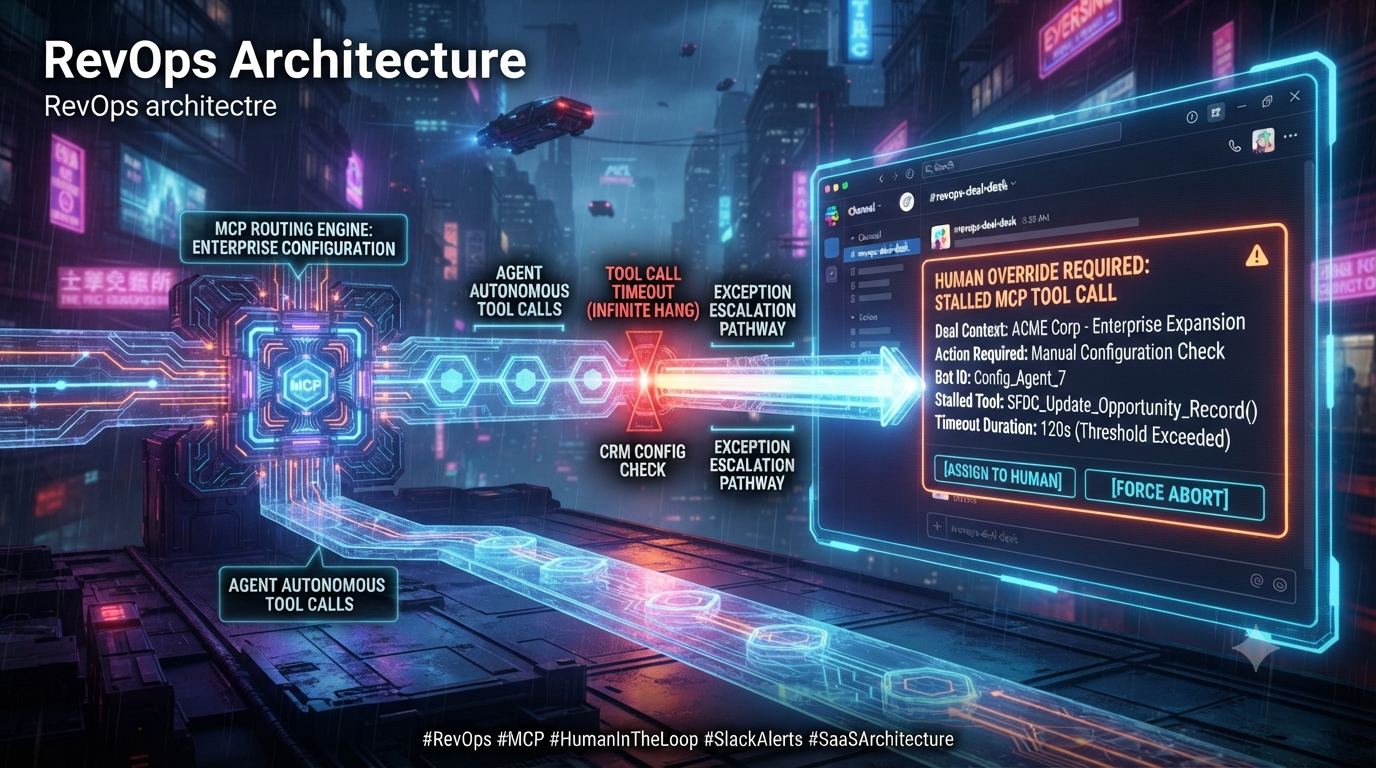
Revenue Operations (RevOps) teams are moving from rigid, script-based automation to agentic workflows built on the Model Context Protocol (MCP). Agents handling quote-to-cash steps, SaaS provisioning, or pricing checks depend on external tools exposed through MCP servers. When one of those tools hangs on a slow legacy ERP, a locked database row, or a degraded upstream API, the agent’s loop stalls and a deal can stall with it.
This guide covers how MCP handles timeouts today, how to design a server that degrades gracefully, and how to hand a stuck tool call to a human through Slack. It reflects the MCP specification revision dated 2026-07-28, the current one at the time of writing.
1. The RevOps Challenge: When Autonomous Agents Hit Walls
RevOps pipelines depend on near-real-time data across CRM, billing, and inventory systems. Teams that put LLM-driven agents into these environments typically wrap core capabilities in MCP servers so the agent can call them as tools. An autonomous sales assistant might use a tool to:
- Validate a custom volume discount against a legacy billing database.
- Provision a temporary sandbox for an enterprise prospect during a live demo.
- Check inventory allocation for a high-value hardware bundle.
Most of these calls return quickly. The trouble comes from the few that don’t, because an agent waiting on a blocked call can’t make progress and the person watching it can’t tell why.
What Actually Happens When an MCP Tool Call Hangs
MCP does not hard-code a response deadline into its transports. The specification instead tells implementations to establish their own timeouts for every request they send, so that hung connections and resource exhaustion are avoided. When a request gets no success or error response in time, the sender should issue a cancellation notification for that request and stop waiting. The spec also says SDKs and middleware should allow timeouts to be configured per request.
Two further details from the spec matter here:
- A client may reset its timeout clock when it receives a progress notification for the request, since that suggests work is actually happening.
- Implementations should still enforce a maximum timeout regardless of progress notifications, to limit the damage a misbehaving client or server can do.
In practice, the timeout you hit is usually set by the client’s SDK or host application, not by your server. The official TypeScript SDK defaults to 60 seconds and raises an error with code `-32001` (“Request timed out”) when it expires. That code is an SDK choice: the spec states that errors purely local to an implementation, such as an SDK request timeout, are not assigned codes. The TypeScript SDK also exposes options to reset the timeout on progress and to cap total wait time. Other clients and hosts apply their own limits, so a tool that works against one client may time out in another.
Note that an agent doesn’t see an HTTP 424 (Failed Dependency) from MCP for this. A timeout reaches the agent as a protocol-level error from its client library, or as a tool result you deliberately return.
```
[AI Agent] --> (tools/call: validate_enterprise_pricing) --> [MCP Server]
|
(External API / Legacy ERP)
|
[Hangs / slow response]
|
[Agent loop stalls] <-- (-32001 Request timed out, client-side) <--+
```
For a sales team, the cost of this is real but mundane. The rep waits, the agent has no useful answer to give, and whoever investigates has to piece together client and server logs to find out which call hung.
2. How the Protocol Is Evolving: Statelessness, Tasks, and Multi Round-Trip Requests
Two recent protocol developments directly affect how you should design for slow tools.
The 2026-07-28 Specification
The 2026-07-28 revision made MCP stateless by default. The `initialize` handshake and the `Mcp-Session-Id` header are gone. Every request now carries its protocol version and client capabilities in `_meta`, and Streamable HTTP requests must include `Mcp-Method` and `Mcp-Name` headers so gateways, load balancers, and firewalls can route traffic without parsing the JSON body. The revision also introduced a formal feature lifecycle. Roots, Sampling, Logging, and the legacy HTTP+SSE transport are deprecated, with a defined migration window.
For this article’s topic, the practical consequences are:
- Remote MCP servers can no longer count on a long-lived session or a held-open stream to coordinate with a client. Any pending state, such as “waiting for a human,” has to live in your own storage and be addressed by an identifier.
- Local stdio servers don’t need an immediate rewrite. The main migration boundary is remote Streamable HTTP.
- The official TypeScript SDK now has a v2 line, published as split packages (`@modelcontextprotocol/server`, `/client`, and others) that implements the new revision. The v1 package, `@modelcontextprotocol/sdk`, serves 2025-11-25 and earlier. Check the SDK’s migration guide before porting server code.
MCP Tasks: The Protocol’s Answer to Long-Running Calls
Tasks were introduced as an experimental feature in the 2025-11-25 revision to track durable, long-running requests. A caller starts an operation, gets a task handle back immediately, and polls for status instead of holding a connection open.
In 2026-07-28, Tasks moved out of the core spec into an official extension under the `io.modelcontextprotocol/tasks` namespace, and the design was simplified:
- A single extension capability flag replaces the earlier multi-level capability checks.
- The client advertises support, and the server decides per request whether to return a task handle.
- The task methods are `tasks/get` (status and, when finished, the result), `tasks/update` (to answer input requests), and `tasks/cancel`.
- Task statuses are `working`, `input_required`, `completed`, `failed`, and `cancelled`.
- Cancellation is cooperative and acknowledged only: a cancelled task may still complete.
- If a JSON-RPC error occurs during execution the task becomes `failed`, but a tool result with `isError: true` still counts as `completed` with that result attached.
Because the extension is new and client adoption varies, treat it as the preferred mechanism where your clients support it and keep a fallback for those that don’t. The next section describes such a fallback.
Asking a Human: Multi Round-Trip Requests
When a tool needs input from a person mid-call, the older approach had the server send an elicitation request back to the client over a live connection. The 2026-07-28 revision replaced that with Multi Round-Trip Requests (MRTR, SEP-2322). The server answers the client’s request with a result whose `resultType` is `input_required` and an `inputRequests` map. The client gathers the input and retries the original request with matching `inputResponses`, using a new JSON-RPC id. This keeps the exchange compatible with stateless, load-balanced servers.
MRTR is designed for a person who is present in the client. It doesn’t route a decision to a different person in a different system. That is the gap a Slack escalation fills: the agent’s user may be a sales rep, while the person qualified to approve a pricing override is a RevOps manager who isn’t in the agent’s session at all.
3. Architectural Pattern: Handle-Based Async Calls with a Fallback State Machine
For tools that depend on slow or unpredictable systems, avoid holding the request open until the downstream system answers. A workable pattern has four parts.
Step 1: Set a server-side deadline well under the client’s timeout
Choose a “soft deadline” for the downstream call that is comfortably shorter than the shortest client timeout you expect, for example a few seconds against a 60-second SDK default. The point is that your server decides what happens on a slow call, rather than leaving the client’s timeout to decide.
Step 2: Return a handle instead of an error
If the downstream call finishes before the deadline, return the result normally. If not, keep the downstream request running in the background, record a transaction under a unique `handleId`, and return a structured result with a status such as `PENDING_HUMAN_REVIEW` plus that handle. The agent gets a clear, machine-readable answer: the work is not done and here is how to check on it. Where your clients support the Tasks extension, this is the natural place to return a task handle instead.
Step 3: Escalate to a human
Once a call is flagged, post a Slack message to a RevOps channel with the deal context and decision buttons. Whoever acts on it should be able to see what was attempted, what failed, and what each choice will do.
Step 4: Let the agent resume
Expose a status tool (for example `get_validation_status`) that takes the `handleId`. When the human decides, or the original call eventually completes, the stored state changes and the agent’s next poll picks it up. Don’t treat a timeout as an approval. The agent should proceed with an override only when a person has explicitly granted it.
A note on terminology: a *circuit breaker* stops calling a failing dependency after repeated failures and fails fast until it recovers. A per-call deadline, as above, is a different mechanism. The two work well together, since a breaker prevents a degraded ERP from tying up one worker per request while the deadline protects each individual call.
4. Designing Slack Alerts for Human-in-the-Loop Overrides
A good alert gives the reviewer what they need to decide without opening other tools.
Using Block Kit for Decision Cards
Slack’s Block Kit lets you build structured messages with sections and interactive buttons. A useful override card includes:
- Context header: the account or deal name.
- Diagnostic detail: which tool timed out, the elapsed time, and the input parameters.
- Decision buttons: for example Approve Override and Reject.
Some Block Kit limits to design around: a button’s `action_id` can be up to 255 characters, its `value` up to 2,000 characters, and its label up to 75 characters. Put the `handleId` in the button’s `value` so the callback can look up the right transaction, and keep any larger context in your own storage rather than in the payload.
```
{
"text": "MCP tool timeout: validate_enterprise_pricing",
"blocks": [
{
"type": "header",
"text": { "type": "plain_text", "text": "MCP Tool Timeout: Enterprise Pricing Validation" }
},
{
"type": "section",
"fields": [
{ "type": "mrkdwn", "text": "*Account:* Acme Corp (sample)\n*Discount requested:* 18%" },
{ "type": "mrkdwn", "text": "*Tool:* `validate_enterprise_pricing`\n*Status:* No response within 7s" }
]
},
{
"type": "actions",
"elements": [
{
"type": "button",
"text": { "type": "plain_text", "text": "Approve Override" },
"style": "primary",
"action_id": "override_approve",
"value": "handle_8f3a2c"
},
{
"type": "button",
"text": { "type": "plain_text", "text": "Reject / Flag Deal" },
"style": "danger",
"action_id": "override_reject",
"value": "handle_8f3a2c"
}
]
}
]
}
```
Incoming Webhooks Versus a Slack App
Slack incoming webhooks can post Block Kit layouts to a channel, which makes them the quickest way to send an alert. A webhook alone, though, can’t receive button clicks. Interactivity is configured per Slack app: you enable it and give Slack a Request URL, and Slack then sends a `block_actions` payload to that URL whenever someone clicks a button. If your cards have buttons that must do something, you need a Slack app with interactivity enabled and an HTTPS endpoint to handle the callbacks. That endpoint is a separate service from a local stdio MCP server, and the two need to share the transaction store.
5. End-to-End Workflow
```
[Sales rep / CRM]
|
v
[AI agent] --(tools/call)--> [MCP server]
|
(waits for legacy ERP, up to the deadline)
|
[Deadline passes: store handle,
status = PENDING_HUMAN_REVIEW]
|
+----------------+-----------------+
v v
[Return handle + status to agent] [Post Block Kit card to Slack]
| |
(agent polls status tool) [RevOps manager clicks a button]
| |
| [Slack -> your callback endpoint:
| verify signature, ack fast,
| update stored state]
v |
[Agent sees APPROVED / REJECTED] <-----------+
```
6. Implementation Blueprint: TypeScript MCP Server
The following is an illustrative sketch, not production code. It uses the v1 TypeScript SDK (`@modelcontextprotocol/sdk`) and Node 18 or later. In the v2 SDK, servers are imported from `@modelcontextprotocol/server`, so follow the official migration guide if you target 2026-07-28 directly. It shows the deadline, the handle, and the Slack escalation. The in-memory `Map` is a stand-in; use a shared store such as Redis so your Slack callback service can see the same state.
```
import { randomUUID } from "node:crypto";
import { McpServer } from "@modelcontextprotocol/sdk/server/mcp.js";
import { StdioServerTransport } from "@modelcontextprotocol/sdk/server/stdio.js";
import { z } from "zod";
type Status =
| "PROCESSING"
| "COMPLETED"
| "PENDING_HUMAN_REVIEW"
| "APPROVED_OVERRIDE"
| "REJECTED";
interface Transaction {
dealId: string;
status: Status;
result?: unknown;
}
// Replace with Redis or a database so the Slack callback service shares it.
const transactions = new Map<string, Transaction>();
// Keep this well below the shortest client timeout you expect.
const SOFT_DEADLINE_MS = Number(process.env.SOFT_DEADLINE_MS ?? 7000);
// Hard cap so the background request cannot run forever.
const HARD_TIMEOUT_MS = 120_000;
const server = new McpServer({ name: "revops-mcp-gateway", version: "1.0.0" });
async function postSlackEscalation(
handleId: string,
dealId: string,
toolName: string
): Promise<void> {
const url = process.env.SLACK_REVOPS_WEBHOOK_URL;
if (!url) return;
const body = {
text: `MCP tool timeout: ${toolName}`,
blocks: [
{
type: "header",
text: { type: "plain_text", text: `MCP Tool Timeout: ${toolName}` },
},
{
type: "section",
text: {
type: "mrkdwn",
text: `Validation for deal *${dealId}* did not finish within the deadline and needs a decision.`,
},
},
{
type: "actions",
elements: [
{
type: "button",
text: { type: "plain_text", text: "Approve Override" },
style: "primary",
action_id: "override_approve",
value: handleId,
},
{
type: "button",
text: { type: "plain_text", text: "Reject" },
style: "danger",
action_id: "override_reject",
value: handleId,
},
],
},
],
};
try {
await fetch(url, {
method: "POST",
headers: { "Content-Type": "application/json" },
body: JSON.stringify(body),
});
} catch (err) {
console.error("Slack escalation failed:", err); // stderr: stdout is the stdio channel
}
}
async function callLegacyBilling(dealId: string, discountPercentage: number) {
const res = await fetch(process.env.LEGACY_BILLING_URL!, {
method: "POST",
headers: { "Content-Type": "application/json" },
body: JSON.stringify({ dealId, discountPercentage }),
signal: AbortSignal.timeout(HARD_TIMEOUT_MS), // actually cancels the request
});
if (!res.ok) throw new Error(`Billing API returned ${res.status}`);
return res.json();
}
server.registerTool(
"validate_enterprise_pricing",
{
description: "Validates a pricing tier against the legacy billing core.",
inputSchema: { dealId: z.string(), discountPercentage: z.number() },
},
async ({ dealId, discountPercentage }) => {
const handleId = randomUUID();
transactions.set(handleId, { dealId, status: "PROCESSING" });
// Start the call and keep it running in the background.
const work = callLegacyBilling(dealId, discountPercentage).then(
(result) => {
const tx = transactions.get(handleId);
// Don't overwrite a human decision that arrived first.
if (tx && tx.status === "PROCESSING") {
tx.status = "COMPLETED";
tx.result = result;
} else if (tx) {
tx.result = result;
}
return result;
},
(err) => {
console.error("Billing call failed:", err);
throw err;
}
);
const deadline = new Promise<"DEADLINE">((resolve) =>
setTimeout(() => resolve("DEADLINE"), SOFT_DEADLINE_MS)
);
const outcome = await Promise.race([work, deadline]);
if (outcome !== "DEADLINE") {
return { content: [{ type: "text", text: JSON.stringify(outcome) }] };
}
// Deadline passed: flag for review, notify a human, give the agent a handle.
transactions.get(handleId)!.status = "PENDING_HUMAN_REVIEW";
work.catch(() => {}); // avoid an unhandled rejection from the background call
await postSlackEscalation(handleId, dealId, "validate_enterprise_pricing");
return {
content: [
{
type: "text",
text: JSON.stringify({
status: "PENDING_HUMAN_REVIEW",
handleId,
message:
"Validation is slow. A review card was sent to Slack. Poll get_validation_status with this handleId.",
}),
},
],
};
}
);
server.registerTool(
"get_validation_status",
{
description: "Returns the current status of a validation started earlier.",
inputSchema: { handleId: z.string() },
},
async ({ handleId }) => {
const tx = transactions.get(handleId);
return {
content: [
{
type: "text",
text: JSON.stringify(tx ?? { status: "UNKNOWN_HANDLE" }),
},
],
isError: !tx,
};
}
);
async function main() {
await server.connect(new StdioServerTransport());
console.error("RevOps MCP gateway running on stdio");
}
main().catch((err) => {
console.error("Fatal error:", err);
process.exit(1);
});
```
Two points about this sketch are worth calling out. First, racing a request against a timer does not cancel the request, so the code passes an `AbortSignal` to cap the background call. Second, the server logs to stderr, because on the stdio transport stdout carries the protocol messages.
7. Governance, Security, and State Reconciliation
Slack buttons let people change business state, so treat the callback endpoint like any other authorization-sensitive API.
1. Verify every Slack request. Slack signs each request with your app’s signing secret. Compute an HMAC-SHA256 over the string `v0:{timestamp}:{raw request body}`, prefix the hex digest with `v0=`, and compare it to the `X-Slack-Signature` header using a constant-time comparison. Reject requests whose `X-Slack-Request-Timestamp` is more than five minutes from your clock, which blocks replays. Verify against the raw body before any JSON or form parsing, because re-encoding it changes the bytes.
2. Acknowledge within three seconds. Slack expects a 2xx response to an interaction in about three seconds and retries failed deliveries. Return quickly, then do the real work asynchronously.
3. Make decisions idempotent. Because of retries and impatient double clicks, key each decision on the `handleId` (or Slack’s own event identifiers) and apply a state transition only once. A single deal can have more than one escalation over its life, so the deal ID alone is too coarse a key. Redis or a database with an atomic compare-and-set both work.
4. Restrict who can approve. Check the Slack user ID in the callback against an allowlist or group, and record who decided. An override that bypasses a pricing validation is a financial control, not a convenience.
5. Keep an audit trail. Log the timeout, the notification time, the reviewer, the decision, and the resulting state change in an append-only store. Many organizations need this for internal controls, and it is invaluable when someone asks why a discount went through.
6. Don’t over-share in Slack. Cards live in channels with many members. Include only the context a reviewer needs and keep sensitive fields in your own system, referenced by handle.
7. Update the card after a decision. Edit or replace the original message so other reviewers can see it has been resolved and don’t act on it twice.
Conclusion
Tool calls that hang are an operational reality of connecting agents to legacy systems, and MCP leaves the timeout policy to you. The protocol is moving toward stateless servers, the Tasks extension for long-running work, and Multi Round-Trip Requests for in-session input, and each of these favors storing pending work under explicit identifiers rather than holding connections open. A handle-based design with a server-side deadline, a Slack escalation with authenticated callbacks, and a status tool the agent can poll lets a stuck call become a visible decision for a human instead of a silent stall. Test it against the clients you actually support, because timeout behavior and Tasks support differ between them.
Sources and Further Reading
- MCP specification: Lifecycle (timeouts and error handling)
- MCP specification: Tasks (2025-11-25, experimental)
- MCP Tasks extension overview (2026-07-28)
- AAIF: Handle long-running MCP tool calls with the Tasks extension
- SEP-2322: Multi Round-Trip Requests
- Cloudflare: The next generation of MCP (2026-07-28 specification)
- WorkOS: MCP went stateless, what changed in the 2026-07-28 spec
- Slack: Block Kit button element reference
- Slack: Verifying requests from Slack