Production AI agents built on large language models (LLMs) run into the same problems again and again. Queries are ambiguous, enterprise context is missing, tools fail, and customers get frustrated. When retrieval comes back empty or the user is already upset, the model will often still produce a fluent, confident answer. That answer may be wrong.
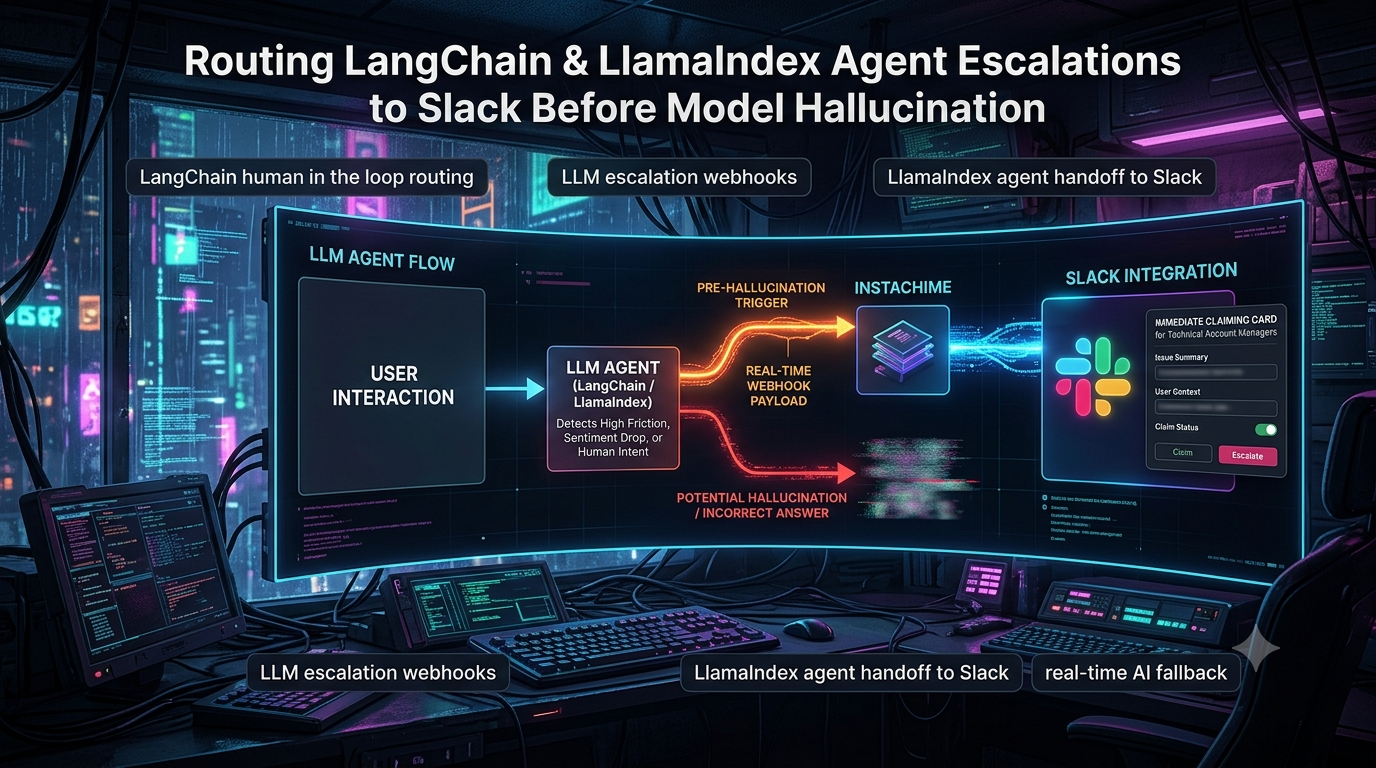
The fix is a deliberate pause. When an agent built with LangChain/LangGraph or LlamaIndex detects explicit escalation intent, rising frustration, or weak grounding, it stops before generating or releasing an answer. It then sends a structured payload to a human-facing channel. Here that channel is a claimable Slack card, delivered with InstaChime, so a Technical Account Manager (TAM) or support engineer can take over, supply the missing facts, or correct the agent.
This pattern reduces the chance that an ungrounded answer reaches the user. It does not eliminate hallucination, and the detection thresholds are only as good as your tuning. This article covers the triggers, the pause-and-resume mechanics in both frameworks, and where InstaChime and Slack fit. It also covers a few pitfalls that commonly break these designs.
Where InstaChime fits, and where it doesn't
InstaChime describes itself as speed-to-lead software for sales teams. It captures leads through a webhook, deduplicates them, routes them, and alerts a team in Slack, Microsoft Teams, or by mobile push. Its comparison pages describe claimable alert cards with SLA countdowns and automatic round-robin re-routing when nobody claims in time.
That claim-and-SLA mechanic carries over to agent escalations. An escalation is a time-sensitive event that needs exactly one human owner. But InstaChime's public documentation covers inbound capture and outbound `lead.created` webhooks. It does not describe a callback that resumes a paused agent. Plan on owning that "resume" leg yourself, as described below.
Turnkey voice platforms vs. custom agent stacks
Conversational AI is built in two broad ways: hosted voice/chat platforms, and developer-controlled frameworks.
Hosted voice platforms (Retell, Vapi and similar)
Platforms like Retell and Vapi bundle speech-to-text, LLM reasoning, and text-to-speech behind a managed telephony pipeline. They are not closed boxes:
- Retell supports a custom LLM integration. Retell's server opens a WebSocket to a backend you run, sends live transcripts, and gets your responses back. Retell's own docs advise using it only when specific compliance or use-case requirements demand it. A Retell staff reply in its community forum states that warm transfer isn't supported with custom-LLM agents. Check current docs before relying on that.
- Vapi documents custom LLM support ("bring your own server"), function and API-request tools, knowledge bases, server webhooks, and a Slack tool. It also documents a transfer-call tool with blind and warm-transfer modes, including modes that speak a message or generated summary to the receiving person before connecting the caller.
For a phone agent, a built-in transfer is often the right escalation path. The trade-off is control. In a hosted platform, the platform owns the orchestration loop. When you need custom retrieval logic, multi-step state, or a pause that holds the graph mid-execution while a human writes the answer, you usually want to own that loop.
Custom stacks (LangChain/LangGraph, LlamaIndex)
- LangChain/LangGraph. In LangChain v1, `create_agent` is the standard way to build agents. It is built on LangGraph, so it gets checkpointing and persistence. LangChain ships a `HumanInTheLoopMiddleware` that pauses on sensitive tool calls via an `interrupt_on` policy. For escalation based on friction or retrieval quality, you write a LangGraph node yourself.
- LlamaIndex. Workflows, LlamaIndex's event-driven orchestration layer, reached 1.0 as a standalone package (`pip install llama-index-workflows`, imported as `workflows`). The old `llama_index.core.workflow` import remains as a compatibility layer. LlamaAgents, LlamaIndex's offering for building and deploying document-processing agents, sits on top of Workflows.
Custom stacks give you full visibility into state, but you must design the human-in-the-loop path yourself. If you don't, the agent has no interceptor when it hits an edge case.
Escalation triggers: catch the failure early
Check conditions before the answer is generated, or at least before it is released to the user. Three kinds of trigger work well together.
1. Explicit intent and deterministic rules
Match the incoming message against patterns such as "talk to a person," "human representative," or a specific escalation phrase. Keep patterns narrow. A bare substring match on "agent" will fire on "your agent docs are wrong." On a match, skip the normal tool and RAG steps and go straight to the escalation node.
2. Lightweight sentiment or frustration scoring
Run a small, low-latency model or classifier ahead of the main agent loop. It should return a frustration score, a sentiment label, and an escalation-intent flag. Escalate when the score crosses a threshold (for example, above 0.78) on one or several consecutive turns.
Treat any threshold as a starting value. LLM-produced scores are not calibrated probabilities, so tune the number against labeled conversations from your own traffic.
3. Grounding and execution anomalies
The agent can also inspect its own run:
- Weak retrieval. Low similarity scores across retrieved chunks suggest the knowledge base doesn't cover the question. The right cutoff depends on your embedding model and corpus, so measure it.
- Tool loops. The same tool is called repeatedly with identical inputs and the step never resolves.
- Low model confidence. Some providers expose token log-probabilities that can serve as a rough uncertainty signal. They are not available from every provider and are poorly calibrated, so use them as one signal among several and not a standalone hallucination detector.
```
Incoming message / agent step
|
+------------+-------------+--------------------+
| | |
Deterministic Frustration / Grounding &
intent match sentiment score loop checks
| | |
+------------+-------------+--------------------+
|
Any trigger fires?
yes | | no
v v
Halt generation Continue normal
Send escalation agent loop
payload; pause
```
Implementation: LangGraph
LangGraph's `interrupt()` pauses a graph from inside a node. LangGraph saves the graph state through its checkpointer and waits until you resume the thread. You resume by invoking the graph again with `Command(resume=...)`, and the value you pass becomes the return value of the `interrupt()` call. A checkpointer and a `thread_id` in the config are required.
Checkpointers come from separate packages:
| Checkpointer | Package | Intended use |
|---|---|---|
| `InMemorySaver` (alias `MemorySaver`) | `langgraph-checkpoint` | Testing and development |
| `SqliteSaver` | `langgraph-checkpoint-sqlite` | Local development and small projects |
| `PostgresSaver` / `AsyncPostgresSaver` | `langgraph-checkpoint-postgres` | Production |
| Redis | `langgraph-checkpoint-redis` (maintained in a separate Redis repository) | Production, if you already run Redis |
The pitfall: nodes re-run from the top on resume
When you resume, LangGraph re-executes the interrupted node from its first line. If you send the Slack/InstaChime notification in the same node as `interrupt()`, the notification fires again on every resume, and a new random ID gets generated each time. Two fixes:
1. Put the side effect in its own node ahead of the interrupt node, so it completes and is checkpointed first.
2. Use a stable identifier (the graph's `thread_id`) so retries and duplicates collapse. InstaChime's capture docs say a repeated request with the same source ID or contact fingerprint doesn't create a duplicate lead.
The example below does both.
```
import os
import re
from typing import Optional, TypedDict
import requests
from langchain_core.runnables import RunnableConfig
from langgraph.checkpoint.memory import InMemorySaver # use PostgresSaver in production
from langgraph.graph import END, START, StateGraph
from langgraph.types import Command, interrupt
INSTACHIME_CAPTURE_URL = "https://instachime.com/api/webhooks/capture"
FRUSTRATION_THRESHOLD = 0.78 # starting point; tune on your own data
ESCALATION_PATTERN = re.compile(
r"\b(speak|talk) to (a |an )?(human|person|representative|agent)\b"
r"|\bhuman operator\b",
re.IGNORECASE,
)
class AgentState(TypedDict):
messages: list[str]
user_email: str
company: str
frustration_score: float
escalated: bool
human_override_response: Optional[str]
final_answer: Optional[str]
def analyze_frustration(text: str) -> float:
"""Stub: call your lightweight classifier or small LLM here."""
raise NotImplementedError
def standard_llm_generator(state: AgentState) -> dict:
"""Stub: your normal RAG/tool-calling generation step."""
raise NotImplementedError
def evaluator(state: AgentState) -> dict:
latest = state["messages"][-1]
score = analyze_frustration(latest)
explicit = bool(ESCALATION_PATTERN.search(latest))
return {
"frustration_score": score,
"escalated": explicit or score > FRUSTRATION_THRESHOLD,
}
def route_after_evaluation(state: AgentState) -> str:
return "escalate" if state["escalated"] else "answer"
def notify_instachime(state: AgentState, config: RunnableConfig) -> dict:
Runs once: this node finishes (and is checkpointed) before the interrupt node starts.
thread_id = config["configurable"]["thread_id"]
payload = {
"source": "langgraph_agent",
"lead_id": thread_id, # stable ID so retries don't create duplicates
"email": state["user_email"],
"company": state["company"],
"message": state["messages"][-1],
Fields InstaChime doesn't map are kept in its raw payload
"thread_id": thread_id,
"frustration_score": state["frustration_score"],
"chat_history": state["messages"][-5:],
}
resp = requests.post(
INSTACHIME_CAPTURE_URL,
json=payload,
headers={"x-instachime-secret": os.environ["INSTACHIME_SECRET"]},
timeout=10,
)
resp.raise_for_status()
return {}
def await_operator(state: AgentState) -> dict:
Pauses the graph. The value passed to Command(resume=...) is returned here.
reply = interrupt({"reason": "High friction or weak grounding", "status": "AWAITING_OPERATOR"})
return {"human_override_response": reply, "final_answer": reply, "escalated": False}
builder = StateGraph(AgentState)
builder.add_node("evaluator", evaluator)
builder.add_node("standard_llm_generator", standard_llm_generator)
builder.add_node("notify_instachime", notify_instachime)
builder.add_node("await_operator", await_operator)
builder.add_edge(START, "evaluator")
builder.add_conditional_edges(
"evaluator",
route_after_evaluation,
{"escalate": "notify_instachime", "answer": "standard_llm_generator"},
)
builder.add_edge("notify_instachime", "await_operator")
builder.add_edge("await_operator", END)
builder.add_edge("standard_llm_generator", END)
app = builder.compile(checkpointer=InMemorySaver())
config = {"configurable": {"thread_id": "ticket-1042"}}
app.invoke({...initial state...}, config)
#
Later, from your own endpoint, once an operator has replied:
app.invoke(Command(resume="Use parameter `edge_region`; docs fix is in progress."), config)
```
If you only need approval before specific tool calls, such as sending an email or issuing a refund, LangChain's `HumanInTheLoopMiddleware` on `create_agent` may be enough. It issues the same kind of interrupt and also needs a checkpointer.
Implementation: LlamaIndex Workflows
In Workflows, steps consume and emit events. For human input there are two documented patterns:
- A step returns an `InputRequiredEvent`, and a later step consumes a `HumanResponseEvent`.
- Inside a single step, `ctx.wait_for_event()` emits a waiter event and suspends until a matching event arrives. The `requirements` argument filters which event satisfies the wait.
The documentation notes that code before a `wait_for_event` call must be idempotent, because the step can re-run. This is the same trap as in LangGraph. The example puts the notification in its own step, and the waiting step holds only the wait.
```
import os
import aiohttp
from workflows import Context, Workflow, step
from workflows.events import (
Event,
HumanResponseEvent,
InputRequiredEvent,
StartEvent,
StopEvent,
)
INSTACHIME_CAPTURE_URL = "https://instachime.com/api/webhooks/capture"
class StandardGenerationEvent(Event):
user_message: str
class EscalationRequiredEvent(Event):
ticket_id: str
reason: str
user_message: str
risk_score: float
class HandoffPendingEvent(Event):
ticket_id: str
class OperatorReplyEvent(HumanResponseEvent):
ticket_id: str
async def check_hallucination_risk(message: str) -> tuple[bool, float]:
"""Stub: run retrieval and return (is_risky, risk_score), e.g. from similarity scores."""
raise NotImplementedError
class EscalationWorkflow(Workflow):
@step
async def evaluate(self, ev: StartEvent) -> StandardGenerationEvent | EscalationRequiredEvent:
message = ev.get("user_message")
ticket_id = ev.get("ticket_id")
is_risky, score = await check_hallucination_risk(message)
if is_risky:
return EscalationRequiredEvent(
ticket_id=ticket_id,
reason="Weak retrieval grounding",
user_message=message,
risk_score=score,
)
return StandardGenerationEvent(user_message=message)
@step
async def notify(self, ev: EscalationRequiredEvent) -> HandoffPendingEvent:
payload = {
"source": "llamaindex_workflow",
"lead_id": ev.ticket_id, # stable ID for deduplication
"message": ev.user_message,
"trigger_reason": ev.reason,
"risk_score": ev.risk_score,
}
async with aiohttp.ClientSession() as session:
async with session.post(
INSTACHIME_CAPTURE_URL,
json=payload,
headers={"x-instachime-secret": os.environ["INSTACHIME_SECRET"]},
timeout=aiohttp.ClientTimeout(total=10),
) as resp:
resp.raise_for_status()
return HandoffPendingEvent(ticket_id=ev.ticket_id)
@step
async def wait_for_operator(self, ctx: Context, ev: HandoffPendingEvent) -> StopEvent:
reply = await ctx.wait_for_event(
OperatorReplyEvent,
waiter_event=InputRequiredEvent(prefix=f"Awaiting operator for {ev.ticket_id}"),
requirements={"ticket_id": ev.ticket_id},
)
return StopEvent(result=reply.response)
@step
async def generate(self, ev: StandardGenerationEvent) -> StopEvent:
... # your normal generation step
Drive the workflow and respond later (adapt to your installed version's API):
handler = workflow.run(user_message="...", ticket_id="ticket-1042")
async for event in handler.stream_events():
if isinstance(event, InputRequiredEvent):
break # hand off to humans; resume when the operator replies
handler.ctx.send_event(OperatorReplyEvent(response="...", ticket_id="ticket-1042"))
result = await handler
```
The docs show breaking out of the event loop and resuming later. Workflows 1.0 also lets runs be serialized to JSON mid-execution and restored. If your workflow runs on short-lived servers, build on that instead of holding a handler in memory.
InstaChime and Slack: who does what
What InstaChime documents
- Inbound capture. POST JSON to `https://instachime.com/api/webhooks/capture`. If your workflow uses a shared secret, send it in the `x-instachime-secret` header. Contact fields (`full_name`, `email`, `phone`, `company`) and `message` are the recommended fields. Anything unmapped should still be sent so it's kept in the raw payload.
- Processing. InstaChime stores the raw payload, normalizes common fields, checks for duplicates, runs routing, and starts alert delivery.
- Response handling. HTTP 200 means accepted. 401/403 indicates a secret problem, 400 a payload problem, and 5xx should be retried with exponential backoff.
- Slack alerts. The setup guide uses a Slack incoming webhook configured in InstaChime's settings.
- Outbound webhooks. InstaChime can send a signed `lead.created` event to your endpoint. When you configure a signing secret, it signs the raw request body with HMAC-SHA256 in the `x-instachime-signature` header. Verify it against the raw body, not re-serialized JSON, using a timing-safe comparison.
Check which of your payload fields actually appear on the Slack card. InstaChime is designed around lead data, and extra agent context such as chat history may live only in the stored raw payload.
What you build
Because the resume path isn't documented, the usual design keeps the human's reply on your side:
1. InstaChime posts the claimable alert. A TAM claims it.
2. The TAM answers through something your application controls: a Slack app with a modal or message action pointing at your endpoint, or an internal tool linked from the alert.
3. Your endpoint calls `app.invoke(Command(resume=reply), config)` for LangGraph, or sends the matching event into the workflow for LlamaIndex.
If you build the Slack interaction layer yourself, these constraints matter:
- Acknowledge fast. Slack requires an acknowledgment of an interaction payload within 3 seconds.
- Slow work. A `response_url` can be used up to 5 times within 30 minutes. For longer than that, post a message the normal way. Modal triggers (`trigger_id`) expire in 3 seconds, so open the modal immediately.
- Updating the card. Use the `response_url` or `chat.update` to change a message after a click, for example to show "Claimed by …".
- Verify requests. Check Slack's `X-Slack-Signature` and `X-Slack-Request-Timestamp` headers.
- Locking is yours. Slack message updates don't give you an atomic lock. If two people click Claim at nearly the same time, only your datastore can decide who won. Use a conditional write, a unique constraint, or Redis `SET NX` keyed by ticket ID, and have the loser's handler show a "already claimed" message.
The claiming lifecycle
```
Agent trigger fires
|
v
Graph/workflow pauses (checkpointed)
|
v
POST to InstaChime capture endpoint (stable lead_id)
|
v
Claimable Slack card; SLA clock starts
|
v
TAM claims (your datastore decides if two people race)
|
v
TAM replies via your Slack modal/endpoint
|
v
Your service resumes the agent:
LangGraph: Command(resume=reply)
LlamaIndex: send OperatorReplyEvent(...)
|
v
Reply is delivered to the user; card marked resolved
```
Decide up front what happens if nobody claims before the SLA expires. InstaChime's documentation describes round-robin re-routing for unclaimed alerts. Your agent should also have a timeout path, for example telling the user a specialist will follow up by email, so a paused conversation never hangs.
Comparison
| Dimension | Hosted voice/chat platforms | Custom stack (LangGraph/LlamaIndex) + alerting |
|---|---|---|
| Orchestration control | Platform owns the loop; custom LLM/tool hooks exist (Retell, Vapi) | You own the loop and state |
| Typical escalation | Call transfer (Vapi offers blind and several warm modes), tool or server webhooks | Pause mid-graph; resume with a human-written answer |
| Context passed to a human | Summaries or headers on transfer (Vapi), transcripts via webhooks | Whatever you put in the payload, plus full checkpointed state |
| Pause before an answer is generated | Depends on how you wire custom LLM or tools | Native (`interrupt()`, `wait_for_event`) |
| Engineering effort | Lower to start | Higher: state storage, webhooks, resume endpoints |
Whether the "before generation" pause actually prevents wrong answers depends on your triggers. It is a risk-reduction technique, not a guarantee.
Implementation checklist
- Durable checkpointing. Use `PostgresSaver`/`AsyncPostgresSaver` (or the Redis integration) in production. `InMemorySaver` is for development and loses state on restart. For LlamaIndex, persist or serialize the workflow context.
- Narrow, tested triggers. Combine regex intent rules, a frustration classifier, and retrieval-quality checks. Tune thresholds on real conversations and track false escalations.
- Idempotent side effects. Keep notifications out of the node or step that holds the pause, and send a stable `lead_id` so retries don't double-alert.
- Secrets handled correctly. Keep the `x-instachime-secret` value server-side only. If you consume InstaChime's outbound webhooks, verify `x-instachime-signature` (HMAC-SHA256 of the raw body).
- Retry policy. Retry 5xx responses from InstaChime with exponential backoff, and don't retry 400/401/403 until fixed.
- Slack app configured. Enable Interactivity & Shortcuts with a request URL (this is an app setting, not an OAuth scope). Grant `chat:write` for posting and updating messages, and add `commands` only if you use slash commands. Verify Slack request signatures and acknowledge within 3 seconds.
- Claim lock in your datastore. Don't rely on Slack for mutual exclusion.
- Resume endpoint. Authenticate it, map ticket ID to `thread_id` (LangGraph) or workflow handler/context (LlamaIndex), and handle duplicate or late replies.
- Timeouts and fallbacks. Define what the user sees if no one claims or replies within your SLA.
Sources and further reading
- LangGraph interrupts and human-in-the-loop: <https://docs.langchain.com/oss/python/langgraph/interrupts>
- LangChain v1 (`create_agent`, `HumanInTheLoopMiddleware`): <https://docs.langchain.com/oss/python/releases/langchain-v1>
- LangGraph checkpointer integrations: <https://docs.langchain.com/oss/python/integrations/checkpointers/index.md>
- LlamaIndex Workflows, human in the loop: <https://developers.llamaindex.ai/python/llamaagents/workflows/human_in_the_loop/>
- Workflows 1.0 announcement: <https://www.llamaindex.ai/blog/announcing-workflows-1-0-a-lightweight-framework-for-agentic-systems>
- InstaChime webhook capture API: <https://instachime.com/help/webhook-capture-api>
- InstaChime outgoing webhooks: <https://instachime.com/help/crm-webhooks-overview>
- InstaChime Slack alerts: <https://instachime.com/help/slack-alerts>
- Slack, handling user interaction: <https://docs.slack.dev/interactivity/handling-user-interaction>
- Retell custom LLM overview: <https://docs.retellai.com/integrate-llm/overview.md>
- Vapi transfer-call tool: <https://docs.vapi.ai/tools/transfer-call>