In B2B sales and RevOps, how fast you respond to an inbound lead matters a great deal. The most-cited evidence is the 2007 Lead Response Management study, led by Dr. James Oldroyd (then at MIT Sloan) with InsideSales.com. It analyzed more than 15,000 web leads and over 100,000 call attempts. The odds of making contact with a lead were roughly 100 times higher when the call came within 5 minutes than after 30 minutes. The odds of qualifying the lead were roughly 21 times higher.
Two caveats apply. This is vendor platform data analyzed by an academic, not a peer-reviewed paper, and it compares 5 minutes with 30 minutes rather than describing a smooth curve. It supports a clear conclusion anyway: minutes matter, and hours are costly.
Many inbound routing stacks still lean on point-to-point webhooks, scheduled CRM syncs, and passive notifications such as email or a Slack alert with no ownership workflow. A rep has to notice the alert, open the CRM, check account ownership, and manually claim the lead. Every step adds delay.
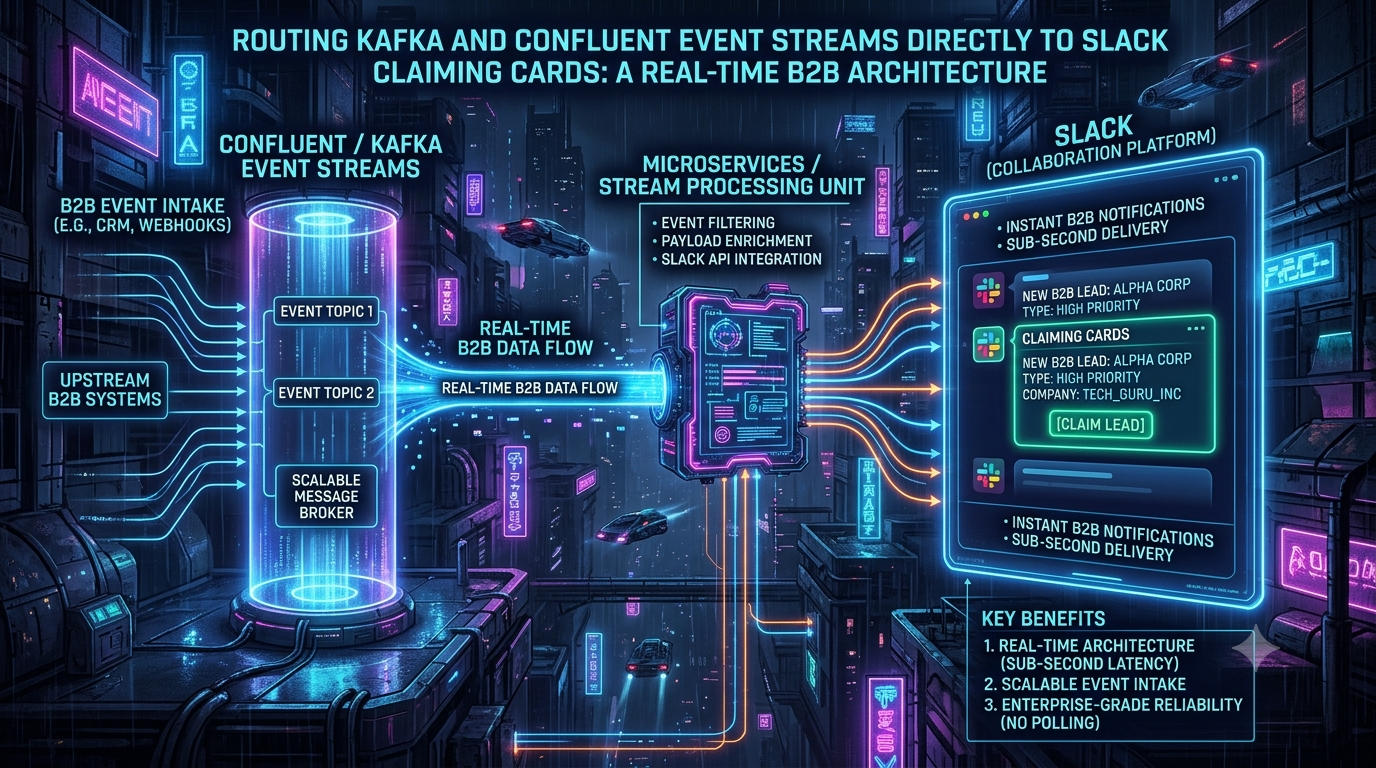
An alternative is an event-driven pipeline built on Apache Kafka and Confluent Cloud. Raw form, product-signup, and behavioral events are written to Kafka, enriched in flight with stream processing, and rendered as interactive Slack Block Kit “claiming cards.” A rep clicks one button to take ownership, and the system guarantees only one rep wins.
This article walks through the architecture, the stream-processing step, the Slack payloads, the concurrency handling, and the delivery-guarantee and rate-limit constraints that decide whether the design holds up in production.
1. Why Webhooks and Polling Fall Short
```
LEGACY PATTERN
[Web Form] ─HTTP POST─> [Webhook receiver] ─> [Scheduled CRM sync] ─> [Static Slack alert]
STREAMING PATTERN
[Web Form / App] ─> [Kafka topic] ─> [Flink SQL enrichment] ─> [Slack router] ─> [Block Kit claim card]
│
├─> Warehouse (Snowflake / BigQuery)
└─> CRM sync
```
Failure modes of the legacy pattern
1. Load spikes. A webinar or launch can produce thousands of sign-ups in minutes. A synchronous webhook chain pushes that burst straight onto downstream APIs. When those APIs return HTTP `429 Too Many Requests`, leads are delayed or dropped unless you have built retry logic.
2. Tight coupling. Each source system (a form tool, a marketing platform, a CDP) is wired directly to a destination. If the receiving service is down during a deploy, delivery depends on the retry behavior of every source.
3. Polling latency. Scheduled syncs mean the sales team acts on data that is as old as the polling interval.
4. No in-flight context. A raw payload usually has little more than a name, email, and company domain. Territory, account owner, and tier have to be looked up afterward, which adds round trips.
What Kafka adds
Kafka is a distributed, append-only commit log. For this use case, the relevant properties are:
- Buffering. Producers write to a durable log, and consumers read at their own pace. A traffic spike accumulates as consumer lag rather than as failed requests against Slack or your CRM.
- Ordering where it matters. Kafka guarantees order within a partition. Keying events by `lead_id` keeps all events for one lead in order.
- Fan-out. Independent consumers, such as the warehouse loader, the CRM sync, and the Slack router, can read the same topic without interfering with one another.
- Replay. Because events are retained, you can reprocess them after fixing a bug.
2. End-to-End Architecture
```
[Event producers] ─> [Kafka / Confluent Cloud: marketing.lead-intake.v1]
│
▼
[Flink SQL enrichment + deduplication]
│
▼
[sales.lead-routing-claims.v1]
│
▼
[Slack router service]
┌───────────┴───────────┐
▼ ▼
[Slack Web API] [Redis: atomic claim]
(Block Kit cards) │
▲ ▼
└──── Slack interactivity ─> [sales.lead-claim-events.v1]
```
1. Ingestion. Web forms, product-signup triggers, and enrichment vendors publish events to a raw topic such as `marketing.lead-intake.v1`. Producers can use a Kafka client library or Confluent’s REST Produce API. Register schemas in Schema Registry so malformed events are rejected at the edge.
2. Stream processing. Flink SQL on Confluent Cloud joins each lead against reference data (territories, account owners, tiers) and writes an enriched event to `sales.lead-routing-claims.v1`.
3. Dispatch. A small, horizontally scalable service consumes the enriched topic. It builds a Block Kit message and posts it to the right Slack channel with `chat.postMessage`.
4. Claim handling. When a rep clicks Claim Lead, Slack sends an interaction payload to the service’s Request URL. The service acknowledges immediately, then attempts an atomic claim in Redis. The winner’s claim is published to `sales.lead-claim-events.v1` so the CRM sync and analytics consumers can act on it.
5. Card update. The service replaces the original card with a read-only “claimed” state, using the interaction’s `response_url` or the `chat.update` method.
3. In-Flight Enrichment with Flink SQL
Confluent’s current direction for stream processing on Confluent Cloud is Apache Flink. Confluent acquired the Flink company Immerok in 2023 and made Flink SQL a first-class managed service. ksqlDB remains available, and its documentation is maintained for both Confluent Platform and Confluent Cloud. For a new project, Flink SQL is the more future-proof choice, so the examples below use it.
Input schema: `marketing.lead-intake.v1`
```
{
"$schema": "http://json-schema.org/draft-07/schema#",
"title": "LeadIntakeEvent",
"type": "object",
"properties": {
"lead_id": { "type": "string", "format": "uuid" },
"first_name": { "type": "string" },
"last_name": { "type": "string" },
"email": { "type": "string", "format": "email" },
"company_domain": { "type": "string" },
"estimated_arr": { "type": "number" },
"source": { "type": "string" },
"timestamp": { "type": "integer" }
},
"required": ["lead_id", "email", "company_domain", "timestamp"]
}
```
Enrichment query (Flink SQL)
The query below joins the lead stream to a table of account territories. It uses a temporal join, which Flink expresses with `FOR SYSTEM_TIME AS OF`. This is the SQL:2011 syntax for looking up the version of the right-hand table that was valid at the event’s time.
```
CREATE TABLE enriched_lead_claims AS
SELECT
l.lead_id,
l.first_name,
l.last_name,
l.email,
l.company_domain,
l.estimated_arr,
l.source,
l.`timestamp` AS submission_timestamp,
COALESCE(a.territory_name, 'Unassigned-Inbound') AS territory,
COALESCE(a.designated_slack_channel, 'C0000000000') AS target_channel_id,
COALESCE(a.account_tier, 'Tier-3') AS account_tier
FROM lead_intake AS l
LEFT JOIN account_territories FOR SYSTEM_TIME AS OF l.`$rowtime` AS a
ON l.company_domain = a.domain_key;
```
Two practical notes:
- A temporal join needs the right-hand table to be versioned, meaning it has a primary key and a time attribute. Confluent’s Flink documentation describes the table-type requirements in detail.
- In ksqlDB, the equivalent enrichment is a stream-table `LEFT JOIN`, with no `FOR SYSTEM_TIME` clause. The stream and table must be co-partitioned on the join key.
Treat the fallback channel ID above as a placeholder. A fallback for unmapped domains is worth having so no lead is ever left unrouted.
4. The Slack Claiming Card
Block Kit lets the router render structured fields and interactive buttons in a single message.
```
┌────────────────────────────────────────────────────────┐
│ 🚨 New High-Value Inbound Lead │
│ Prospect: Jane Doe Company: Acme Corp │
│ Email: jane.doe@acme.com Est. Value: $150,000 ARR │
│ Territory: Enterprise East Status: 🟢 Unclaimed │
│ │
│ [ ⚡ Claim Lead ] [ 👁 View in CRM ] │
└────────────────────────────────────────────────────────┘
```
Payload for `chat.postMessage`:
```
{
"channel": "C0000000000",
"text": "New inbound lead: Jane Doe (Acme Corp)",
"blocks": [
{
"type": "header",
"text": { "type": "plain_text", "text": "🚨 New High-Value Inbound Lead", "emoji": true }
},
{
"type": "section",
"fields": [
{ "type": "mrkdwn", "text": "*Prospect:*\nJane Doe" },
{ "type": "mrkdwn", "text": "*Company:*\nAcme Corp" },
{ "type": "mrkdwn", "text": "*Email:*\n`jane.doe@acme.com`" },
{ "type": "mrkdwn", "text": "*Est. Value:*\n$150,000 ARR" },
{ "type": "mrkdwn", "text": "*Territory:*\nEnterprise East" },
{ "type": "mrkdwn", "text": "*Status:*\n🟢 *Unclaimed*" }
]
},
{ "type": "divider" },
{
"type": "actions",
"block_id": "lead_claim_actions",
"elements": [
{
"type": "button",
"text": { "type": "plain_text", "text": "⚡ Claim Lead", "emoji": true },
"style": "primary",
"value": "3f2a9c1e-0000-0000-0000-000000000000",
"action_id": "action_claim_lead"
},
{
"type": "button",
"text": { "type": "plain_text", "text": "👁 View in CRM", "emoji": true },
"url": "https://crm.example.com/leads/3f2a9c1e",
"action_id": "action_view_crm"
}
]
}
]
}
```
The top-level `text` field is the notification fallback. Put the `lead_id` in the button `value` so the callback can identify the lead without a lookup.
5. Concurrency: First Click Wins
When a high-intent lead appears in a shared channel, several reps may click within milliseconds of each other. Without a single atomic decision point, two reps can both see a success message and write conflicting ownership to the CRM.
The fix is to make the claim a single atomic operation. Redis `SET key value NX` does exactly that. It sets the key only if it does not already exist, and exactly one caller gets a success reply.
```
Rep A and Rep B click at the same moment
│
▼
Slack interaction callbacks
│
▼
Router: acknowledge (HTTP 200) immediately
│
▼
Redis SET claim:lead:<id> NX
┌───────┴───────┐
OK (Rep A) nil (Rep B)
│ │
▼ ▼
Publish claim event Ephemeral message to Rep B:
to Kafka; replace "Already claimed by Rep A"
the card
```
Slack imposes two timing rules that shape the handler:
- Acknowledge within 3 seconds. The endpoint must return HTTP `200 OK` within 3 seconds of receiving an interaction payload, or the user sees an error.
- Respond via `response_url`. Each interaction payload carries a `response_url` that accepts up to 5 messages within 30 minutes. The code below acknowledges first, then does the Redis and Kafka work and responds through `response_url`.
The sample also verifies Slack’s request signature (the `X-Slack-Signature` HMAC over `v0:<timestamp>:<raw body>`) and rejects requests older than five minutes to blunt replay attacks.
Node.js example: interaction router and claim producer
```
const crypto = require('crypto');
const express = require('express');
const axios = require('axios');
const Redis = require('ioredis');
const { Kafka } = require('kafkajs');
const app = express();
app.use(express.urlencoded({
extended: true,
verify: (req, _res, buf) => { req.rawBody = buf.toString(); }
}));
const redis = new Redis(process.env.REDIS_URI);
const kafka = new Kafka({
clientId: 'slack-lead-router',
brokers: [process.env.KAFKA_BROKER],
ssl: true,
sasl: {
mechanism: 'plain',
username: process.env.KAFKA_KEY,
password: process.env.KAFKA_SECRET
}
});
const producer = kafka.producer({ idempotent: true });
producer.connect().catch((err) => { console.error('Kafka connect failed', err); process.exit(1); });
function verifySlackSignature(req) {
const ts = req.get('x-slack-request-timestamp');
const sig = req.get('x-slack-signature');
if (!ts || !sig || Math.abs(Date.now() / 1000 - Number(ts)) > 60 * 5) return false;
const base = `v0:${ts}:${req.rawBody}`;
const expected = 'v0=' + crypto
.createHmac('sha256', process.env.SLACK_SIGNING_SECRET)
.update(base)
.digest('hex');
const a = Buffer.from(sig);
const b = Buffer.from(expected);
return a.length === b.length && crypto.timingSafeEqual(a, b);
}
const CLAIM_TTL_SECONDS = 60 * 60 * 24 * 30; // keep ownership records for 30 days
app.post('/slack/interactions', (req, res) => {
if (!verifySlackSignature(req)) return res.status(401).end();
// Acknowledge within Slack's 3-second window; do the real work afterwards.
res.status(200).end();
handleInteraction(JSON.parse(req.body.payload)).catch((err) =>
console.error('Error processing Slack interaction:', err)
);
});
async function handleInteraction(payload) {
const action = payload.actions && payload.actions[0];
if (!action || action.action_id !== 'action_claim_lead') return;
const leadId = action.value;
const userId = payload.user.id;
const responseUrl = payload.response_url;
const claimKey = `claim:lead:${leadId}`;
const claim = JSON.stringify({ user_id: userId, claimed_at: Date.now() });
// Atomic first-writer-wins: only one caller gets 'OK'.
const won = await redis.set(claimKey, claim, 'EX', CLAIM_TTL_SECONDS, 'NX');
if (!won) {
const existing = JSON.parse((await redis.get(claimKey)) || '{}');
const secondsAgo = existing.claimed_at
? Math.max(0, Math.round((Date.now() - existing.claimed_at) / 1000))
: null;
await axios.post(responseUrl, {
response_type: 'ephemeral',
replace_original: false,
text: `⚠️ This lead was already claimed by <@${existing.user_id}>` +
(secondsAgo !== null ? ` ${secondsAgo}s ago.` : '.')
});
return;
}
try {
await producer.send({
topic: 'sales.lead-claim-events.v1',
messages: [{
key: leadId,
value: JSON.stringify({
lead_id: leadId,
claimed_by_user_id: userId,
claimed_at: Date.now()
})
}]
});
} catch (err) {
// Release the claim so the lead is not stuck in a half-claimed state.
await redis.del(claimKey);
await axios.post(responseUrl, {
response_type: 'ephemeral',
replace_original: false,
text: '❌ Something went wrong while claiming this lead. Please try again.'
});
throw err;
}
await axios.post(responseUrl, {
replace_original: true,
text: `Lead claimed by <@${userId}>`,
blocks: [
{
type: 'header',
text: { type: 'plain_text', text: '✅ Lead Claimed', emoji: true }
},
{
type: 'section',
text: {
type: 'mrkdwn',
text: `Claimed by <@${userId}> at <!date^${Math.floor(Date.now() / 1000)}^{time}|just now>.`
}
}
]
});
}
app.listen(3000, () => console.log('Slack interaction router listening on port 3000'));
```
Design notes on this example:
- A single key decides ownership. An earlier pattern of using a short-lived lock plus a separate owner key leaves a window where the lock expires and a second rep can claim again. Here the claim key itself is the record of ownership, with a long TTL.
- Redis is the fast arbiter, not the system of record. Downstream consumers of `sales.lead-claim-events.v1` write ownership to the CRM. Design them to be idempotent, and reconcile Redis against the CRM periodically.
- Redis availability matters. If Redis is unavailable, the router cannot safely grant claims. Use a managed, replicated deployment, and decide in advance whether claims fail closed or queue.
- Check payload fields against Slack’s current docs. The code uses the stable `user.id` rather than the username, which Slack has deprecated in interaction payloads.
6. Delivery Guarantees, Rate Limits, and Error Handling
A dropped lead is lost pipeline, so the dispatch side needs explicit failure handling.
At-least-once delivery
Disable auto-commit on the consumer and commit offsets only after the Slack API call succeeds, or after the event has been persisted to a fallback store. This is at-least-once processing. A crash between posting and committing will replay the event, so the router can post a duplicate card. Slack’s `chat.postMessage` has no idempotency key. Before posting, record `lead_id` in a deduplication store (Redis works here too) and skip leads that already have a card.
Slack rate limits
Slack’s documentation sets expectations that shape this design:
- Apps can generally post no more than one message per second per channel, whether through `chat.postMessage`, an incoming webhook, or other means. Short bursts are tolerated, but Slack warns that messages sent during bursts may not be stored or displayed.
- `chat.postMessage` also has workspace-wide limits above the per-channel limit, in the range of several hundred messages per minute.
- When you exceed a limit, Slack returns HTTP `429` with a `Retry-After` header giving the number of seconds to wait. Continuing to send after exceeding limits risks the app being disabled.
For a lead-claiming workflow, this means:
- Throttle per channel. Keep a per-channel queue and send at most about one message per second to each channel.
- Shard channels. Route by territory or segment (as the enrichment step already does) so a spike for one segment does not queue behind another.
- Respect `Retry-After`. On a `429`, pause the affected partition or channel for the indicated interval. Kafka retains the events in the meantime.
- Consider digests for extreme bursts. If one channel can receive hundreds of leads in a minute, per-lead cards are not feasible. Prioritize by tier or ARR, and summarize the long tail.
Dead letter queue
Events that fail repeatedly, because of schema errors, invalid channel IDs, or persistent API failures, should go to a dead letter topic such as `sales.lead-routing.dlq` after a bounded number of retries with exponential backoff. Alert the on-call channel, and replay from the DLQ once the cause is fixed.
7. What Improves, and What You Should Measure
Avoid quoting generic performance figures from vendor material. Measure your own baseline and compare. The main differences between the two designs:
| Dimension | Webhook / scheduled-sync stack | Kafka + Slack claiming architecture |
|---|---|---|
| Notification latency | Bounded by sync interval and CRM workflow delays | Bounded by stream-processing and Slack API latency |
| Traffic spikes | Pushed directly onto downstream APIs | Absorbed by the log as consumer lag |
| Ownership conflicts | Resolved after the fact, or not at all | Resolved atomically at click time |
| Context at notification time | Often minimal | Enriched in flight (territory, tier, owner) |
| Replay and audit | Limited | Event log retained for replay |
On availability, Confluent’s documentation lists a 99.99% uptime SLA for multi-zone configurations of Standard, Enterprise, and Dedicated clusters, with conditions. For example, Standard and Enterprise clusters need a minimum of 2 eCKUs, and Dedicated clusters must be multi-zone. Single-zone options carry lower SLAs. An SLA covers the Kafka service, not your whole pipeline. Your router, Redis, and Slack itself have their own failure modes, so “zero lead loss” requires the delivery design in section 6, not just a managed cluster.
Track these metrics to prove the change worked:
- Time from form submission to card posted, as p50 and p99.
- Time from card posted to claim.
- Time from submission to first contact attempt. This is the one the research above cares about.
- Duplicate-claim attempts blocked, and claim events that failed to sync to the CRM.
- Consumer lag and DLQ depth, with alerts on both.
Conclusion
Webhooks and scheduled syncs are adequate for low-volume routing, but they struggle once volume, context requirements, and ownership conflicts grow. A Kafka-based pipeline decouples producers from consumers, absorbs spikes, and enriches leads in flight with Flink SQL. Combined with Slack Block Kit cards and an atomic claim step, it gives reps the context to act and gives the business a single, auditable owner per lead.
The details that determine success are mostly unglamorous: acknowledge Slack interactions inside 3 seconds, verify request signatures, throttle to Slack’s per-channel limits, deduplicate under at-least-once delivery, and make the claim a single atomic write. Get those right, and the architecture delivers on the promise behind the five-minute rule.
Sources
- Slack API rate limits: <https://docs.slack.dev/apis/web-api/rate-limits>
- Slack `chat.postMessage` reference: <https://docs.slack.dev/reference/methods/chat.postMessage/>
- Slack: handling user interaction (3-second acknowledgment, `response_url`): <https://docs.slack.dev/interactivity/handling-user-interaction>
- Confluent Cloud cluster types and uptime SLA options: <https://docs.confluent.io/cloud/current/clusters/cluster-types.html>
- Confluent Cloud for Apache Flink: joins, including temporal joins: <https://docs.confluent.io/cloud/current/flink/reference/queries/joins.html>
- Confluent Cloud ksqlDB overview: <https://docs.confluent.io/cloud/current/ksqldb/overview.html>
- Lead Response Management study (Oldroyd / InsideSales.com, 2007), as summarized at <https://callingly.com/blog/state-of-speed-to-lead> and <https://www.retellai.com/blog/speed-to-lead>