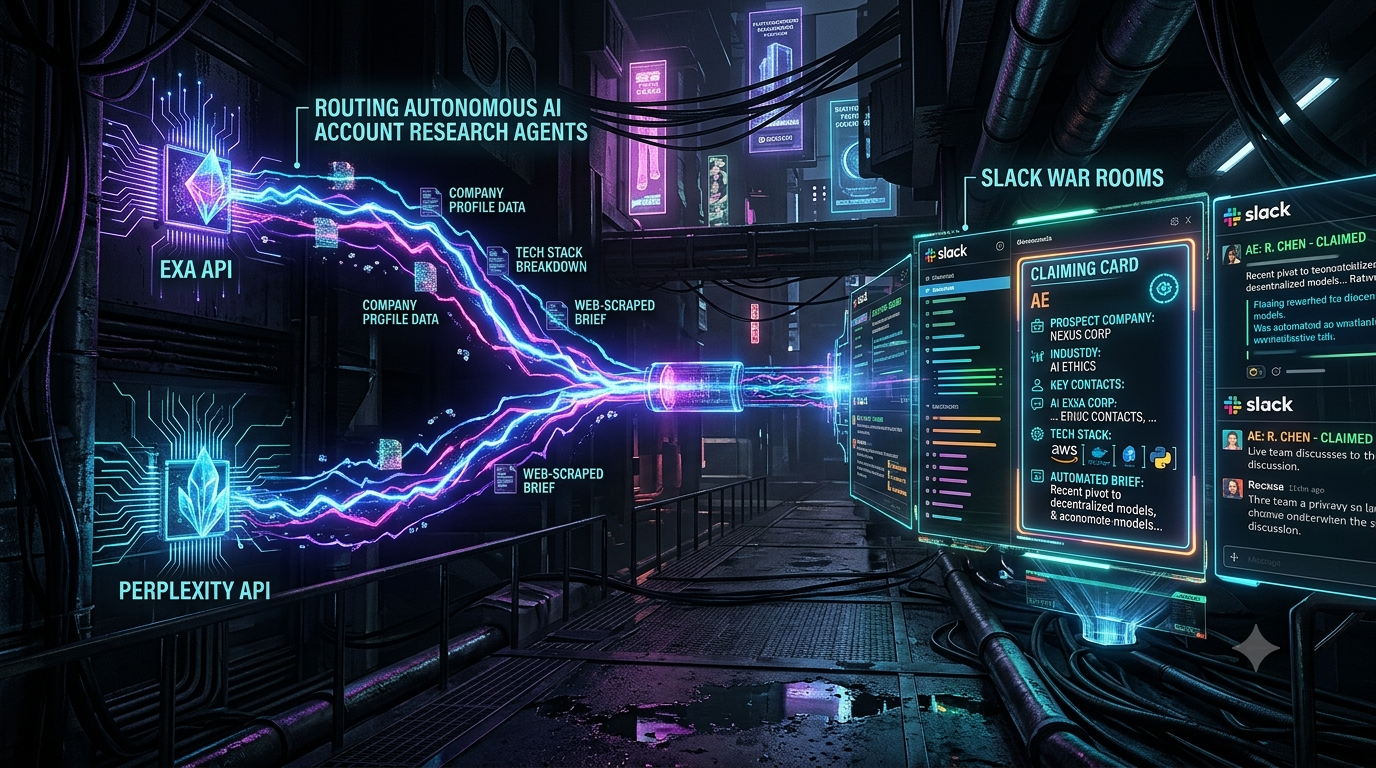
The traditional inbound lead alert is thin. A prospect fills out a form, an enrichment vendor such as ZoomInfo or HubSpot’s Breeze Intelligence (the successor to Clearbit) appends firmographic fields, and a Slack message drops into a channel with a company name, a headcount range and an industry tag.
The Account Executive (AE) then opens LinkedIn, checks the company’s news and job postings, skims the CRM record and tries to form a view before the call starts. That research is manual and slow, and it competes with the one thing the lead data says matters most: speed.
This guide walks through an alternative. When a high-intent account shows up, an agentic pipeline gathers fresh web signals with the Exa API, writes a cited brief with the Perplexity API, and posts it to a Slack “war room” as a claiming card. The first AE to click owns the account. The sections below cover the architecture, working code, and the pitfalls to plan for.
1. Why Static Lead Alerts Fall Short
Speed matters, but context decides what you do with it
The best-known research on inbound response time is a 2011 Harvard Business Review study, *The Short Life of Online Sales Leads*, by James Oldroyd, Kristina McElheran and David Elkington. It analyzed about 1.25 million leads and found that firms contacting a lead within an hour were nearly seven times as likely to have a meaningful conversation with a decision-maker as firms that waited even one more hour. They were more than 60 times as likely as firms that waited 24 hours or longer.
A separate Lead Response Management study from InsideSales.com and MIT-affiliated researchers reported that the odds of qualifying a lead were roughly 21 times higher when contact came within 5 minutes rather than 30.
These studies measure how quickly teams *respond*, not how well they are prepared. They also cover inbound leads in general, so they don’t prove that research automation raises conversion. They do show why the minutes after a trigger are valuable, and why spending them on manual tab-switching is expensive.
Where the time goes
Sales teams lose a lot of time to work that isn’t selling. Summaries of Salesforce’s State of Sales research report that reps spend only about 40% of their time actively selling, with the rest going to admin, data entry, internal meetings and searching for content. Pre-call research is one slice of that overhead, and it is the slice this architecture targets.
Static enrichment has three structural problems:
- Freshness. Enrichment databases refresh on a schedule. They can lag behind a funding round, an executive hire, a product launch or a hiring push that you could find on the open web today.
- Fragmentation. The useful context is spread across the CRM, LinkedIn, news, job boards, engineering blogs and documentation.
- Shallow output. A firmographic row says *who* the company is. It says nothing about *why they might care now*.
```
[Legacy flow]
Lead form → static enrichment → bare Slack alert → AE researches manually → call
[Agentic flow]
Intent trigger → Exa signal search → Perplexity cited brief → Slack claiming card → AE claims, reads brief, calls
```
2. Core Architecture: Exa for Discovery, Perplexity for Synthesis
The pipeline has two stages: retrieve signals, then write the brief.
Exa: retrieval built for agents
Exa is an AI-native search engine (it was previously known as Metaphor). Its relevant capabilities for account research are:
- Semantic search. `POST https://api.exa.ai/search` authenticates with an `x-api-key` header. Each request can return page text, query-relevant highlights, or summaries under a `contents` object. Exa’s own guidance is to use highlights for agent workflows and fall back to full text only when needed, which keeps token costs down.
- Company and people verticals. Adding `"category": "company"` or `"category": "people"` searches dedicated indexes instead of the general web. Exa describes its people index as covering more than a billion profiles, and press coverage puts its company index at roughly 50 million company pages. One quirk from Exa’s docs: these two categories do not support date, text or domain filters, so you encode constraints in the query itself, such as “Series A fintech companies in Europe with 50–200 employees”.
- Monitors. Exa’s Monitors API runs saved searches on a schedule and notifies you by webhook. It suits standing questions like “which target accounts just posted infrastructure roles?”
- Exa Agent API. Exa also offers a managed research agent for multi-step list building and enrichment. This article uses plain search plus your own synthesis step, but the Agent API is worth evaluating if you want Exa to handle the multi-hop research.
Exa returns source URLs with its results, so every claim in your pipeline can be traced to a page. That makes outputs *verifiable*. It does not make downstream LLM output automatically correct, so treat the brief as a well-sourced draft.
Perplexity: grounded, cited synthesis
Perplexity’s API now offers four core APIs: Agent, Search, Embeddings and an Orchestrator for open-weight models. For this use case the Agent API is the relevant piece.
- It is a single endpoint (`POST https://api.perplexity.ai/v1/agent`) that gives access to models from OpenAI, Anthropic, Google, xAI and Perplexity itself.
- It offers presets (`fast`, `low`, `medium`, `high`) that bundle model, tools and token budgets. Per Perplexity’s docs, the presets include inline citations for source-backed claims.
- It can run its own `web_search` and `fetch_url` tools. If you want the brief grounded mainly in the sources Exa found, say so in the prompt. The agent may still search on its own, which can be a feature (gap-filling) or a bug (drift), so review early outputs.
- Cost is returned in the response `usage` object. In Perplexity’s quickstart examples, a single preset call costs a few cents.
If you have an older integration built on Sonar chat completions, Perplexity publishes a migration guide mapping Sonar parameters to the Agent API.
What the brief should contain
A useful AE brief is short and structured:
1. What the company does and who it sells to.
2. Recent triggers such as funding, leadership changes, launches or hiring patterns, each with a date and a link.
3. Technical and organizational signals inferred from job posts, docs and engineering content, labeled as inferences.
4. Two or three discovery questions tied to your product.
5. A sources list.
Keep the “inferred” label. An LLM reading a job posting can guess at a tech stack, and the rep should know which lines are guesses.
3. The Slack War Room and the Claiming Card
An AE war room is a dedicated channel (for example `#ae-war-room-tier1`) where qualified inbound and high-intent accounts land. Each post is a claiming card: a Block Kit message with an account summary, the research brief and buttons. The first click assigns ownership.
Platform constraints to design around
- Buttons need a Slack app. Interactive messages require a registered Slack app with Interactivity enabled and a request URL. A plain incoming-webhook alert will not give you working claim buttons. Use `chat.postMessage` with a bot token.
- Acknowledge fast. Slack expects your handler to acknowledge a button click within 3 seconds. Acknowledge first and do the CRM work afterward.
- Text limits. A section block’s text is limited to 3,000 characters, and a button label to 75. Put the short version in the message and the full brief in a modal, which is another way to hold longer text.
- Update, don’t repost. After a claim, use `chat.update` to remove the claim button and show the owner. Other AEs then see the state change in place.
- Claims are a race. Two AEs can click within the same second. Make the ownership write atomic, either a compare-and-set in your database or a CRM update that fails if an owner already exists. Update Slack only if the write wins.
Card anatomy
1. Header: account name and trigger type.
2. Context line: industry, size, region and source of the trigger.
3. Brief excerpt: the top of the brief, truncated to fit a section block.
4. Buttons: Claim account and View full brief. Optional extras like “Route to SDR” are custom logic you build yourself.
4. Implementation Walkthrough
The code below uses the Python packages `exa_py`, `perplexityai` and `slack_bolt`. Treat it as a starting point and check each vendor’s current docs before shipping.
Step 1: Gather signals with Exa
```
import os
from exa_py import Exa
exa = Exa(api_key=os.environ["EXA_API_KEY"])
def gather_signals(company_name: str, domain: str) -> list[dict]:
query = (
f"{company_name} ({domain}) recent news, funding, leadership changes, "
"engineering hiring and technology initiatives"
)
result = exa.search(
query,
num_results=8,
contents={"highlights": {"max_characters": 2000}},
)
return [
{
"title": r.title,
"url": r.url,
"published": r.published_date,
"highlights": r.highlights or [],
}
for r in result.results
]
```
For firmographics, run a second call with `category="company"`. For the buying committee, add a `category="people"` call such as “VP of Engineering at {company}”. Remember to put any constraints in the query string for those two categories.
Step 2: Write the brief with Perplexity
```
from perplexity import Perplexity
pplx = Perplexity() # reads PERPLEXITY_API_KEY from the environment
def write_brief(company_name: str, signals: list[dict]) -> str:
sources = "\n\n".join(
f"[{i}] {s['title']} ({s['url']}, {s['published']})\n" + "\n".join(s["highlights"])
for i, s in enumerate(signals, start=1)
)
prompt = f"""You are preparing a pre-call brief for an enterprise Account Executive.
Company: {company_name}
Use primarily the sources below. Only add outside facts if you can cite them.
Mark anything you are inferring (rather than reading directly) as "Inference".
If the sources do not support a section, write "No clear signal found."
Sections:
1. What the company does
2. Recent triggers (with dates)
3. Technical and organizational signals
4. Three discovery questions
5. Sources
SOURCES
{sources}
"""
response = pplx.responses.create(preset="medium", input=prompt)
return response.output_text
```
Perplexity’s Agent API returns a standard response object. The generated text is in `output_text`, and the full `output` includes the search results the agent used, which you can store alongside the brief for audit purposes. Pick the preset based on how much latency and cost you can accept per account. Deeper presets do more searching and take longer, so measure your own end-to-end time rather than assuming.
Step 3: Post the claiming card and handle clicks
```
import os
from slack_bolt import App
app = App(
token=os.environ["SLACK_BOT_TOKEN"],
signing_secret=os.environ["SLACK_SIGNING_SECRET"],
)
def post_claiming_card(channel: str, account_id: str, company: str, brief: str):
LLM markdown differs from Slack mrkdwn (e.g. bold vs *bold*); convert before posting.
excerpt = brief[:2800] + ("…" if len(brief) > 2800 else "")
blocks = [
{"type": "header", "text": {"type": "plain_text", "text": f"🚨 High-intent account: {company}"[:150]}},
{"type": "section", "text": {"type": "mrkdwn", "text": excerpt}},
{
"type": "actions",
"elements": [
{
"type": "button",
"style": "primary",
"text": {"type": "plain_text", "text": "Claim account"},
"action_id": "claim_account",
"value": account_id,
},
{
"type": "button",
"text": {"type": "plain_text", "text": "View full brief"},
"action_id": "view_brief",
"value": account_id,
},
],
},
]
app.client.chat_postMessage(channel=channel, blocks=blocks, text=f"New account: {company}")
@app.action("claim_account")
def handle_claim(ack, body, client):
ack() # must happen within 3 seconds
user = body["user"]["id"]
account_id = body["actions"][0]["value"]
channel, ts = body["channel"]["id"], body["message"]["ts"]
Atomic compare-and-set in your CRM or database; returns False if already owned.
if not assign_owner_if_unclaimed(account_id, user):
client.chat_postEphemeral(channel=channel, user=user, text="This account was already claimed.")
return
blocks = body["message"]["blocks"]
for b in blocks:
if b["type"] == "actions":
b["elements"] = [e for e in b["elements"] if e["action_id"] != "claim_account"]
blocks.append({"type": "context", "elements": [{"type": "mrkdwn", "text": f"✅ Claimed by <@{user}>"}]})
client.chat_update(channel=channel, ts=ts, blocks=blocks, text="Account claimed")
client.chat_postMessage(channel=channel, thread_ts=ts, text=f"<@{user}> owns this account. Use this thread for deal prep.")
@app.action("view_brief")
def handle_view(ack, body, client):
ack()
brief = load_brief(body["actions"][0]["value"]) # from your datastore
chunks = [brief[i : i + 2900] for i in range(0, len(brief), 2900)][:10]
client.views_open(
trigger_id=body["trigger_id"], # short-lived; use it immediately
view={
"type": "modal",
"title": {"type": "plain_text", "text": "Account brief"},
"close": {"type": "plain_text", "text": "Close"},
"blocks": [{"type": "section", "text": {"type": "mrkdwn", "text": c}} for c in chunks],
},
)
```
`assign_owner_if_unclaimed` and `load_brief` are placeholders for your CRM and storage layer. Run the Bolt app behind the HTTPS request URL configured under Interactivity & Shortcuts. Socket Mode is a convenient alternative for local development.
5. Production Concerns
- Hallucination and inference. Citations let a rep verify a claim. They do not guarantee the summary represents a source accurately. Keep the “Inference” labels, show source links, and have reps flag bad briefs so you can tune prompts.
- Privacy and compliance. People-level data is sensitive. Exa’s people index is built from public professional profiles. Have legal and security review what you store, where it goes in the CRM, and how you handle deletion requests in the regions you sell into.
- Cost control. Both vendors price per request or per token. Trigger research only for accounts that pass an ICP or intent threshold, and cache briefs for a reasonable period instead of regenerating them.
- Failure paths. If Exa or Perplexity times out, still post a card with whatever enrichment you have and note that the brief is pending. A missing brief should never delay a claim.
- Unclaimed accounts. Add an escalation rule, such as re-pinging or routing to a backup owner after a set number of minutes. Pick the number from your own SLAs.
- Security. Verify Slack request signatures (Bolt does this for you), keep API keys in a secrets manager, and avoid logging full briefs if they contain personal data.
6. Measuring Whether It Works
Don’t assume the system helps. Measure it against a baseline, ideally with a holdout group of accounts routed the old way.
1. Time to first touch. Minutes from trigger to the AE’s first outreach. This links directly to the response-time research above.
2. Claim latency. Time from card post to claim, which shows whether the war room creates accountability or just noise.
3. Pre-call prep time. Sample how long AEs spend researching an account before and after rollout. Ask them, because it is hard to instrument.
4. Stage conversion. Discovery-to-opportunity conversion for accounts that received a brief versus those that didn’t.
5. Brief quality. The percentage of briefs reps rate as useful, plus the number flagged for factual errors.
Treat conversion changes cautiously. Many things move at once when a team changes its routing process, so a controlled comparison tells you more than a before-and-after chart.
7. Conclusion
A bare lead alert tells an AE that something happened. A claiming card with a cited brief tells them what they might say about it, and it assigns ownership in one click. Exa handles discovery, Perplexity handles synthesis, and Slack handles routing and accountability. Each piece has real constraints: Slack’s interactivity requirements, the 3-second acknowledgment, section length limits, claim race conditions, and LLM output that needs verification.
Start small: one trigger type, one channel, a handful of AEs, and a baseline to compare against. Expand once the briefs prove useful to the people reading them.
References
- Oldroyd, McElheran & Elkington, “The Short Life of Online Sales Leads,” *Harvard Business Review*, March 2011: <https://hbr.org/2011/03/the-short-life-of-online-sales-leads>
- Exa Search API guide: <https://exa.ai/docs/reference/search-api-guide-for-coding-agents>
- Exa company and people verticals: <https://exa.ai/docs/reference/verticals/company-for-coding-agents>
- Perplexity API quickstart: <https://docs.perplexity.ai/docs/getting-started/quickstart>
- Slack modals and view object reference: <https://docs.slack.dev/surfaces/modals>
- Slack interactive messages: <https://api.slack.com/interactive-messages>