*Last reviewed against vendor documentation in November 2026. Agent tooling changes quickly, so check the linked sources before you pin versions.*
Introduction: Moving Beyond First-Generation Orchestration
Many teams built their first multi-agent systems on early orchestration libraries such as LangChain, LangGraph, CrewAI, AutoGen, Semantic Kernel, and OpenAI’s experimental Swarm. Those projects proved that multi-agent workflows were viable. Production use then raised harder questions about typed outputs, durable state, observability, interoperability between vendors, and safe handoffs to people.
The 2026 landscape reflects those lessons:
- Microsoft Agent Framework reached 1.0 in early April 2026 for .NET and Python. It combines Semantic Kernel’s foundations with AutoGen’s orchestration ideas. Microsoft has since moved both predecessors into maintenance mode.
- Google’s Agent Development Kit (ADK) now spans Python, Java, Go, and TypeScript. ADK for Java 1.0.0 shipped on March 30, 2026, and ADK Go 1.0 followed a day later.
- Mastra, a TypeScript framework, shipped a stable 1.0 on January 20, 2026.
- Pydantic AI builds agents around typed, validated outputs.
- Amazon Bedrock AgentCore became generally available on October 13, 2025. It is a managed runtime for agents built with a range of frameworks, including LlamaIndex, Google ADK, LangGraph, CrewAI, and the OpenAI Agents SDK.
All of these tools let you build capable autonomous agents. A persistent gap remains at the last-mile human handoff. Suppose an agent meets a prospect with custom security requirements, unusual contract terms, or a negotiation request beyond its guardrails. Dropping the conversation or replying with a generic “someone will email you within 24 hours” wastes a high-intent lead.
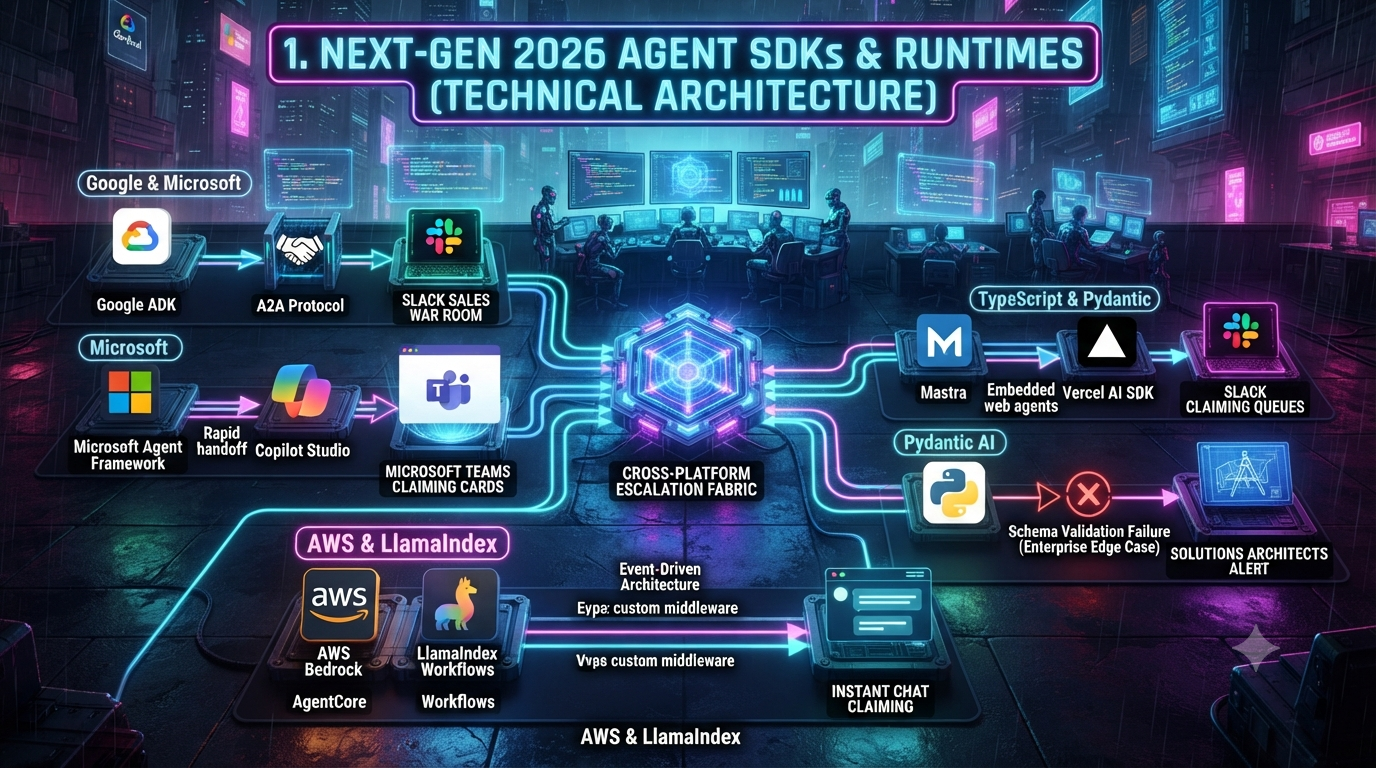
This article covers how to design human-in-the-loop (HITL) escalation paths from each runtime into Slack and Microsoft Teams. The goal is a sub-minute path from trigger to a human owning the lead. Treat “sub-minute” as a service-level objective you measure, not a property any SDK gives you. The vendors document no latency guarantees for these paths.
Architectural Comparison: What Each Runtime Gives You
| Runtime / SDK | Languages | Primitive for pausing on a human | Typical chat integration (you build this) |
|---|---|---|---|
| Google ADK | Python, Java, Go, TypeScript | Tool confirmation (`ToolConfirmation`), long-running tools, A2A `input-required` task state | Slack Block Kit via Bolt or Web API |
| Microsoft Agent Framework 1.0 | .NET, Python | Workflow request/response (`RequestPort`, `ctx.request_info()`, `RequestInfoEvent`) plus checkpoints | Teams bot with Adaptive Cards |
| Mastra (with Vercel AI SDK) | TypeScript | `suspend()` / `resume()` on workflow steps, persisted as snapshots | Slack Web API and interactivity endpoint |
| Pydantic AI | Python | Typed outputs (`output_type`), `ModelRetry`, `UnexpectedModelBehavior` | Slack incoming webhook or Web API |
| Amazon Bedrock AgentCore | Framework-agnostic (container-based) | None built in; you pair it with EventBridge and Step Functions | Slack or Teams via Lambda |
AgentCore is a hosting runtime rather than an agent framework. The framework running inside it, such as LlamaIndex, supplies the pause primitive. The chat integrations in the last column are not built into any of these SDKs. You write them.
Cross-Cutting Facts About the Chat Platforms
These platform behaviors shape every design below.
- Slack must be acknowledged within 3 seconds. When a user clicks a Block Kit button, Slack sends a `block_actions` payload to your app’s Request URL. Your app must return HTTP 200 within 3 seconds or the user sees an error. Acknowledge first, then do the real work asynchronously. Update the original message afterward with `chat.update` or the payload’s `response_url`.
- Interactivity needs a bot app. An incoming webhook can post Block Kit messages, but receiving button clicks requires a Slack app with Interactivity enabled and a Request URL. Alternatively, Slack’s Socket Mode lets a Bolt app receive interactions over a WebSocket with no public endpoint.
- Teams Universal Actions need a bot. `Action.Execute` is part of Adaptive Cards schema 1.5. Your bot receives an `adaptiveCard/action` invoke activity when a user clicks. Automatic refresh covers channels of up to 60 users, and you must list the user IDs to refresh. Teams has no built-in “update for everyone” behavior. To show a card as claimed to everyone, your bot edits the message. Cards below version 1.5 that use `Action.Execute` may stop working in some Teams clients, so define an `Action.Submit` fallback.
1. Google ADK and the A2A Protocol: Escalating Negotiation Boundaries to Slack
Context
Google released the Agent2Agent (A2A) protocol in April 2025 and donated it to the Linux Foundation that June. The 1.0 specification followed in 2026, with three transport bindings (JSON-RPC, gRPC, HTTP+JSON), signed Agent Cards, and multi-tenancy. In 2026 A2A is supported across several frameworks, and Microsoft’s Agent Framework lists A2A 1.0 support as coming.
Three details in the original draft of this article were out of date:
- The Agent Card lives at `/.well-known/agent-card.json`. Version 0.3 renamed it from `agent.json`, and 1.0 registered the new suffix.
- In 1.0, the card lists `supportedInterfaces` instead of a single `url`.
- A2A tasks move through `submitted`, `working`, `input-required`, and `auth-required`. They end in the terminal states `completed`, `failed`, `canceled`, or `rejected`. The 1.0 wire format uses enum-style names such as `TASK_STATE_INPUT_REQUIRED`. Send the `A2A-Version: 1.0` header, because servers assume a 0.3 client without it.
The escalation trigger
`input-required` is the protocol’s way of saying the agent needs something from the other side before it can continue. A negotiation request outside the agent’s policy fits that state well. Examples are a custom data-processing addendum, a discount beyond the approved ceiling, or a single-tenant deployment. The agent should not guess an approval. It should hand the decision to a human.
ADK offers building blocks for this. `ToolConfirmation` pauses a tool call for human approval or extra input. Long-running function tools cover work that finishes later. How a pending tool maps onto an A2A task state depends on your ADK version and its A2A integration, so check that mapping in your release before relying on it.
Implementation sketch
The tool below posts a claim card to Slack and returns immediately with a pending status. It is deliberately small. The deterministic policy check (discount ceiling, contract-term allow-list) should live in code, not only in the prompt.
```
import os
import httpx
from google.adk.agents import LlmAgent
from google.adk.tools import LongRunningFunctionTool
SLACK_API = "https://slack.com/api/chat.postMessage"
async def escalate_negotiation(
account_domain: str,
requested_terms: str,
estimated_arr_usd: float,
escalation_id: str,
) -> dict:
"""Post a claim card to the sales war room and return a pending status.
Call this when a buyer agent asks for terms outside the approved policy.
"""
payload = {
"channel": os.environ["SLACK_WAR_ROOM_CHANNEL_ID"],
"text": f"Negotiation boundary reached: {account_domain}",
"blocks": [
{"type": "header",
"text": {"type": "plain_text", "text": f"Escalation: {account_domain}"}},
{"type": "section", "fields": [
{"type": "mrkdwn", "text": f"*Est. ARR:*\n${estimated_arr_usd:,.0f}"},
{"type": "mrkdwn", "text": f"*Requested terms:*\n{requested_terms}"},
]},
{"type": "actions", "elements": [{
"type": "button",
"style": "primary",
"text": {"type": "plain_text", "text": "Claim"},
"action_id": "claim_escalation",
"value": escalation_id,
}]},
],
}
async with httpx.AsyncClient(timeout=5) as client:
resp = await client.post(
SLACK_API,
headers={"Authorization": f"Bearer {os.environ['SLACK_BOT_TOKEN']}"},
json=payload,
)
data = resp.json()
Slack returns HTTP 200 even on failure; check the "ok" field.
if not data.get("ok"):
return {"status": "error", "detail": data.get("error", "unknown")}
return {"status": "pending_human_review", "slack_ts": data["ts"]}
negotiator = LlmAgent(
name="enterprise_negotiator",
model=os.environ.get("ADK_MODEL", "gemini-2.5-flash"),
instruction=(
"You handle inbound B2B inquiries. Never approve discounts, custom legal "
"terms, or non-standard deployments yourself. For any such request, call "
"escalate_negotiation and tell the counterparty a human will respond."
),
tools=[LongRunningFunctionTool(func=escalate_negotiation)],
)
```
The claim handler
The Slack handler must acknowledge within 3 seconds and must prevent two reps from claiming the same lead. Use an atomic Redis `SET ... NX`, since `SETNX` has long been deprecated in favor of `SET` with the `NX` option.
```
from slack_bolt.async_app import AsyncApp
import redis.asyncio as redis
app = AsyncApp() # token and signing secret from env
r = redis.from_url(os.environ["REDIS_URL"])
@app.action("claim_escalation")
async def claim(ack, body, client):
await ack() # within 3 seconds
esc_id = body["actions"][0]["value"]
rep = body["user"]["id"]
channel, ts = body["channel"]["id"], body["message"]["ts"]
won = await r.set(f"claim:{esc_id}", rep, nx=True, ex=3600)
if won:
await client.chat_update(
channel=channel, ts=ts,
text=f"Claimed by <@{rep}>",
blocks=[{"type": "section",
"text": {"type": "mrkdwn", "text": f":white_check_mark: Claimed by <@{rep}>"}}],
)
Next: open a modal for the rep's counter-offer, then resume the A2A task.
else:
await client.chat_postEphemeral(
channel=channel, user=rep, text="Someone else already claimed this one."
)
```
When the rep submits terms, your service sends a new message on the same A2A task ID. That is how an A2A server continues a task that is waiting in `input-required`.
2. Microsoft Agent Framework 1.0: Checkpointed Pauses and Teams Adaptive Cards
Context
Microsoft Agent Framework 1.0 reached general availability in early April 2026 for .NET and Python. Microsoft describes it as stable, backward-compatible, and covered by a long-term-support commitment. It stabilizes the following:
- single-agent abstractions;
- middleware;
- memory and context providers;
- graph-based workflows;
- orchestration patterns including sequential, concurrent, handoff, group chat, and Magentic-One.
It ships first-party connectors for Microsoft Foundry, Azure OpenAI, OpenAI, Anthropic Claude, Amazon Bedrock, Google Gemini, and Ollama. It supports MCP and has A2A support, with A2A 1.0 listed as coming soon at launch. At Build 2026 (June 2 to 3), Microsoft brought the Agent Harness and several orchestration patterns to stable. Foundry Hosted Agents have since reached general availability.
The escalation primitive
The workflow human-in-the-loop mechanism works as follows:
1. An executor sends a request outward. In Python it calls `ctx.request_info()`. In .NET it routes through a `RequestPort`.
2. The workflow emits a `RequestInfoEvent` and waits.
3. Your code supplies the response, and the framework routes it to the executor’s `@response_handler` method in Python.
When a checkpoint is created, pending requests are saved with it. When you restore from a checkpoint, pending requests are re-emitted as `RequestInfoEvent` objects. That behavior suits a Teams handoff where a rep might respond minutes later, after a process restart.
The earlier draft of this article used `HumanApprovalExecutor`, `SaveCheckpointAsync`, and `RequestExternalInputAsync`. Those are not documented Agent Framework APIs, so they are removed here. The Python sketch below uses the documented request/response pattern.
Implementation sketch (Python)
```
from dataclasses import dataclass
from agent_framework import Executor, WorkflowContext, handler, response_handler
@dataclass
class EnterpriseLead:
session_id: str
company: str
prospect_email: str
estimated_seats: int
summary: str
@dataclass
class ClaimRequest:
session_id: str
company: str
@dataclass
class RepClaim:
rep_name: str
class TeamsLeadRouter(Executor):
def __init__(self) -> None:
super().__init__(id="teams_lead_router")
@handler
async def route(self, lead: EnterpriseLead, ctx: WorkflowContext) -> None:
post_claim_card() is your Teams bot code. It sends an Adaptive Card
(schema 1.5) with an Action.Execute button.
await post_claim_card(lead)
await ctx.request_info(
request_data=ClaimRequest(lead.session_id, lead.company),
response_type=RepClaim,
)
@response_handler
async def on_claim(
self, original_request: ClaimRequest, response: RepClaim,
ctx: WorkflowContext[str, str],
) -> None:
await ctx.yield_output(f"{original_request.company} claimed by {response.rep_name}")
```
Surrounding code does the following:
1. It runs the workflow and watches for the `request_info` event, which carries a `request_id`.
2. It stores that ID with the card’s `Action.Execute` data.
3. When your Teams bot receives the `adaptiveCard/action` invoke, it resumes the run by passing `responses={request_id: RepClaim(...)}` to `workflow.run(...)`.
The Teams card itself:
```
{
"$schema": "http://adaptivecards.io/schemas/adaptive-card.json",
"type": "AdaptiveCard",
"version": "1.5",
"body": [
{"type": "TextBlock", "weight": "Bolder", "text": "Enterprise lead ready: Contoso"},
{"type": "FactSet", "facts": [
{"title": "Seats", "value": "2,500"},
{"title": "Summary", "value": "Asked about SSO, audit logs, and a regional data residency option."}
]}
],
"actions": [{
"type": "Action.Execute",
"title": "Claim lead",
"verb": "claimLead",
"data": {"requestId": "<request_id from RequestInfoEvent>"},
"fallback": {"type": "Action.Submit", "title": "Claim lead", "data": {"requestId": "<request_id>"}}
}]
}
```
To show “Claimed by …” to everyone in the channel, have the bot edit the posted message after the first successful claim. Use an atomic lock, as in the Slack example, so only one claim wins.
3. Mastra and the Vercel AI SDK: Suspending a Workflow for a Slack Claim
Context
Mastra describes itself as a TypeScript framework for agents, workflows, memory, and evals. It uses the Vercel AI SDK underneath for model calls, and Mastra 1.0 added support for AI SDK v6. Product teams often use this stack for in-app assistants inside Next.js or React apps.
The escalation primitive
A Mastra workflow step can call `suspend()`, which saves its execution state as a snapshot in your configured storage provider. Snapshots persist across deployments and restarts. You later call `resume()` with data matching the step’s `resumeSchema`.
One behavior from the docs matters here. On resume, the step restarts from the beginning with `resumeData` populated. Any side effect before `suspend()`, such as posting to Slack, must be guarded. Otherwise it fires again on resume. The original sketch of this article had that bug. The version below checks `resumeData` first.
Implementation sketch
```
import { createStep } from "@mastra/core/workflows";
import { z } from "zod";
import { WebClient } from "@slack/web-api";
const slack = new WebClient(process.env.SLACK_BOT_TOKEN);
export const routeToSlackQueue = createStep({
id: "route-to-slack-queue",
inputSchema: z.object({
orgName: z.string(),
activeSeats: z.number(),
intentSignal: z.string(),
conversationId: z.string(),
runId: z.string(),
}),
suspendSchema: z.object({ reason: z.string(), slackTs: z.string() }),
resumeSchema: z.object({ claimedBy: z.string() }),
outputSchema: z.object({ claimedBy: z.string() }),
execute: async ({ inputData, resumeData, suspend }) => {
// Resumed: a rep has claimed the lead.
if (resumeData) return { claimedBy: resumeData.claimedBy };
// First execution: post the claim card once, then suspend.
const res = await slack.chat.postMessage({
channel: process.env.SLACK_PLG_QUEUE_CHANNEL!,
text: `Enterprise intent from ${inputData.orgName}`,
blocks: [
{
type: "section",
text: {
type: "mrkdwn",
text: `*In-app enterprise signal: ${inputData.orgName}*\n• Active seats: ${inputData.activeSeats}\n• Trigger: ${inputData.intentSignal}`,
},
},
{
type: "actions",
elements: [{
type: "button",
style: "primary",
text: { type: "plain_text", text: "Take over chat" },
action_id: "claim_plg_chat",
value: JSON.stringify({ runId: inputData.runId, conversationId: inputData.conversationId }),
}],
},
],
});
return await suspend({ reason: "awaiting_rep_claim", slackTs: res.ts ?? "" });
},
});
```
When the Slack interactivity route receives the click, it acknowledges within 3 seconds. It then resumes the run:
```
const workflow = mastra.getWorkflow("plgEscalation");
const run = await workflow.createRun({ runId });
await run.resume({ step: "route-to-slack-queue", resumeData: { claimedBy: slackUserId } });
```
On the front end, `useChat` from the AI SDK can render a “connecting you to a specialist” state while the run is suspended. Switching the user’s chat from the model stream to a live two-way bridge with the rep is an application design you build yourself. Neither Mastra nor the AI SDK provides it out of the box.
4. Pydantic AI: Designing Typed Escalation Outputs
Context
Pydantic AI is a Python agent framework built around validated, typed outputs. Current versions use `output_type` and `result.output`, and `@agent.output_validator` for post-processing. Older material, including the original draft of this article, uses `result_type`, `result.data`, and `@agent.result_validator`. Those older names are outdated. When validation fails or an output validator raises `ModelRetry`, Pydantic AI asks the model to try again, up to the configured retry limit. After that, the run fails with an exception such as `UnexpectedModelBehavior`.
A better pattern than catching exceptions
The original idea was to treat schema-validation failures as buying signals. That is partly right, but there is a catch. A validation failure often means the model produced a bad extraction, not that the prospect’s needs are unusual. Routing every failure to a Solutions Architect would flood the channel with noise.
A more reliable design gives the agent an explicit “this doesn’t fit” output. Pydantic AI supports union output types, so the agent can return either a standard spec or a custom-scoping request. Keep the exception handler as a safety net for genuine failures.
```
import os
from dataclasses import dataclass
from typing import Literal
import httpx
from pydantic import BaseModel, Field
from pydantic_ai import Agent
from pydantic_ai.exceptions import UnexpectedModelBehavior
@dataclass
class QualificationDeps:
prospect_email: str
company_domain: str
sa_slack_webhook: str
class StandardDeploymentSpec(BaseModel):
cloud_provider: Literal["aws", "gcp", "azure"]
seat_count: int = Field(gt=0, le=5000)
compliance: Literal["standard", "soc2"]
class CustomScopingRequest(BaseModel):
"""Use when the request cannot be expressed as a standard deployment."""
why_nonstandard: str
requirements_summary: str
qualifier = Agent(
os.environ["QUALIFIER_MODEL"], # e.g. "provider:model-name"
deps_type=QualificationDeps,
output_type=[StandardDeploymentSpec, CustomScopingRequest],
instructions=(
"Extract deployment requirements. If anything falls outside the standard "
"options (unsupported infrastructure, extra compliance regimes, custom "
"throughput), return CustomScopingRequest instead of forcing a fit."
),
)
async def qualify(prompt: str, deps: QualificationDeps):
try:
result = await qualifier.run(prompt, deps=deps)
except UnexpectedModelBehavior as exc:
await notify_sa(deps, prompt, f"Extraction failed: {exc}")
return {"escalated": True, "reason": "extraction_failure"}
if isinstance(result.output, CustomScopingRequest):
await notify_sa(deps, prompt, result.output.why_nonstandard)
return {"escalated": True, "reason": "custom_scoping"}
return result.output
async def notify_sa(deps: QualificationDeps, prompt: str, reason: str) -> None:
card = {
"text": "Solutions Architect review requested",
"blocks": [{"type": "section", "text": {"type": "mrkdwn", "text": (
f"*Prospect:* {deps.prospect_email} ({deps.company_domain})\n"
f"*Reason:* {reason}\n*Original request:* _{prompt[:500]}_"
)}}],
}
async with httpx.AsyncClient(timeout=5) as c:
await c.post(deps.sa_slack_webhook, json=card)
```
Limiting the prompt excerpt, as above, keeps raw customer text from filling the channel. Include a link to the trace instead. Pydantic AI supports OpenTelemetry instrumentation, so a trace link in the card is practical.
Keep two things separate in your analytics: “the model failed” and “the customer’s needs are non-standard.” They need different fixes.
5. Amazon Bedrock AgentCore: Event-Driven Escalation with EventBridge and Step Functions
Context
AgentCore Runtime is a serverless hosting environment for agents and tools. Each user session runs in a dedicated microVM with isolated CPU, memory, and filesystem. Sessions can run for up to 8 hours, with an option for longer-lived “Instances” of up to 14 days. It is framework-agnostic and model-agnostic, and it supports MCP and A2A for communication. Observability is OpenTelemetry-compatible and integrates with CloudWatch and with providers such as Datadog and Langfuse.
Two details affect HITL design:
- Session state is ephemeral. A session ends after 15 minutes of inactivity or at its maximum lifetime. A later request with the same session ID then creates a new environment. AWS recommends AgentCore Memory for durable context. Do not design a human handoff that assumes the original microVM will still be alive when a rep responds.
- No built-in escalation to chat. AgentCore does not wire itself to Slack or Teams. EventBridge and Step Functions are your own architecture.
Reference architecture
1. The agent decides to escalate. A LlamaIndex workflow, or any framework hosted on AgentCore, determines that a request needs a human. Use deterministic triggers where you can: clause categories, deal-size flags, or retrieval-score checks. Self-reported confidence from an LLM is poorly calibrated, so calibrate any threshold against your own data.
2. The agent publishes an event. It calls EventBridge `PutEvents` on a custom bus using its execution role’s IAM permissions.
3. EventBridge triggers a Step Functions state machine. It must be a Standard workflow. Express workflows support only request-response integrations, not `.waitForTaskToken`. The original draft said “Express/Standard,” which is wrong for this callback pattern.
4. The state machine uses `lambda:invoke.waitForTaskToken`. The Lambda receives the task token. Store the token in DynamoDB keyed by an escalation ID, and put only that ID in the Slack or Teams button. The token is a capability for completing the task, so it should not sit in message metadata.
5. A human claims the lead. A Slack or Teams interaction reaches your callback endpoint. Verify the request signature, do an atomic claim with a DynamoDB conditional write (`attribute_not_exists(claimed_by)`), and call `states:SendTaskSuccess` with the token.
6. The workflow resumes the agent. The next state calls `InvokeAgentRuntime` with the human’s decision. Reuse the same `runtimeSessionId` if the session is still alive. Otherwise start fresh and load context from AgentCore Memory or your own store.
Step Functions can wait for a callback for up to its one-year execution limit. Set a `TimeoutSeconds` or `HeartbeatSeconds` value on the task so a lost callback doesn’t hang indefinitely.
The original draft claimed this design eliminates public webhook endpoints. That holds only for the agent-to-EventBridge leg, which uses IAM. The return path still needs an HTTPS endpoint for Slack’s Request URL or a Teams bot messaging endpoint. Slack Socket Mode is the exception, since it avoids a public endpoint for Slack.
Implementation sketch (LlamaIndex Workflows)
LlamaIndex Workflows have their own human-in-the-loop events: `InputRequiredEvent` and `HumanResponseEvent`, with `ctx.wait_for_event()` available. Waiting inside a single step ties up a running session, so for long human waits this design ends the run after publishing the escalation instead. The state machine drives the human wait.
```
import json
import os
import boto3
from workflows import Workflow, step
from workflows.events import Event, StartEvent, StopEvent
events = boto3.client("events")
class EscalationNeeded(Event):
escalation_id: str
question: str
reason: str
class RfpWorkflow(Workflow):
@step
async def triage(self, ev: StartEvent) -> EscalationNeeded | StopEvent:
question = ev.get("question", "")
needs_human = ev.get("needs_human", False) # set by deterministic rules upstream
if needs_human:
return EscalationNeeded(
escalation_id=ev.get("escalation_id"),
question=question,
reason=ev.get("reason", "policy_boundary"),
)
return StopEvent(result={"answer": ev.get("draft_answer"), "escalated": False})
@step
async def publish(self, ev: EscalationNeeded) -> StopEvent:
events.put_events(Entries=[{
"Source": "app.rfp-agent",
"DetailType": "HumanEscalationRequested",
"EventBusName": os.environ["AGENT_EVENT_BUS_NAME"],
"Detail": json.dumps({
"escalation_id": ev.escalation_id,
"question": ev.question,
"reason": ev.reason,
}),
}])
return StopEvent(result={"status": "escalated", "escalation_id": ev.escalation_id})
```
An EventBridge rule on `HumanEscalationRequested` starts the state machine. The `Source` value above avoids the reserved `aws.` prefix.
Core Engineering Principles for Sub-Minute Escalations
1. Claim atomically. Multiple reps will click at once. Use Redis `SET key value NX EX <ttl>` or a DynamoDB conditional write, and update the card so everyone sees one owner. In Slack, use `chat.update`. In Teams, edit the message from your bot.
2. Acknowledge fast, work later. Slack’s 3-second acknowledgment window is strict. Return 200 immediately, then call models, databases, and resume logic asynchronously.
3. Send state, not transcripts. Put structured fields in the card: company, trigger, requested terms, a short summary, and a link to the trace in your observability tool. Keep long transcripts out of the channel.
4. Make the handoff two-way. The rep’s decision should flow back into the agent’s state. Examples are an A2A message on the same task, an Agent Framework response, a Mastra `resume()`, or an AgentCore invocation. The agent can then stay consistent if the conversation continues.
5. Escalate the escalation. Add a timer. If nobody claims a high-priority card within your target window, notify a backup channel or an on-call owner. Pick the window from your own SLO. A 60-second goal needs a shorter first timer than a 90-second one.
6. Measure end to end. Track time from trigger to card posted, and from card posted to claimed. Each hop adds latency: EventBridge, Step Functions, Lambda cold starts, and Slack or Teams API calls. Test your actual path before promising a number.
7. Protect the channel. Verify Slack request signatures and Teams bot authentication. Limit what customer text goes into cards. Don’t put tokens or secrets in button values.
Conclusion
The 2026 SDKs and runtimes give you solid pause-and-resume primitives:
- A2A `input-required` and ADK tool confirmation;
- Microsoft Agent Framework request/response with checkpoints;
- Mastra `suspend()` and `resume()` snapshots;
- Pydantic AI’s typed outputs and retries;
- AgentCore hosting paired with Step Functions callbacks.
None of them delivers a finished Slack or Teams experience. The last mile is yours to build: claim locking, card updates, signature verification, timers, and the path that returns a human decision to the agent. Teams that treat that path as a first-class, measured part of the system keep high-intent leads from going cold, without claiming more than the tooling guarantees.
Sources and Further Reading
- Microsoft Agent Framework 1.0 announcement: <https://devblogs.microsoft.com/agent-framework/microsoft-agent-framework-version-1-0/>
- Agent Framework human-in-the-loop docs: <https://learn.microsoft.com/agent-framework/workflows/human-in-the-loop>
- InfoQ on Agent Framework harness and Hosted Agents: <https://infoq.com/news/2026/08/agent-framework-harness-ga>
- ADK for Java 1.0.0 announcement: <https://developers.googleblog.com/en/announcing-adk-for-java-100-building-the-future-of-ai-agents-in-java/>
- A2A v1.0 builder’s guide (Agentic AI Foundation): <https://aaif.io/blog/a2a-v1-0-a-builder-s-guide-part-1-discovery-tasks-and-clients>
- Mastra 1.0 announcement: <https://mastra.ai/blog/announcing-mastra-1>
- Mastra suspend and resume: <https://mastra.ai/docs/workflows/suspend-and-resume>
- Pydantic AI output docs: <https://pydantic.dev/docs/ai/core-concepts/output/>
- Amazon Bedrock AgentCore GA announcement: <https://aws.amazon.com/about-aws/whats-new/2025/10/amazon-bedrock-agentcore-available>
- AgentCore Runtime overview and session behavior: <https://docs.aws.amazon.com/bedrock-agentcore/latest/devguide/agents-tools-runtime.html>
- AWS Step Functions integration patterns: <https://docs.aws.amazon.com/step-functions/latest/dg/connect-to-resource.html>
- LlamaIndex Workflows human-in-the-loop: <https://developers.llamaindex.ai/python/llamaagents/workflows/human_in_the_loop/index.md>
- Slack interactivity handling: <https://docs.slack.dev/interactivity/handling-user-interaction>
- Teams Universal Actions for Adaptive Cards: <https://learn.microsoft.com/en-us/microsoftteams/platform/task-modules-and-cards/cards/universal-actions-for-adaptive-cards/work-with-universal-actions-for-adaptive-cards>