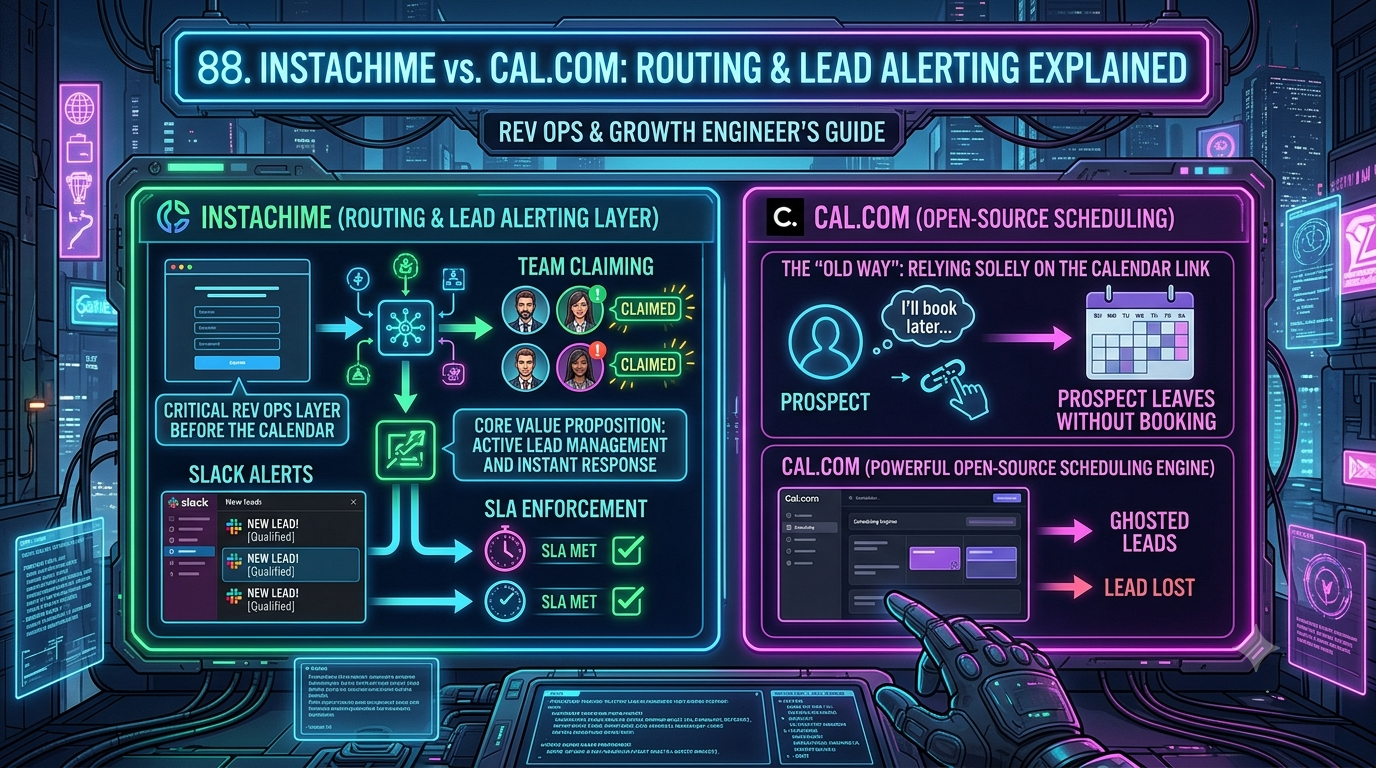
Cal.com is a strong open-source scheduling platform built around routing forms and weighted round-robin — but it only assigns a lead after someone completes a booking. InstaChime works upstream: it turns a form-submission webhook into a claimable, SLA-timed Slack or Teams alert instantly, which is why growth and RevOps teams add it in front of Cal.com rather than replace it.
The Core Difference: Open-Source Calendar Routing vs. Instant SLA Alerting
Cal.com's routing model exists to get a qualified visitor onto a booked calendar slot. A routing form collects responses, applies conditional logic, and hands the lead to a round-robin or weighted round-robin pool of hosts. Cal.com supports priority ranking, load balancing, and round-robin groups, so hosts with more capacity receive more slots.
That workflow is entirely pre-booking. If the prospect closes the tab before picking a time, there's no lead owner, no alert, and no SLA clock — just a routing-form response sitting in Cal.com's dashboard.
InstaChime operates one step earlier, at the webhook payload itself. When a form fires — from a Google Ads lead form, Meta Lead Ads, a website form, or an existing Zapier/Make step — InstaChime's capture endpoint ingests it immediately and starts an SLA clock. It evaluates the lead against rule-based, round-robin, weighted, territory, or skill-based routing logic before any calendar is involved.
The assigned owner gets an interactive alert in Slack, Microsoft Teams, Discord, Telegram, SMS, WhatsApp, or voice, with a visible countdown and a claim action. If nobody claims it in time, a secondary alert escalates automatically to a backup owner or manager.
The two tools aren't strict substitutes. Cal.com is calendar infrastructure, while InstaChime is a claim-and-escalate layer that sits in front of whatever calendar a rep eventually uses. Many teams run both — InstaChime handles the initial hand-raise, and a Cal.com link goes out afterward only if the prospect needs to schedule instead of connecting live.
Why Teams Look for Cal.com Alternatives
- Booking-step drop-off. Cal.com's routing forms qualify a lead, but the prospect still has to pick a time slot on a second page. Every extra step between form submission and a confirmed meeting is a place a warm lead can abandon the flow.
- No native chat alerting. Cal.com has no built-in Slack or Teams app. Reaching a sales channel in real time means wiring up Zapier, Make, or a custom listener on Cal.com's outgoing booking webhooks — Cal.com's own documentation points teams to third-party automation tools to bridge exactly this gap.
- No SLA or claim concept. Cal.com workflows send calendar reminders and confirmation emails. There's no "time since lead arrived" clock, no claim button, and no automatic escalation if a rep misses a hand-raise.
- Per-seat pricing that ignores lead volume. Teams pay $15/user/month (about $12/user/month billed annually) no matter how many leads a rep actually works. Attribute-based routing — matching leads to reps by custom fields like deal size or account owner — is gated to the Organizations plan at $28–$37/user/month.
- Routing forms are a funnel qualifier, not a work queue. They're built to filter which calendar a visitor sees, not to give a manager a live view of who claimed what, and how fast.
Feature Comparison: InstaChime vs. Cal.com
| Capability | InstaChime | Cal.com |
|---|---|---|
| Trigger point | Webhook fires the instant a form is submitted; the SLA clock starts before any calendar is shown. | A routing form must be completed, and the buyer still has to select an open slot on a round-robin booking page. |
| Chat alerting | Native Slack, Microsoft Teams, Discord, Telegram, SMS, WhatsApp, voice fallback, and browser push, each with a claim action. | No native chat app. Slack notifications require Zapier, Make, or a custom listener on Cal.com's booking webhooks. |
| SLA enforcement | Every assigned lead shows a live countdown; unclaimed leads auto-escalate to a secondary owner or manager. | No "time to claim" concept. Workflows send calendar reminder emails, not claim-based escalation. |
| Routing logic | Rule-based, round-robin, weighted, territory, and skill-based routing, bundled from the Growth plan ($79/mo). | Round-robin and weighted round-robin ship on Teams ($15/user/mo); attribute-based routing needs Organizations ($28–37/user/mo). |
| Pricing model | Tiered by monthly lead volume with a bundled user allotment — e.g., 10 users included at $79/mo. | Priced per seat. A 10-person team on Teams runs roughly $150/mo regardless of how many leads come in. |
*Pricing checked against Cal.com's and InstaChime's public pricing pages as of September 2026; confirm current rates before publishing, since SaaS pricing changes without notice.*
How to Migrate from Cal.com to InstaChime
1. Redirect the webhook, not the whole calendar. Leave your Cal.com booking page live if some prospects genuinely prefer to self-schedule. For your primary lead form, stop pointing it at a Cal.com routing form and send the payload to InstaChime's webhook capture endpoint with your shared secret instead — this moves the SLA clock's start time from "booking confirmed" to "form submitted."
2. Rebuild your routing rules and alert channels. Recreate whatever round-robin or attribute logic lived in your Cal.com routing form using InstaChime's rule-based, round-robin, weighted, territory, or skill-based routing options. Connect the Slack, Teams, or SMS channels your reps already watch; most of this is dashboard configuration, and a developer is only needed for a custom source bridge or non-standard field mapping.
3. Set your SLA window and CRM handoff. Define a claim threshold (five minutes is common for inbound demo requests) and a secondary escalation owner for missed alerts. Connect InstaChime's outgoing webhook to send accepted leads, as a `lead.created` payload, into HubSpot, Salesforce, Pipedrive, or whatever CRM your team already works from.
Frequently Asked Questions
Is InstaChime cheaper than Cal.com?
It depends on team size, because the two price on different axes. Cal.com's Teams plan runs $15/user/month ($12/user/month billed annually), so a 10-person team costs roughly $150/month regardless of lead volume. InstaChime's Growth plan bundles 10 users and 10,000 leads/month for $79/month — cheaper per seat at that size, but priced by lead volume rather than scheduling features, and it doesn't include Cal.com's calendar infrastructure.
Do I need a developer to set up InstaChime instead of Cal.com's routing forms?
Not for a standard setup. Most teams connect a webhook URL, a shared secret, and an alert channel directly in InstaChime's dashboard, similar in effort to configuring a Cal.com routing form. A developer becomes useful only for a custom bridge — a non-standard form platform or advanced CRM field mapping — the same edge case that would also require developer help to get Cal.com into Slack, since Cal.com has no native Slack integration either.
Can I keep using Cal.com after switching to InstaChime for lead alerts?
Yes. The two tools solve different problems: InstaChime replaces the instant-alert and claim layer, not the calendar. Most teams keep Cal.com (or another scheduler) as the actual booking page and just stop routing the first alert through it — a rep sends a Cal.com link manually only when a claimed prospect can't connect live and needs to schedule instead.