*Last reviewed: September 2026*
Zapier connects thousands of apps and can push lead data into Slack or Teams in minutes, but it broadcasts unmasked personal data by default and retains full task history for up to 69 days on US-hosted infrastructure. InstaChime masks PII before delivery, runs a visual SLA clock, and offers EU-hosted processing for RevOps teams and DPOs balancing speed with compliance.
The Core Difference: Generic Webhook Broadcasting vs. Native PII-Masked Routing
The primary difference between Zapier and InstaChime is data security architecture inside real-time messaging environments — not connectivity or speed.
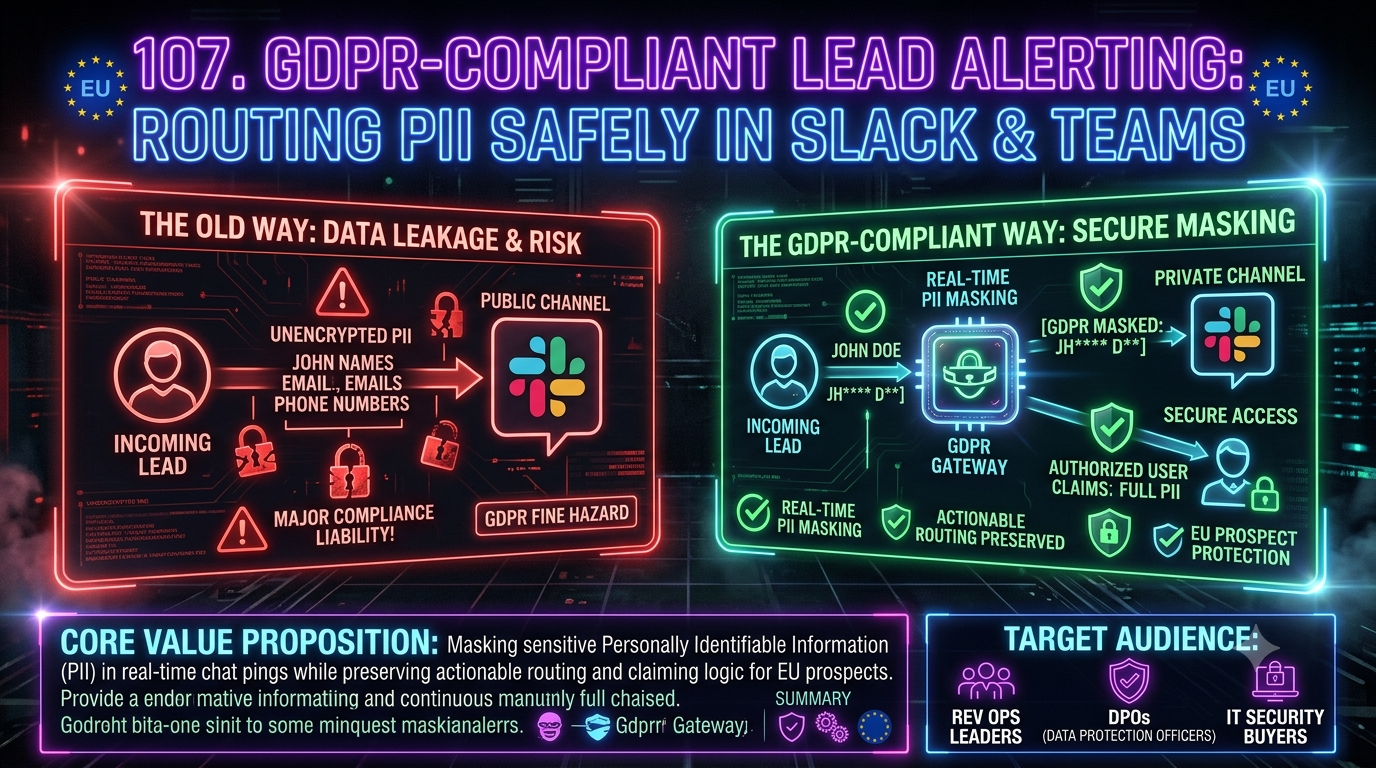
Zapier acts as a generic transport layer. It ingests form submissions and posts whatever fields you map directly into the destination channel. When an EU prospect submits an inbound form, a standard Zap outputs full names, work emails, and phone numbers as plain text into shared Slack or Teams channels. That creates real exposure under GDPR's data minimisation principle (Article 5(1)(c)) and its security-of-processing requirement (Article 32), because anyone with channel access can read and copy the data, and typical Slack/Teams channels have no built-in record of who viewed a given message afterward.
InstaChime isolates sensitive attributes before message delivery. When a high-ARR prospect submits a form, InstaChime's ingestion engine redacts personal identifiers — masking emails as `a*@enterprise.com` and anonymizing phone numbers — while keeping firmographic context (employee count, country, tech stack) fully visible. The assigned Senior AE clicks an authenticated claim button that routes them into the CRM record or a single-use secure view, so PII stays behind Role-Based Access Control (RBAC)** rather than sitting in a chat channel.
Why Teams Look for Zapier Alternatives for GDPR-Compliant Lead Alerting
European RevOps directors, Data Protection Officers (DPOs), and enterprise IT buyers move off generic Zaps for three recurring reasons:
- Broad channel PII exposure. By default, a Zap posts whatever fields you've mapped into the message text with no redaction step. If a form captures a name, email, and phone number, those values appear in plain text to every member of the channel — including people who have no business reason to see them.
- Custom redaction adds engineering overhead. Zapier has no native field-level PII masking step. Teams that want redaction typically build it themselves with Code steps (JavaScript/Python) or Regex-based Formatter steps for every form and lead source. Each custom step is a point of failure: a form-field rename or a new lead source can silently break the logic, and every extra step consumes task quota on metered plans.
- Task-history retention window. Zapier retains full Zap history — including the exact field values that ran through each step — for 29 to 69 days by default, with backups kept for up to 4 months. Enterprise customers can shorten in-account retention to a 7-day minimum, but cannot disable it entirely. Anyone with task-history access inside the Zapier account can view the complete, unmasked payload during that window, independent of who has access to the destination Slack or Teams channel.
Feature Comparison: InstaChime vs. Zapier
| Capability | InstaChime | Zapier |
|---|---|---|
| Real-time PII masking in chat | Native. Automatically redacts email, phone, and name fields while preserving company/firmographic context. | Manual only. Requires a custom Code or Regex/Formatter step built per form. |
| Task/message log retention | Configurable, short-window retention with auto-deletion designed for compliance. | Retains full unmasked field values for 29–69 days by default (up to 4 months in backups); Enterprise can shorten to 7 days minimum, not zero. |
| Interactive lead claiming | Authenticated one-click claim routes reps to the CRM record or a secure single-use view. | Posts a static message or CRM link; any access check happens in the CRM itself, not in the Zap. |
| Response SLA enforcement | Built-in visual countdown timer with automatic re-routing if unacknowledged. | Not built-in. Approximating SLA timing requires custom Delay/Path logic with no visual timer in chat. |
| Data residency / hosting | Native EU hosting option to keep processing inside the EEA. | Standard plans run on AWS US-East-1 (United States) only; region selection isn't available without a custom enterprise agreement, so transfers rely on Standard Contractual Clauses (SCCs). |
How to Migrate from Zapier to InstaChime
1. Connect form sources and set PII masking rules.
*Prerequisite: form endpoints and DPO field classification.*
Redirect your form webhooks (HubSpot, Marketo, or a custom web form) to InstaChime's ingestion URL. Select which fields — `first_name`, `email`, `phone_number` — require dynamic masking before the chat payload is generated.
2. Map authorized CRM destinations and SSO roles.
*Prerequisite: Okta or Azure AD Single Sign-On (SSO).*
Configure one-click lead claiming to route assigned reps directly to the authenticated Salesforce or HubSpot record. Enforce SSO so reps verify identity before any unmasked PII is displayed.
3. Deploy alert channels with visual SLA timers.
*Prerequisite: Slack or Microsoft Teams admin privileges.*
Set your target response SLA (e.g., sub-30 seconds) and deploy masked alerting channels in Slack or Teams. Enable fallback routing so unclaimed leads automatically transfer to a secondary Senior AE when the timer expires.
Frequently Asked Questions
Does sending lead notifications to Slack or Teams violate GDPR?
Posting unmasked personal data — a prospect's personal email or direct phone number — into a shared, multi-user channel creates real exposure under GDPR's data-minimization principle (Article 5) and its security-of-processing requirement (Article 32), especially when the channel has broad membership and no way to see who viewed a message afterward. Whether a specific setup counts as a violation depends on your Data Processing Agreement, retention settings, and access controls — but masking PII before it reaches chat, and keeping full records behind authenticated CRM access, materially reduces that exposure. This is general information, not legal advice; confirm your specific obligations with your DPO or counsel.
How does InstaChime mask PII without breaking lead claiming logic for AEs?
InstaChime redacts personal attributes — displaying `f@enterprise.com` alongside firmographic data like ARR and location — in the shared channel. When the assigned Senior AE clicks the interactive claim button, InstaChime validates their SSO session and routes them directly to the secured CRM record, so the full, unmasked data is only ever visible to the one authenticated, assigned rep.
Can InstaChime ensure lead data processing stays entirely within the EU?
Yes. InstaChime offers a dedicated European Economic Area (EEA) data residency option. Inbound form webhooks, enrichment processing, and notification routing can be configured to run on EU-based infrastructure, which is relevant for teams whose enterprise IT or legal review requires it.