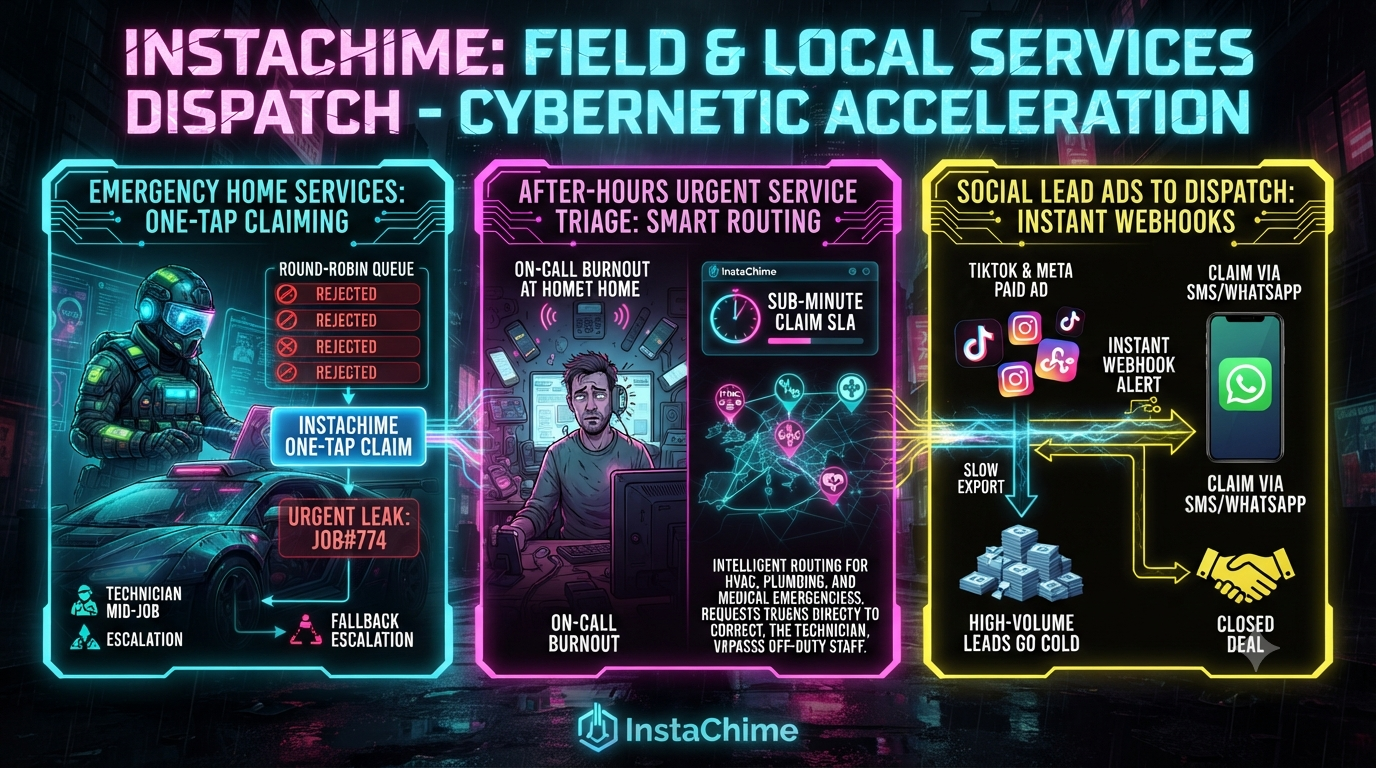
In field and local services, from emergency HVAC and plumbing to urgent legal intake and multi-location medical practices, lead value decays in minutes, not days. Traditional B2B sales teams often work from desktop CRM queues and round-robin rotations. Field teams work in a different setting: technicians drive between jobs, work in basements with poor reception, or have their hands in a wall. When an urgent request arrives through a web form, a hotline, or a Meta or TikTok lead ad, blind round-robin assignment can hand it to someone who can’t pick up. Event-driven webhooks, urgency-based triage, and mobile-first one-tap claiming give the first available, qualified responder a chance to lock the job in under a minute.
This article explains how that model works, where its limits are, and how to implement it without breaking messaging-platform rules or privacy obligations.
The Mechanics of High-Intent Local Lead Decay
Enterprise software buyers compare vendors over weeks or quarters. A homeowner with a burst pipe or a failed refrigeration unit doesn’t. They search, tap a local ad, and contact a handful of providers, and the first one to reach them with a credible answer has a large advantage.
The most cited evidence on this is the Lead Response Management study, led by Dr. James Oldroyd (then at MIT Sloan) with InsideSales.com. It analyzed more than 15,000 web leads and 100,000 call attempts. According to a summary of its findings, contacting a lead within 5 minutes rather than 30 gave roughly 100 times the odds of reaching them and 21 times the odds of qualifying them. Delaying from 5 to 10 minutes cut qualification odds about fourfold.
Two caveats are worth stating:
- The study dates from 2007 and covered web leads across several industries, not specifically emergency home services. Treat it as strong directional evidence, not a precise benchmark for your trade.
- Commonly repeated figures such as “the first responder wins 78% of home service jobs” circulate widely in vendor marketing, but their primary source is hard to trace. This article doesn’t rely on them.
There is also evidence that the industry isn’t keeping up. ServiceTitan’s 2026 Residential Survey, as cited on its blog, found that only about half of contractors respond to new leads within the first hour.
Why Desktop CRM Workflows Fail in the Field
Field service management (FSM) platforms such as ServiceTitan, Housecall Pro, and Jobber are strong at scheduling, dispatching booked work, and invoicing. Latency tends to creep in at the edges, where leads arrive from other systems and have to reach a human who can act:
1. Polling and batch delays. Many automation connectors check for new data on an interval rather than receiving it instantly. Zapier’s documentation puts polling intervals for polling triggers at 1 to 15 minutes depending on plan. Some triggers are “instant” because the source app sends a webhook. Whether a given lead source offers one is something to check, not assume.
2. Dispatcher bottlenecks. When every inbound form lands in one office inbox or queue, a single person cross-referencing technician locations and availability becomes the choke point during storms and after hours.
3. Notification blindness. Passive push notifications and email alerts are easy to miss when a technician is driving or on a ladder.
4. Masked or intermediated contact details. Some lead sources don’t pass the customer’s real number. For example, ServiceTitan’s documentation notes that for Google Local Services Ads leads it receives a Google tracking number rather than the customer’s own number. Your routing design has to work with whatever contact path the source provides.
```
[Inbound lead: web form / ad platform / call]
│
▼ (webhook or API event)
[Intent & urgency classifier]
├── High urgency ──► [Broadcast claim card: Slack / Teams / SMS / WhatsApp]
│ │
│ ├── Tech A (driving) -> no response
│ ├── Tech B (on site) -> no response
│ └── Tech C (available) -> taps "Claim" -> atomic lock acquired
│
└── Low urgency ──► [Next-business-day queue + automated confirmation]
```
1. Emergency Home Services Dispatch: Why One-Tap Claiming Can Beat Round-Robin When Technicians Are Mid-Job
Round-robin assumes every person on the roster is equally available. For inside sales reps at desks, that’s close enough. For technicians, availability changes minute by minute.
The Failure Modes of Rigid Round-Robin in Field Operations
- The “under the sink” trap. If the rotation lands on a technician who is mid-repair or on the highway, the lead sits unacknowledged. A five-minute timeout before reassignment is long enough for a homeowner to call the next company.
- Geographic mismatch. Plain rotation ignores location and shift status. An emergency lockout sent to someone 45 minutes away while a closer technician is idle wastes drive time and fuel.
- False accountability. A CRM showing “Assigned” tells a manager the lead is handled, but nobody may have actually seen it.
How One-Tap Claiming and Atomic Locks Solve Field Latency
One-tap claiming, sometimes called broadcast-with-lock or “shark tank” routing, reverses the assignment model. Instead of guessing who is free, the routing engine sends an interactive alert to a targeted group of eligible technicians through channels they already watch on their phones, such as SMS, WhatsApp, Slack, or Microsoft Teams. The first person to tap Claim gets the job. Slack, for example, supports buttons in messages for claiming a lead so that ownership is visible to the whole channel.
A good alert carries enough to decide in seconds:
- Service category and issue summary (for example, *Active water leak, main shutoff failed*)
- Service ZIP or postal code, or a rough area
- A one-tap claim action
- Customer name and phone number, revealed only after a claim, so two people don’t call the same customer
Preventing double-claims is the core engineering requirement. In practice this means an atomic claim: a conditional write in your database or workflow engine that succeeds for exactly one claimant. When the claim succeeds:
1. The claimant is recorded as the owner in your CRM or FSM.
2. The customer’s contact details and dial link are revealed to that person only.
3. Every other recipient’s alert updates to show who claimed it and when, and the claim button is disabled.
Not every channel can update a message after it has been sent. Interactive cards in Slack and Teams can be edited, while SMS can’t. On SMS, the practical substitute is a short follow-up text to the other recipients (“Claimed by Tech C”). Design for that difference.
Multi-Tier Fallback Escalation Rules
Even with broadcast claiming, a surge can leave a lead unclaimed. Time-boxed escalation keeps it from expiring silently. The timings below are an example configuration to adapt to your market, not an industry benchmark.
| Escalation tier | Example elapsed time | Target audience | Delivery channel | Action |
|---|---|---|---|---|
| Tier 1: Primary zone | 0–45 seconds | On-shift technicians in the target service area | Push, Slack, or Teams interactive card | One-tap claim |
| Tier 2: Adjacent zone | 45–90 seconds | On-shift technicians in neighboring territories | SMS or WhatsApp alert | One-tap claim |
| Tier 3: Supervisor | 90–150 seconds | On-duty supervisor or lead dispatcher | High-priority SMS plus a call | Direct contact with the customer |
| Tier 4: Containment | 150+ seconds | Customer and overflow answering service | Automated text to customer | Confirm receipt, give an honest ETA window, book a callback |
2. After-Hours Urgent Service Triage: Balancing On-Call Burnout with Fast Claim SLAs
Nights, weekends, and holidays are often where emergency work and premium rates concentrate, and they are also where on-call fatigue builds. Waking someone at 2:30 AM for a routine tune-up request trains them to ignore alerts, which hurts response to genuine emergencies.
Separating True Emergencies from Routine Inquiries
Effective after-hours routing triages before an alert reaches an on-call phone. Evaluate intent keywords, structured form fields, and account status (for example, an existing maintenance-contract customer).
#### Home services (HVAC, plumbing, restoration)
- Urgent, wake someone up: flooding, burst pipe, gas smell, sewage backup, no heat during severe cold, a commercial cooling failure, or an explicit “emergency dispatch” selection on the form. Define your own temperature thresholds for no-heat and no-cooling calls rather than borrowing one from a blog.
- Non-urgent, next-business-day queue: annual maintenance, new-unit quotes, thermostat upgrades, routine drain cleaning. Send an instant automated confirmation with the actual time the customer will be contacted.
- Safety note: a suspected gas leak or carbon monoxide alarm is a call-emergency-services situation first. Your automated reply should say so before it mentions dispatch.
#### Legal intake (personal injury, criminal defense, family law)
- Urgent: an arrest or bail inquiry, active police questioning, a recent accident, or a request for an emergency protective order. People in these situations often contact several firms quickly, so speed matters.
- Non-urgent: document review, general consultations, billing questions.
- Compliance note: rules on solicitation, advertising, and handling prospective-client information vary by jurisdiction. Have your compliance counsel review automated outreach scripts.
#### Medical, dental, and veterinary practices
- Urgent: post-operative complications, knocked-out teeth or acute dental trauma, or a pet that has eaten something toxic, routed to the on-call clinician.
- Non-urgent: refill requests, routine appointments, insurance questions, handled with an automated scheduling link.
- Safety and privacy note: a web form or text must never be the only path for a life-threatening situation. Auto-replies should tell people to call their local emergency number. In the US, protected health information in consumer messaging apps or chat channels creates HIPAA exposure. Use tools and agreements that cover it, and keep clinical detail out of broadcast alerts. Send “urgent patient callback, ZIP/location, call-back link,” not symptoms.
Architecting Burnout-Proof On-Call Rotations
- Schedule-aware routing. Sync broadcast pools with the on-call calendar (Google Calendar, Outlook, PagerDuty, or Opsgenie) so off-shift people are excluded automatically.
- Acknowledgment-gated escalation. Start with the primary on-call responder, escalate to the secondary after a short window, and broadcast to the full roster only as a last resort. Waking everyone for every ticket is the fastest route to burnout.
- Reply-based claiming for people who don’t live in an app. Technicians often silence app notifications with focus or do-not-disturb modes. Texting or WhatsApp with a reply keyword (such as `CLAIM`) works from a lock screen, but delivery past silent modes depends on each person’s phone settings and carrier. Test it on the devices your team actually uses, and have staff allow emergency bypass for the dispatch number or contact.
3. TikTok & Meta Lead Ads to Local Dispatch: Closing the Speed Gap on Paid Social Leads
Roofers, solar installers, med-spas, remodelers, and auto repair shops rely heavily on Meta Lead Ads (Facebook and Instagram instant forms) and TikTok’s Instant Form lead generation. Because these forms pre-fill contact details inside the app, submitting is easy and volume is high. The challenge is following up before the prospect’s attention moves on.
Where Native Paid Social Workflows Lose Buyers
1. Manual exports. Downloading leads from the ad platform once or twice a day turns warm leads into cold ones. TikTok’s own documentation lists real-time CRM delivery and the ability to follow up immediately among the reasons to integrate rather than export manually.
2. Polling connectors. A connector that checks every few minutes adds delay at the moment it matters most.
3. Missing context. If the alert doesn’t carry the offer, the campaign, and the form answers (for example, roof age or insurance-claim status), the rep opens with a generic script.
Real-Time Webhook Ingestion to Mobile Claiming
Both platforms support push-style delivery:
- Meta offers a `leadgen` webhook for Page lead ads. One detail matters for latency planning: the notification contains a `leadgen_id`, not the lead’s details, so your server must call the Graph API to retrieve the contact fields. Meta also notes that real-time pings can arrive with a delay of up to a few minutes. Typical delivery is faster, but don’t promise “sub-second” end to end.
- TikTok offers a Custom API with webhooks so that lead updates reach your CRM or lead handler in real time, along with direct and third-party integrations.
#### Example real-time paid social pipeline
1. Webhook received. The platform notifies your endpoint of a new lead.
2. Fetch and normalize. Retrieve the lead details (Meta), validate the phone number format (E.164), check your CRM for an existing customer and route repeat customers to their account owner, and capture campaign and ad identifiers.
3. Two actions in parallel.
- Customer side: Send a prompt, honest confirmation by SMS or WhatsApp, such as: *“Hi Sarah, this is Apex Cooling. We got your request for same-day AC service. Alex from our dispatch team will call you shortly from this number.”* Only promise what your process can deliver.
- Team side: Push an interactive claim card to the territory’s Slack channel, Teams chat, or text group showing the ZIP code, the offer, and the form answers, with a Claim & Call button.
4. Claim, lock, call. When someone claims, the system locks the lead, writes the owner to your CRM (HubSpot, Salesforce, GoHighLevel, or ServiceTitan), and gives the rep a dial link or starts a bridged call while the prospect is still near their phone.
Messaging Rules You Need to Design Around
- WhatsApp opt-in and templates. Under WhatsApp’s business policy, you may contact people on WhatsApp only if they’ve given you their number and opted in to receive messages. A message you start must use an approved template, and free-form replies work only within the 24-hour customer service window that opens when the user messages you. The same constraint applies to staff alerts. If a technician hasn’t recently messaged your business number, a template message is required. Pricing for service and utility messages has also changed during 2026, so check Meta’s current rate card before modeling costs.
- SMS consent. Obtain and record consent for text messages, and in the US register your business texting traffic with carriers (A2P 10DLC) so alerts aren’t filtered. Ad lead forms should include clear consent language for follow-up texts and calls.
- Unknown numbers. A call from an unfamiliar number may go unanswered. CallRail’s 2026 home services statistics roundup reports that 86% of homeowners won’t answer a number they don’t recognize. That is a vendor-published figure, but the takeaway holds: send the heads-up text first, and call from a number the customer can recognize.
Comparison: Traditional Dispatch vs. Event-Driven One-Tap Claiming
This table is qualitative. Real response times depend on your lead sources, staffing, and configuration, so measure your own baseline.
| Dimension | Round-robin / manual dispatch | Polling automation (interval-based) | Event-driven one-tap claiming |
|---|---|---|---|
| Trigger latency | Depends on how often someone checks the inbox or queue | Up to the polling interval (1–15 minutes on Zapier, by plan) | Seconds, when the source offers a webhook; limited by the source platform’s own delivery delay |
| Availability check | Blind assignment or manual judgment | Blind assignment via static rotation | Self-selection by whoever is free |
| Collision prevention | Manual coordination | Risk of duplicate calls in shared threads | Atomic claim: one winner |
| Field experience | Heavy FSM or CRM app login | Email or basic push | Cards or replies in Slack, Teams, SMS, or WhatsApp |
| After-hours triage | Pages everyone or goes to voicemail | Basic time-of-day filter | Keyword or intent triage with tiered escalation |
| Setup effort | Low | Low to medium | Medium; needs routing logic, consent handling, and testing |
One-tap claiming has trade-offs. It favors whoever sees the alert first, so you need rules to prevent the same fast responders from taking every job, such as skill and territory filters and fairness caps. It also assumes people are willing to watch a channel, so it works best alongside clear on-call expectations.
Implementation Blueprint: Deploying Fast Field Routing
1. Consolidate inbound sources. Bring web forms (Webflow, WordPress, Gravity Forms), paid social webhooks, call-tracking events such as missed calls (CallRail, Twilio), and marketplace leads into one listener. Check which sources push events and which must be polled. For Google Local Services Ads, booking leads reach contractors through partner software such as Housecall Pro, Jobber, LeadConnector, Scorpion, ServiceTitan, and Workiz, so plan around the integration your FSM supports.
2. Define territory and skill tags. Map ZIP codes and service categories (for example, `HVAC_Emergency`, `Plumbing_Commercial`, `PI_Auto_Accident`) to responder pools so people only see jobs they are licensed and located to handle.
3. Set SLA timers. Pick a short Tier-1 claim window for emergencies and a longer one for routine paid social leads, then add a Tier-2 backup pool and a supervisor tier so nothing stalls unassigned. Start with the example timings above and tune them against real claim data.
4. Track claim metrics. Measure Time-to-Claim and Time-to-First-Contact by technician and territory, not just leads assigned. Review unclaimed and escalated leads weekly, since they show where coverage is thin.
5. Test before go-live. Send test leads at 2 AM, with phones on silent, through every channel. Confirm that claim locks hold under simultaneous taps and that off-shift staff aren’t alerted.